

Closed (fixed)
Project:
Web Links
Version:
6.x-2.x-dev
Component:
Contrib: Checker
Priority:
Normal
Category:
Support request
Assigned:
Unassigned
Reporter:
Created:
11 Aug 2010 at 17:51 UTC
Updated:
30 Oct 2015 at 06:44 UTC
Jump to comment: Most recent, Most recent file




Comments
Comment #1
nancydruIt should be in a collapsed fieldset near the bottom of the page.
Comment #2
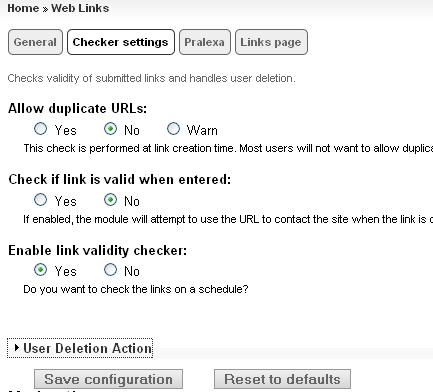
Starminder commentedJust not seeing it...
Comment #3
nancydruTry clicking "Save configuration."
Comment #4
Starminder commentedI did - got a message that it saved, but nothing changed. Also tried resetting to default for chuckles, that didn't result in anything either.
Comment #5
Starminder commentedAny suggestions? Should I roll back to a certain version? thanks :)
Comment #6
nancydruYou might try re-downloading the current -dev. Obviously I am always at the current -dev release and it shows fine for me.
Comment #7
Starminder commentedThanks, I rolled back a few dev versions and then went to 2.3 - to no avail. Something is stomping on it. What version of Views are you using?
Comment #8
nancydruI'm using Views 6.x-2.11 and I have seen it stomp on other URLs, which is warned about somewhere in the docs. Views does a hook_menu_alter, so it runs after module menu items are created. Any module could also do a hook_form_alter and change the form. The only unlikely culprit I could see doing that would be Linkchecker, but I haven't looked at it to see. If you have that module, you might disable it and see if WL operates correctly.
Comment #9
Starminder commentedNo love.
I disabled linkchecker and went to views 6.x-2.11.
Comment #10
nancydruJust changing Views isn't enough. You have to look at all the menu entries it creates and see if any is a duplicate. But the fact that the page shows up at all kind of says that is not the problem.
It looks like WL's link check is turned off, even though the options say on. Try setting it to "no' and see if maybe the options are backwards, even though it looks okay on my system. If not, then set it back to "yes" and see if that clears it up.
Comment #11
Starminder commentedI toggled all of the settings to no avail. :/ Pounding my head against the desk didn't work, either!
Comment #12
nancydruThe last resort is to completely remove the module Including deleting it from your system) and re-download and install. There may be some piece floating around from an older release.
Comment #13
Starminder commentedCan do - will I lose my links or the taxonomy for it?
Comment #14
rmiddle commentedYou wont lose those unless you uninstall the module. if you uninstall then you lose all you data.
Thanks
Robert
Comment #15
Starminder commentedGood news. I was rerunning a different db update and saw the update pulldown list for checker. I selected 6000 and ran it and now voila - checker works as expected.
Thanks for your help!! :)
Comment #16
nancydruFabulous. Glad that was it.
FYI, any time a module is removed, the taxonomy vocabulary will remain, but will be disconnected from the content type, so you would have to re-select the content type in the vocabulary. If you had uninstalled WL then you would have lost it all.
Comment #17
Starminder commentedNow I'm REALLY glad that was it! :)
Comment #18
nancydruComment #19
Starminder commentedSpoke too soon. Went in to make a change to linkchecker settings and they are gone again. For chuckles reran the database update 6200 again, and it ran fine no errors. Unfortunately, the checker settings still aren't visible. Any suggestions on what else to try?
Comment #20
nancydruOkay,given the warnings above, let me try to be very clear.
If you find another copy hiding somewhere, you'll have to hunt for it and delete that before continuing. -- I'd say that there is a chance this is the cause. Actually, the system table could help find it. If you're comfortable in the database, you might even look there before doing anything else.
Comment #21
Starminder commented1. Put the site into maintenance mode, or better yet, do this on a test copy. Done, no issues
2. Delete the module directory entirely. (Do NOT disable or uninstall the module.) Done, no issues
3. Check to see if it is still works (another copy hiding somewhere). It didn't work, it's not anywhere else
4. Download the latest -dev. Got it
5. Clear the caches (admin/settings/performance, or Devel) Done, no issues
6. Check to see if it works. It works
7. Check to see if any updates need to run again. No updates
Still in the same boat, no checker settings.
I'm happy to do whatever in the database, or give you access.
Thanks!!
Comment #22
Starminder commentedAny additional thoughts on this one? Thanks!
Comment #23
nancydruI cannot even come close to reproducing this. I hate to ask for access to your site.
Comment #24
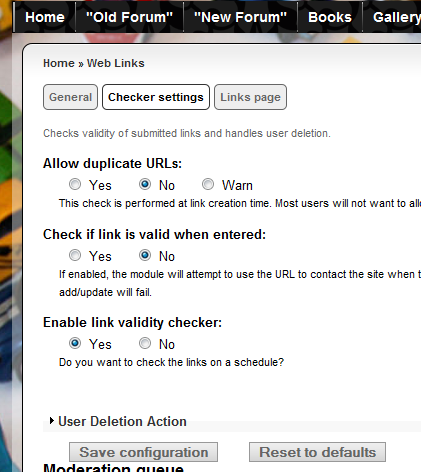
nancydruDo you mean like the attached image (from your site)?
Comment #25
Starminder commentedYep - just like that...
what browser are you using?
In Firefox, I still get this...
Comment #26
nancydruI was using IE7.
Comment #27
Starminder commentedI just tried in IE8, I get the same result as in Firefox.
Comment #28
nancydruI'm going to guess then that there is a broken HTML tag in there somewhere. If you can, try running it through the HTML validator and let's see if it can locate it.
Comment #29
Starminder commentedNot sure if these are it or not
Comment #30
nancydruSomebody is messing with your body tag, but that is definitely not Web Links. That would have to be in your page.tpl.php file in your theme.
span id="liveclock"is probably that clock you show; also not WL.Seeing this, I would suggest removing the clock and see if that is the culprit.
Comment #31
Starminder commenteddisabled time block, thanks for pointing this out. No change in settings visibility.
I do not claim to be a firebug expert, but I turned that on for chuckles and grins and get this:
uncaught exception: Syntax error, unrecognized expression: [@name=weblinks_checker_enabled]
I'll try anything :)
Thanks!
Comment #32
nancydruOh, yeah??? I need a date. ;-)
Comment #33
Starminder commentedWhatever it is, I'm sure it's only weird the first few times! ;)
Comment #34
nancydruI admit to not being a JavaScript aficionado. That variable is used on lines 4 and 28 in weblinks_checker.js, and it is certainly acting like that could be the problem.
Robert if you see this, could you check that js code, please?
Comment #35
Juan C commentedI don't need this feature for now, but I can confirm that on mine anytime I edit the settings, I can see the image on #24 expanded for 1/2 second, and settles back as on image given on #2. I was thinking that might be some users dont know this option exists.
Comment #36
Starminder commentedWow am I glad to hear it's not just me :)
Comment #37
gstegemann commentedI could reproduce the problem and found the same JavaScript syntax error as reported in #31 by Starminder.
Patch is attached.
Comment #38
gstegemann commentedBTW: a similar problem exists on the Web Links settings page.
I have also added a patch which fixes this.
Comment #39
jonathan1055 commentedWhat browser and version are you using? I cannot replicate the error - I'm on a mac, and tried Firefox 41.0.1, Chrome 45.0 and Safari 6.2.6
The D7 code has does not have the '@' so that's good.
Comment #40
gstegemann commentedFirefox 41.0.1 under Windows.
The syntax error was displayed in the Firefox Konsole. After changing the JavaScript code the syntax error disappeared and the page is displayed correctly.
Yes, that motivated me to create the patch.
Do you have an idea what the '@' character stands for?
Comment #41
nancydruThe @ is often used in Drupal to indicate "do not return an error." I don't know if that is true in JS as well.
Comment #42
gstegemann commentedI would say No.
Tests using IE11, Chrome 45 und Windows and Safari 9 under OS X exhibited the syntax error as well. And the Web Links checker page will be not fully displayed.
The syntax error is also raised when using Firefox 41 and Chrome 45 under OS X 10.11.
Comment #43
gstegemann commentedIn fact, I changed the D7 JavaScript code during the port from D6 to D7 as desribed in "Converting 6.x modules to 7.x", https://www.drupal.org/update/modules/6/7#javascript_compatibility, section jQuery 1.3.x.
So this issue will occur when switching from JQuery 1.2.x to 1.3.x.
Comment #44
jonathan1055 commentedRight, that's a very helpful link. Thanks.
I was looking in the console, and using OS X 10.8, Firefox 41, Chrome 45 and still cannot see the error. Maybe it is dependent on the jquery module version, I am on 6.x-1.5 and my status page says jQuery UI is 1.6.
Using the @ was obviously correct at the time for D6, but now after some combination of newer versions/upgrades it fails. I think we should now what in particular causes the failure, so that if you do make the code change and users later have problems we can point to the cause. We don't want to introduce new bugs in D6 without being aware of the consequences.
In D7 we can probably do away with that .js file completely and re-write the functionality with drupal behaviours, directly into the form items. But that's a separate task anyway.
Comment #45
gstegemann commentedDefinitely.
What is version 6.x-1.5? I'm using jQueryUpdate 1.3.2 and jQuery UI is also 1.6.
Sure. Maybe this article is helpful: https://www.drupal.org/node/1058168
Comment #46
jonathan1055 commented6.x-1.5 is the version of the Drupal jquery UI module that I installed on my D6 site a long while ago. I do not have the jquery update module installed at D6.
Comment #47
jonathan1055 commentedWhilst I cannot replicate the syntax errors you are seeing, I've tested your patches in #37 and #38 and the jquery functionality works fine with the @ removed. I am happy for you to commit both of these.
Comment #48
gstegemann commentedThanks for your review. If you don't mind I will commit the patches now.