

 Come together with the global Drupal community in Rotterdam, 28 Sept – 1 Oct 2026. Sessions, contribution, connection, and Early Bird savings until 8 June.
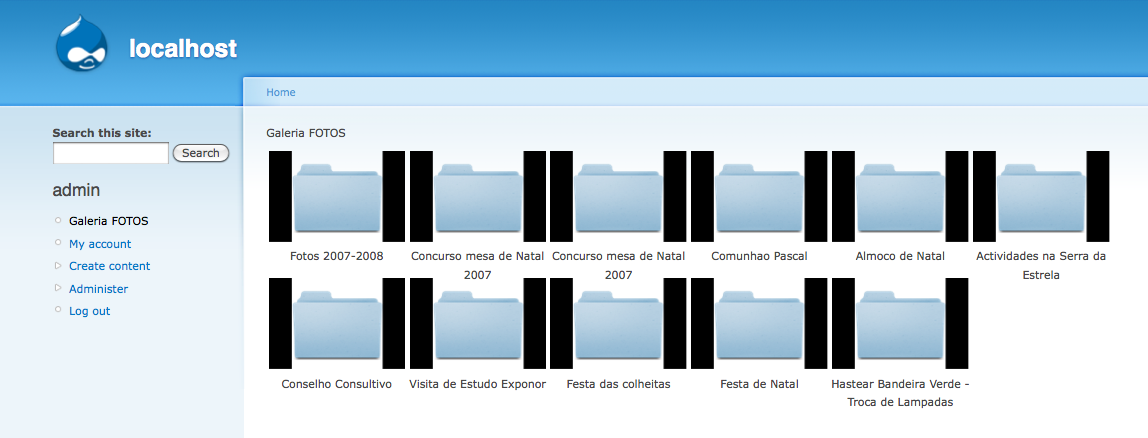
I installed Fast Gallery 6.x-51, in a new copy of Drupal 6.17 and the problem is that I can not have more than two levels in the hierarchy.
As you can see the images.
If you could help me I thank you, everything else works except this.
| Comment | File | Size | Author |
|---|---|---|---|
| #4 | Hierarchy new.png | 118.88 KB | Chase90 |
| Gallery.png | 98.71 KB | Chase90 | |
| Hierarchy.png | 131.59 KB | Chase90 | |
| Default - Storage engine.png | 51.89 KB | Chase90 | |
| General configuration.png | 85.81 KB | Chase90 |




Comments
Comment #1
rapsli commentedtry disabling the fast gallery cache
Comment #2
rapsli commentedI just tried the same thing... could not reproduce the error. Maybe you could also try to start off with fewer folders (like just one, but a really deep one). Maybe there's some timeout when going through all the folders?
Comment #3
Chase90 commentedI just tried disabling the fast gallery cache, but did not work.
I just tried "Maybe you could also try to start off with fewer folders (like just one, but a really deep one). Maybe there's some timeout when going through all the folders?", but did not work also.
I'm using MAMP on Mac OS X 10.6.4 and now I will test a server sternum, to see if the problem is with MAMP on mac.
Thanks anyway
Comment #4
Chase90 commentedI was doing some more tests and discovered that if I put an image in folders that only have folders inside, it works fine. As you can see in the image and compare with the image of the first post.\
But does anyone can tell me why it does this.
Comment #5
rapsli commentedspeaking... if you have a folder that only has a folder it's not working?
Comment #6
Chase90 commentedYes if I have a folder that only has a folder (even if it has images inside) it's not working well.
The gallery is like the image gallery.png that in the first post, gives no error but the gallery does not get the hierarchy right.
Excuse my English.
Comment #7
webservant316 commentedSame problem observed here.
I have defined one gallery and was intending to expand the gallery with sub-folders and sub-sub-folders.
I had a folder containing no images and one sub-folder and the hierarchy displayed properly.
I also had a folder with several subfolders and no images in the folder, then the subfolders are displayed at the gallery root and clicking on them did not work.
I added an image to the folders with sub-folders that had no images and then the hierarchy worked properly.
More added...
For further testing I then remove the 1 image from the folder that had several subfolders. When I did this the folder no longer was displayed at the gallery root. When I then added the single image back into the folder with several subfolders then the folder again properly displayed at the gallery root.
It seems there is a problem is the display of folders if there are no images in the folder. I was hoping to use this module to create one gallery and then easily control navigation through all my photo collections simply by creating folders and sub-folders within my one 'fast_gallery'. If this problem could be fixed that would be great. Otherwise I need to place a single image in all my folder that only have sub-folders to get the thing to work.
This is a great module, thanks for your work on it.
Comment #8
webservant316 commentedchanging to bug
Comment #9
webservant316 commentedmore info has been provided. is it enough to figure out what is wrong?
Comment #10
rapsli commented... it's just a matter of finding the time. @community looking for patches.
Comment #11
webservant316 commentedok, thanks.
Comment #12
rapsli commentedcommitted a fix for this bug and created a new version, containing a cool new feature: in place editing!
Comment #13
rapsli commentedComment #14
webservant316 commentedinstalled new version and folder hierarchies work great again.
what is 'in place editing'?
Comment #15
rapsli commentedgreat. For inplace editing, checkout my blogpost: http://www.rapsli.ch/inplace-editing-fast-gallery even though it's written in german the screenshot should give you an idea of what it should do
there's also a support issue here #863760: JQuery edit in place - need more info