Needs review
Project:
OG User Roles
Version:
6.x-4.x-dev
Component:
Code
Priority:
Normal
Category:
Task
Assigned:
Unassigned
Reporter:
Created:
9 Mar 2010 at 16:43 UTC
Updated:
6 Feb 2013 at 20:29 UTC
Jump to comment: Most recent file


Hi all,
in Views "basic setting" there is the "access" feature, where I can set access restriction to a view display by user CORE roles.
I'd need the same feature, but configurable for user OGUR roles.
Thank you very much!
MXT
(sorry for my bad english)
| Comment | File | Size | Author |
|---|---|---|---|
| #41 | og_user_roles_views_acces_plugun_737292_41.patch | 4.15 KB | szantog |
| #40 | og_user_roles_views_acces_plugun_737292_40.patch | 4.08 KB | szantog |
| #37 | group-node.jpg | 62.48 KB | khad |
| #37 | group-node-view-tab.jpg | 82.07 KB | khad |
| #33 | og_user_roles-HEAD.views-access-plugin.33.patch | 3.87 KB | sun |



Comments
Comment #1
sunThere are no "OGUR roles". OGUR dynamically and transparently grants additional, regular user roles depending on the group context of a page.
Comment #2
mxtThank you for your answer Sun,
so, how I can achieve this goal?
I'll try to explain my problem better: I have OG groups with moderators and authors. Those roles has been assigned with OGUR (not core roles, indeed all CORE roles chekboxes are unchecked. This is what OGUR requires to work correctly, because if I assign also CORE roles to users, they would have these roles over all site/groups regardless of their group membership).
Now If I try to restrict access to a View by roles, it doesn't work because Views check the CORE role of a user, and my users doesn't have CORE roles, but only "OGUR roles".
How can resolve this?
Thank you very much
MXT
Comment #3
sunAgain: Your users only have core roles. There is no such thing like a "ogur role".
OGUR dynamically grants additional core roles to users depending on the current group context. If you want to _list_ those role assignments using Views, then that's not possible (yet) and #729256: Views integration is what you want.
Comment #4
mxtPlease Sun: don't hate me ;-)
What I'm asking in "#729256: Views integration" is different to the request in this thread.
Ok, now I understand that there aren't "ogur role": these "run time" roles works correctly only on pages with OG context setted up, so I think a possible solution to this issue is to keep OG context in this particular view.
I've tried to do so setting up Group relationship/arguments but without success...
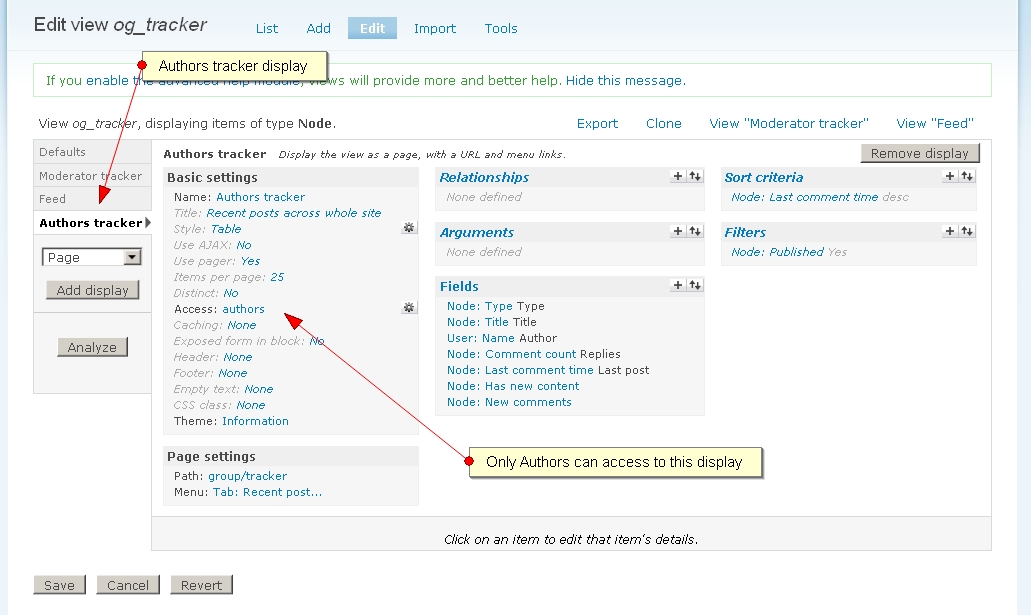
Please see the image in attachment where I summarize the issue.
Do you think using Context module ( http://drupal.org/project/context ) I'll be able to keep OG context in other pages like the one described above?
In this case I'll resolve other similar issue like:
- Check OGUR roles with Rules
- Views Bulk Operations roles restrictions would finally works correctly with OGUR roles
- Any other situation involving other modules that have to check OGUR roles outside OG context
Please tell me if Context module is the right way to follow
Thank you very much for your patience
MXT
Comment #5
mxtI'm very sorry for reopening this, but after View's maintainer answer (see http://drupal.org/node/759264#comment-2817720 ) I definitively think that this is a OGUR bug.
Thank you
Comment #6
sunI'm still not sure what the actual issue/problem is. Can you post an - as simple as possible - procedure to replicate the issue you are facing?
Comment #7
pgillis commentedsubscribe
Comment #8
mxtCore roles configuration ( admin/user/roles ):
Content types ( admin/content/types/add ):
Organic Groups configuration ( admin/og/og ):
Group details:
Organic Group ACCESS configuration ( admin/og/og_access ):
OGUR configuration ( admin/og/og_user_roles ):
Blocks ( admin/build/block ):
Create contents ( /node/add/departments ):
Create users ( admin/user/user/create ):
Assign permissions to users ( admin/user/permissions );
In the "node module" section give the following permission:
Assign users to groups:
Assing OGUR roles to users:
Login with different users:
Ok, to do things quickly, if you are now logged in as administrator in Firefox, my advice is to open 4 different browsers (IE, Opera, safari, Chrome) and do login for each user you have created before.
Create articles contents:
Notice that, thanks to OG access restrictions, "Department-A_Moderator" can edit only "Department-A_Author" content, and "Department-B_Moderator" only "Department-B_Author"
Ok, now the CRUCIAL POINT:We are going to do a single View with a default beaviour, but with different VIEW DISPLAY by OGUR Roles, exactly a new display for each OGUR role.
E.g we can create a new View, but to do things quickly we can modify existing default OG Views. Let's choose the "og_tracker" view in the available views in our site ( admin/build/views/edit/og_tracker ):
Do the following modification to the "og_tracker" View:
Modify the existing PAGE display like this:
Basic settings:
Now add a new PAGE DISPLAY to the "og_tracker" View:
Basic settings:
Page settings:
Ok we have now 2 different display for the same View by user role, but let's insert any kind of differences to give meaning to this separation:
We can insert a lot of diffrences to these displays as needed, but for our purposes do only this:
In "Authors tracker" > FIELDS options, remove the "Organic groups: Groups Groups" field (PAY ATTENTION: do not update default display here, but OVERRIDE it to have this feature only in this this display!)
Final test to show the bug:
In our 4 browsers already opened, with different users logged in, try to view our modified TRACKER view: (or type "/group/tracker" in your browser url bar) and ... TA DA! "Access denied" for ALL USERS!!! Why?!?!?!? it doesn't work because (I think) Views checks the CORE role of a user, and my users doesn't have CORE roles, but only "OGUR roles".
to prove this, let's simply add the right CORE roles to our users ( /admin/user/user ) and respective views display will be shown correctly (obvously we can't keep this settings because OGUR doesn't want this to work correctly)
(See images in attachment)
PLEASE: resolve this!
Thank you very much for your work
MXT
Comment #9
mxtI don't know if the following hypothesis can help somehow... by the way:
I think that the issue can be approached in a more "macro" level, in this way: "Find a way to keep optionally OGUR roles outside OG context".
There are several situations and modules that can really need this new feature, for example:
I don't know: we can set any kind of variable at the top of pages to automatically set OG context? Can OGUR do that by itself? Is its competency area or this have to be done by another module like OG? Otherwise Context module ( see my comment #4 ) ?
MXT
Comment #10
mxtAbout Views issue:
I think that if one of this feature is setted in a Views:
OGUR consequently would offer an option to keep OGUR roles in the view "access restriction - by role" feature.
What do you think about?
Thanks
Comment #11
mxtI noticed that DOMAIN module do what I've asked in my previous comment: it offer the option "access restriction - by domain" to Views.
I think OGUR would offer a similar feature to Views.
Comment #12
sunViews already contains such an access restriction "by role" feature (and even also "by permission"). Therefore, OGUR does not need to reinvent such an access plugin.
I'm not sure what's left to be done or not yet clear in this issue.
Comment #13
mxtYes, but these restriction doesn't works with OGUR.
I think there's REALLY need what I've already asked in #10:
if one of this feature is setted in a Views:
views access restriction would work with OGUR but actually it doesn't.
Sun, I continue seriously think this is a OGUR lack.
Thank you
MXT
Comment #14
mxtWhat I have to do to obtain the right consideration? I think an evasive answer "per month" is not serious.
Please first read my desperation here: http://drupal.org/node/732848#comment-3099766.
NOW: After MONTHS of tests, researches, issues opened everywhere, various alternative explored without success and after Views maintainer response (http://drupal.org/node/759264) I DEFINITIVELY think this issue is a OGUR BUG.
BUG DESCRIPTION:
Views "access restriction" by role doesn't work with OGUR (even if OG context is correctly kept)
I'm working on my project (summarized here: http://drupal.org/node/711246 and here: http://drupal.org/node/742676#comment-2855062 and simplified here: http://drupal.org/node/737292#comment-2846284 ) since 8 months, but the BUG above stopped me to finish.
I made any kind of experiment: but at the end there is always nothing to do. The following is the list of only SOME of the innumerable tests I made:
CONCLUSION: the best results I've reached is using OG + OGUR, but this BUG cannot allow me to finish my work.
PLEASE can you seriously consider to resolve it?
(or tell me if I'm doing something wrong or missing something or suggest me an alternative to reach the goal)
Thank you very much.
MXT
Comment #15
michaelfavia commentedWhile i understand your frustration with the problem you are having I don't see any attached patches with your comments and they tend to come off as slightly ungrateful and entitled to help. Daniel has zero requirement to scratch your itch for you or even fix a bug in the module he helps maintain if he chooses not to do so for any reason he likes. A certain amount of frustration could be understood if you demonstrated an actual bug and provided a patch but withstanding that case I'm inclined to think this is your problem if you care to resolve it.
Comment #16
mxtHi Michealfavia, thank you for your answer, I'm not sure if I correctly interpreted your answer due to my poor english: I'm sorry for this.
You talked about patches: if I was a programmer I'll surely bring my contribute with a patch, but I'm not, so I can't do it. All I can do is research everywhere in Internet for issues similar to mine, and try to resolve with these examples/advices. I also know that maintainers need as more information as possible on a issue, so that's why I tried to do in this thread, writing from scratch a step by step to reproduce the issue (see: http://drupal.org/node/737292#comment-2846284 ), experimenting by myself different alternatives and try to help doing supposition, all time (very very lot of) I dedicated to this issue can be inferred reading this thread from top. I really don't know what still I have to do to demonstrate the bug, but I have a question: does someone tried to reproduce it following my step by step? It's not enough that?
We are not talking about a personal and restricted issue I think, we are talking that OGUR doesn't do what it promise to do using it in combination with VIEWS, a TOP module used by everyone here. OGUR under an OG context must grant additional roles to user under that context, but in a page made with Views where OG context is anyhow present OGUR doesn' do his job with Views access restriction by role seated up. This is my conclusion, and this is what I tried to demonstrate in all this thread. I did as much as possible to demonstrate it, there is obviously the possibility that I'm in error due to some lacking/wrong Views or OGUR parameters configuration but at this point is some other task to demonstrate it.
In conclusion I think resolving this can help the entire Drupal Community and not only my need.
Anyway, advices are always appreciated: what can I do now the bring more help to resolve this issue o to put somebody in condition to resolve it?
Thank you very much
MXT
Comment #17
hubarbeit commentedI need Views to know of OG user roles myself, so I did some "research":
OGUR has to be called before the Views' access plugin, so make sure OGUR has the weight '-1' in the system table. This seems to be included since version 6.x-4.0. Try the latest release and remember to run update.php (as I forgot at first)...
Comment #18
sunhum... did we forget a module update at some point to adjust the weight? It should be installed with -1 by default, but I'm not sure whether this is properly adjusted for older versions.
Comment #19
mxtI'm using the latest version of OGUR (6.x-4.1) and the weight was already seated to -1 in the system table.
Comment #20
itsnotme commentedI feel your pain, I need a better OGUR/Views integration too, but frankly, given the time you obviously spent on the subject, you rather should've tried to hire a programmer for this. This is a free and open-source software, delivered as-is, and it won't help if you demand a solution for your problem once a week.
Speaking of which, I'll try to throw my programming student onto our own OGUR/Views problem...(which is aimed at better administrative filters for users with role x in group).
Comment #21
mxtI have no idea about how much it would cost hiring a programmer to specifically resolve this bug.
Does anyone have a suggestion or a bid for ?
Thank you!
Comment #22
j.helmer commentedI have a solution for this. I needed OG User Roles access integration with views for a client, and there was no getting around it.
I wrote a views plugin that extends the normal views_plugin_access class. The name of my module is 'm29_organization', so you will have to take this into consideration. I have never written a patch, nor do I have much interest in learning how to do so at this time, so if someone else would like to submit a patch for OGUR, be my guest.
In m29_organization.module:
in includes/m29_organization.views.inc:
In includes/m29_organization_ogur_plugin_access.inc:
Basically to sum everything up, this duplicates the basic role access plugin provided by views, adds a form element to specify which path argument is used as the group id, and calls a custom handler that integrates with OGUR.
The group context does not need to be set anywhere else for this to work. I saw numerous postings regarding setting the group context in the views header, but this is terrible practice. If you need the group context for something other than access, it should not be done in the views header (someone unrelated, but feel it is important to mention it here).
A couple additional notes:
Hope this helps everyone!
Comment #23
sunThat would translate into this OGUR patch for me. By all means, I'm no expert in this area. No idea how to make it use a proper Views/Panels context. But if this happens to work, I'm happy to move forward with this already and commit it.
Comment #24
sunAlso, @j.helmer, you should totally learn how to do patches for Drupal! :) http://drupal.org/patch will help you. Everyone in IRC #drupal on irc.freenode.net will certainly too!
Comment #25
j.helmer commented@sun -
thanks for the pointer. I will definitely learn how to do patches as I get more involved in the drupal community, though I develop for drupal professionally, so I would have to learn it on my own time or when we are not busy and there is time for drupal research.
Comment #26
sun@j.helmer: Many (if not even most) people in the Drupal community are doing exactly what you are doing, and they learned it on purpose -- consider that you don't need to apply any hack or workaround next time you need a functionality, and, that you can freely update to newer versions at any time.
Sorry for this off-topic interlude. :)
Comment #27
mxtHi all,
First I want to thank j.helmer for his contribute: thanks a lot!
I've tried to apply the patch provided by Sun in #23: the patch was applied successfully (modifications and new files and folder correctly created in OGUR main folder), then I've cleared the site cache, made a site update, but now I can't see how and where to set the new features.
Can you give me a suggestion? What I have to check/set and where? (In my Views "basic Settings", at the "access" item, I can't see any new option)
Thank you very much!!!
Comment #28
j.helmer commented@sun - Thank you for your input. I look forward to contributing more to the Drupal community.
@MXT - Just use role-based access as you normally would. It just "works."
Comment #29
j.helmer commentedI attached a screen shot in case my previous explanation lacked.
@sun - Not sure how this works, but should we change the status of this issue to "Patch" so we can get it ported into the next stable release?
Comment #30
j.helmer commented@MXT - I spoke too soon. This morning, I removed the code from my module and tried applying the patch sun made. It didn't work. Looking through the code, I found a few problems:
~merlinofchaos
@sun - Any input here? To start out, the patch should drop those .inc files into an includes/ directory. Next, we need to figure out how to properly extend views_plugin_access_role.
Does anyone else have any pointers about how to accomplish this? I created a new forum topic about it: http://drupal.org/node/873710
Comment #31
sunSounds like a bug in Views' plugin autoloading.
Comment #32
j.helmer commentedNot quite there:
Adding directories
It is also possible to use cvs patches to add a directory. For example, to add an add-on module to an existing module.
1. Within a directory that cvs knows about, add a new file to cvs shown above. With contributed modules, this would be in the root directory of that module.
2. Create the patch file by modifying CVS/Entries and using the -N switch shown above.
3. Edit the patch file adding the directory path that the files should reside in.
4. Example shown below, the first part shows the first few lines of the patch file created in the module root, after editing, I manually add 'contrib/exhibit_apachesolr' in front of any reference to the new file.
5. After running the patch file, on a cvs checked out module, it creates both the file exhibit_apachesolr.info inside the created directory exhibit_apachesolr (that resides under contrib).
Comment #33
sunNote that I have no use-case for this feature/patch myself, just trying to get you guys getting along.
I would have tested it, but I'm not sure how to use this access plugin, effectively.
Can you try? I've seen you had that in your code, but upon looking up what Views actually does in that logic/code, it didn't look like it would be necessary.
Ok, looks like my preference breaks some expected standard file layout. ;) Fixed. Shouldn't have an impact on the functionality though.
However, s/includes/views/. Views is not the only API that allows other modules implement plugins.
Hope this helps.
Comment #34
mxtThank you Sun, I've just tried patch #33 and it creates a new "views" folder and puts "og_user_roles.views.inc" and "og_user_roles_plugin_access_role.inc" inside.
I've cleared all caches (views cache also) but unfortunately the patch doesn't work: users with specific OGUR roles can't access to their specific Views display (access denied).
Comment #35
mxtI'll try to describe the problem better:
With this patch I can now see a new "OG role" radio option in Views "basic-settings -> access" admin panel (YEAH!!! ;-).
So I choose this option, click "update", but I have no feedback: the GUI seems to "reset" and no modification are seated at the "access" row. I think it have to lead to a second GUI panel where I'd can choose the OGUR role instead.
Comment #36
mxtIn the meantime I tried the module in http://drupal.org/node/729256#comment-3288276 but "views access restrictions by OGUR roles" still doesn't work for me.
@j.helmer, I have a question for you: under "access options" form, where OGUR roles are listed to choose from, there is a "Group Argument: Define which path argument is the group nid." input form. What is this supposed to do? How it works? I have no arguments in my path and no views arguments defined: I retrieve group context using "Organic groups: Group node (post)" RELATIONSHIP and filter Views results with "(Group) Organic groups: Group member" filter (so a user can view only his group items).

What can I do in this case? any suggestion?
Thanks
MXT
Comment #37
khad commentedHey MXT,
I can feel your pain - being not a programmer, I had to give up on a project to build a drupal site because I couldn't get the permissions system to work properly (didn't hurt as much, though, since it was just for my own needs). The problem was probably the same as you suffer from:
- on a group node (e.g. ?q=node/61), the OGUR permissions are clearly there, as the the group detail block shows (see group-node.jpg)
- navigating to a viewtab on the node (e.g ?q=node/61/documents), the group context is still there (otherwise the detail block wouldn't display), but the OGUR permissions are clearly missing (see group-node-view-tab.jpg).
If money can fix this (hiring a programmer) I might throw in some of my meager resources.
Comment #38
gmclelland commentedsubscribing
Comment #39
j.helmer commentedHey, guys. Sorry I haven't been available for a while.
@MXT: in response to the following:
@j.helmer, I have a question for you: under "access options" form, where OGUR roles are listed to choose from, there is a "Group Argument: Define which path argument is the group nid." input form. What is this supposed to do? How it works? I have no arguments in my path and no views arguments defined: I retrieve group context using "Organic groups: Group node (post)" RELATIONSHIP and filter Views results with "(Group) Organic groups: Group member" filter (so a user can view only his group items).What can I do in this case? any suggestion?
I built the access plugin for a particular case, where the argument is available in the url. My only suggestion (other than writing a new plugin, or re-writing this one) is to change up the way your view works to grab an argument from the url (if possible). Sorry; I don't have the resources right now to develop this more.
@khad: Be sure to set the ACCESS RESTRICTION on the /documents view to OGUR and select "1" as the OGUR context argument. You should be good to go, assuming MXT's patch works (I never tried his revised version of my code).
Comment #40
szantog commentedI'm not a views guru, but I needed this function in views3. I've made it - I think - compatible with views2, based on patch #33.
I've just downloaded the http://drupal.org/project/og_views_extra, and merge some useful thing.
The goal was the next: I wan't use an independent callback function, when ogur settings active in views.
I've changed the numbering of argument, if it's zero, there aren't argument validation, just use a default group context.
In plugin I don't use anything from parent in access and get_acces_plugin functions, just set callback to
And the access callback:
Comment #41
szantog commentedHmm.. The previous doesn't respect 'access all views' role..
Comment #42
timefor commented... n/m
Comment #43
Dave Cohen commentedI'm debugging the same issue on one of my sites. I haven't tried the patches in this thread, and I'm pretty skeptical whether they are taking the right approach.
As far as I can tell, there are two problems. Again, this is without applying patches, and using the regular views access by role.
First problem, the main problem here, is Drupal's menu code is calling views_access() before OGUR has a chance to add roles. I'm not sure if there's going to be any easy way to get OGUR to act first.
Second problem, is og_user_roles_grant_roles() fails to learn the group context. It has fancy-pants code that inspects the menu items. But that slick stuff works on menu paths like node/%menu/edit, but not node/%/members (i.e., the kind of menu path that views adds - note the %node versus just plain %). See #940462: OGUR permissions lost while in OG context for a possible fix for this problem.
Comment #44
Dave Cohen commentedUpdate with a correction... the first problem is not that drupal's menu is calling access hooks too soon. Rather, it is og_user_roles_init that is causing the access hooks to be called.
There's a comment above og_user_roles_determine_context() which clearly states this is undesirable:
... despite the comment, og_user_roles_menu_translate() later calls _menu_load_objects(), which I think because of i18.module causes menu to call the access hooks and cache results. It's a long convoluted stack trace. I think this problem only occurs when i18n.module enabled. I also think I've encountered it before and worked around it with a custom hook_init(). I need to search for that thread...
Comment #45
Dave Cohen commentedOk, hopefully the last time I have to correct myself in this thread.
It's not becasuse og_user_roles calls _menu_load_objects. Rather, it's all baked into i18n.module. Anything that calls node_load() will cause i18n to cause drupal to call the access hooks.
I put a terrible hack into my custom module's hook_init to work around this. Feel free to use it. You'll need to change my test for node type 'group' to whatever is appropriate for your site. And you'll need to adjust your custom module's weight to come before og_user_roles or any module that might call node_load in hook_init.
I don't know whether it makes sense to put something directly into og_user_roles, for those cases when i18n is enabled. All you'd have to do is i18n_selection_mode('off') at the start of og_user_roles_init(), and reset that mode, and the node_load cache at the end. I leave that up to you.
Comment #46
sun@Dave Cohen: Thanks for the analysis. So after all the debugging, it looks like your issue is actually a separate one and not related to this here about Views? If so, we might want to create a separate for i18n compatibility/integration? (and link to it from here)
Comment #47
hosais commentedscribe
Comment #48
fxarte commentedI believe that the cause of this issue is related to how the module, and og, determine the group context: og_user_roles_determine_context(), and og_determine_context().
Essentially both modules, group context calculation depends on the path of the request, and that it must contains the information needed to determine the OG, either a nodeID or the the query parameter: gids . But in the case of a views page, it is not included, resulting in that the group value will be NULL, see both: og_determine_context(), and og_user_roles_determine_context(), and then og_user_roles_grant_roles() will not assign the proper roles to the user.
This situation may happen on any defined path in the site that does not contain the OG information, such as AJAX callbacks (filefield, realname_userreference), views, hook_menu implementations, etc.
In my case, the issue was that when a user was editing a node, they would get a filefield access denied popup. The site uses Content Permissions.
To solve this I had to add in my implementation of hook_init, this code:
This is assuming that the user already have access to edit the node. Also I needed to reset the custom module weight to be lighter then og and og_user_roles.
You may include other conditions particular to your case.
Also adding ?gids[]=### to the URL should fix this issue without any programming.
I know is not specifically for your case, but I hope it helps.