

Closed (fixed)
Project:
Zero Point
Version:
6.x-1.10
Component:
Miscellaneous
Priority:
Normal
Category:
Support request
Assigned:
Unassigned
Reporter:
Created:
2 Mar 2010 at 20:09 UTC
Updated:
1 Oct 2015 at 00:34 UTC
Jump to comment: Most recent, Most recent file


Comments
Comment #1
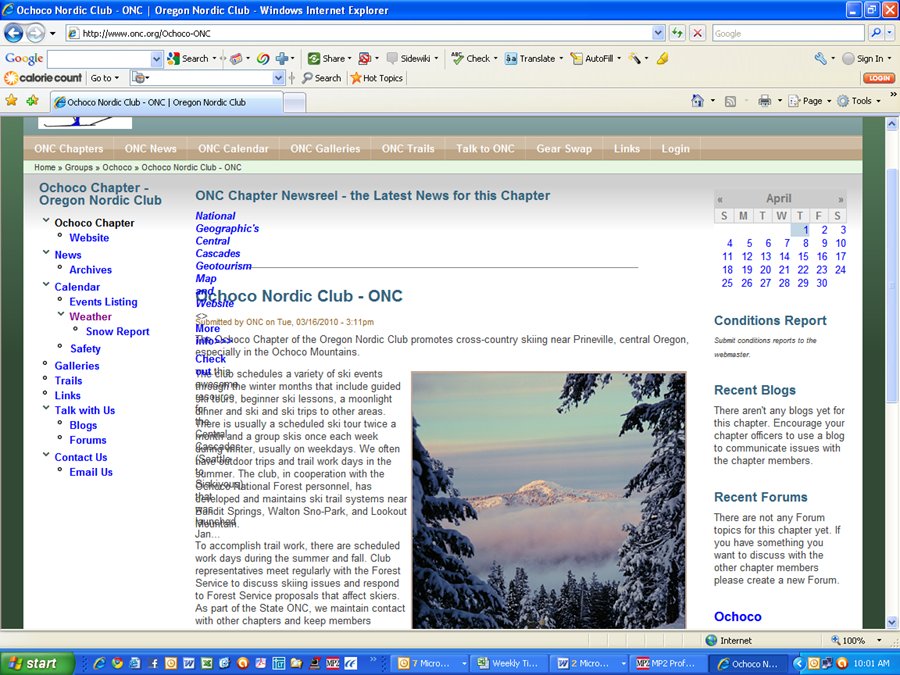
ga6264 commentedSome more information on my problem. Whenever I add the rotating image module on the Top Content and it does not matter whether I created it using views slideshow or rotator it overlaps the middle content. My images are now 227 by 102, also tried 100x100 and it still overlaps. When I try uing the built in Random image or Latest image in zeropoints in does not overlap. Does this have something to do with CSS? Can I edit the CSS to make this work?
Comment #2
florian commentedRename to page.tpl.php and upload the attached file to the root of 0 point theme and see if this solve your problem. Please come back with comments.
Comment #3
ga6264 commentedThanks Dr. Radut for your help. I'll try it tomorrow at work and will let you know the outcome.
Gilbert
Comment #4
ga6264 commentedDr. Radut,
It is still ooverlapping. I downloaded the file and renamed it page.tpl.php. I then copied to inside the zeropoint folder and overwrote the old one. I made a copy of the original. I remove my logo and installed back the default thinking that might cause some problem.
Here are my settings:
Layout is adpaptive width
fixed asymetrical sidbars wide.
Rotating Image size are 462x224
Comment #5
florian commentedI am now sure that the issue is not theme related. I think, the best approach is to put your rotating image inside a div with a predetermined height, like:
What module do you use? Is it something custom made? .. or is the script used in the header theme? If the last is the case then my example above may solve your problem.
Comment #6
ga6264 commentedThe 2 modules I tried to rotate images are image rotator and views slideshow. I am not sure what you mean by..."or is the script user in the header theme?"
Comment #7
florian commentedI mean "script used" ... Did you put your rotator into another region to see the results? I will install the two modules to reproduce the issue.
Comment #8
florian commentedComment #9
ga6264 commentedcorrections, I am using views rotator nd Views slideshow. I'll test adding them on different regions and I'll let you know tomorrow. I can't thank you enough for helping out.
Comment #10
ga6264 commentedI have installed the slideshow on different regions please see attached PDF. For this slideshow I using the views rotator module.
Comment #11
florian commentedThanks for helping me to solve problem. One more question and I'll do my best to solve it this weekend. You are using IE6, right? Is this happening with other browsers, as well?
I suppose you can not send me a valid URL, so ... can you send me the source code of the page by email?
Comment #12
ga6264 commentedUnfortunately I am using IE8 :-). I tried it on other browser like chrome and mozilla and they show the same. I sent you an email with the source code. Let me know if you get it.
Comment #13
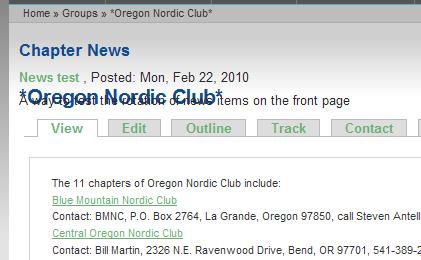
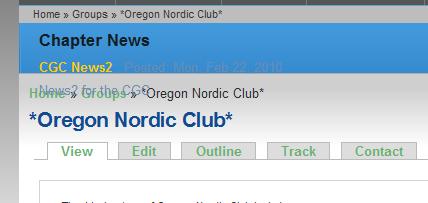
ldekay commentedI'm seeing the same content overlap problem in a Drupal test site on any browser. I have even specified the region height but still get overlap. I've also tried moving the rotator block into a User region above Top Content (Salamander Skins theme) and rotator still overlaps content. The module doesn't seem to communicate to the height parameter for the User region, so it allows the Rotator to overlap content in the Top Content region. Attaching two images showing each case.
It generally works fine in a separate production site and I can't see any difference in the basic setup of the two sites other than having some different modules enabled for testing in the Test site. One user does see an overlap problem using IE7, but it checks out on all other browsers tested (IE8, Firefox, Chrome, Safari, Opera). I'm also attaching images from the production site.
Comment #14
florian commentedComment #15
florian commentedThis was fixed in newer versions.