

 Come together with the global Drupal community in Rotterdam, 28 Sept – 1 Oct 2026. Sessions, contribution, connection, and Early Bird savings until 8 June.
Here http://drupal.org/node/421128
It is said for the block configuration :
"and there is also a setting in the block configuration to have the block show only a single user's status (and update form where appropriate)".
I can't see this setting.
I need to show the last statuts in this block and to hide it on the profile where I use the "Stream" pane which list already the last status.
Currently I don't know how to do this.
Thanks
| Comment | File | Size | Author |
|---|---|---|---|
| #2 | fbss_block.png | 16.54 KB | icecreamyou |
| #2 | fbss_view.png | 39.87 KB | icecreamyou |


Comments
Comment #1
lanebritch2 commentedhi Julma!
You can find all the core theme functions at http://api.drupal.org/api/group/themeable/6.
Try it!
I hope it will help you!
moving truck rental
Lane :D
Comment #2
icecreamyou commented@Jumla:
By default, the block shows the latest status and a status update form for the current user, without any configuration. There are two exceptions to this. The first is that you can use the "Legacy Mode" setting to change the user whose status/update-form will appear in the block. That setting is found at
admin/settings/facebook_status, and it will cause the node author's status to appear in the block on node pages and/or the profile owner's status to appear in the block on profile pages. The default behavior is to have legacy mode enabled for profile pages.The setting that the documentation refers to is the other exception. It allows you to make the block so it shows only one user's status, i.e. you could make it show only the Administrator's status/update-form. That setting is actually in the block configuration at
admin/build/block/configure/facebook_status/facebook_status. I've attached a screenshot of what that setting looks like.To hide a block on user profiles, just change the block visibility settings. If you want to hide the latest status from the block, check the
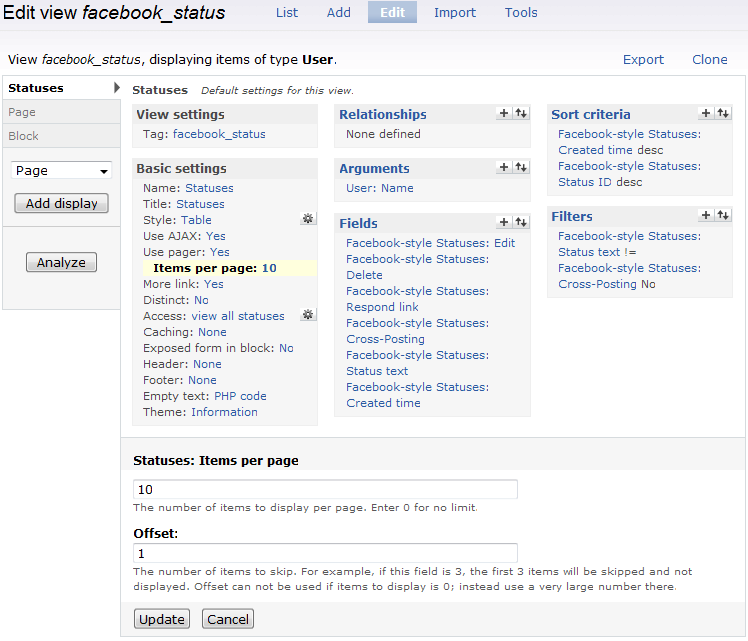
Hide status above textfieldsetting atadmin/settings/facebook_status/advanced. There is no way to only have the status appear on the block when the block is not being shown on the user profile unless you override the theme functions (documentation). However, what I usually do is edit the View that's displaying the stream of statuses on the profile and change the offset (see the second attached screenshot).Hope that helps you.
@lanebritch2: While useful for many things, those theming functions are not really relevant to the question Jumla asked. However, I appreciate you trying to help answer the question!