

 Come together with the global Drupal community in Rotterdam, 28 Sept – 1 Oct 2026. Sessions, contribution, connection, and Early Bird savings until 8 June.
Hi,
I try to found solution for use the archive module with an independant recorder audio program.
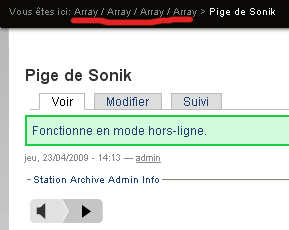
When I upload a new audio node i have "no way" (look the file attachement) and it's impossible to connect it with the schedule program ?
What is the correct path for the archive page ?
Can you help me ?
| Comment | File | Size | Author |
|---|---|---|---|
| #14 | Screen shot 2009-11-28 at 2.32.36 PM.png | 135.21 KB | drewish |
| #13 | Screen shot 2009-11-28 at 2.14.55 PM.png | 147.29 KB | thumb |
| #10 | Screen shot 2009-11-28 at 1.54.26 PM.png | 50.15 KB | thumb |
| #10 | Screen shot 2009-11-28 at 1.56.23 PM.png | 12.27 KB | thumb |
| #4 | station_archive_565246.patch | 11.53 KB | drewish |


Comments
Comment #1
drewish commentedi'm not sure what's going on with the bread crumbs you highlighted. i'd suggest trying a core theme (link garland) and seeing if it's still a problem. if it is please take a screen show with the theme if it' works correctly that points to your custom theme as the problem.
you should be able to create audio nodes and then after they're saved associate them with a program.
Comment #2
lesonunique commentedHi,
I am able to associate my audio nodes with a program.
My problem:
- I must create manualy the "program_nid" associate with a "title" in the "station_archive_program"
- I don't understand how create the association between the Audio Archive with this type of link:
http://localhost/category/station-archive/[program's name] <-- it's the name and not the program_nid !
with the shedule pogram where the link are like this:
http://localhost/station/archives/16
http://localhost/station/archives/16/feed
Have you solution ?
Thanks
Comment #3
drewish commentedyeah lots of issues. here's a start on it.
Comment #4
drewish commentedokay so this fixes:
- breadcrumbs
- loading the program's djs and genre into the imported audio node
- the default views for station/archive/%program-nid and station/archive/%program-nid/rss
there's probably more to fix but this gets most of it working. i've committed the attached patch to HEAD. i'll roll a new release so grab that and let me know if it works better.
Comment #5
thumb commentedBreadcrumbs are now displayed but links aren't working for me.
Update to be more specific on breadcrumb links.
Home » Station » Archives » Program Name
Station: displays blank page or view titled "Station". Sole breadcrumb is "Home"
Archives: same page, title, and breadcrumb.
Program Name: same page, title, and breadcrumb.
I don't see corresponding views for station_archive, do I need to create them?
Comment #6
drewish commentedHum... make sure you empty the views cache. You've got a station_archive.views_default.inc file right?
Comment #7
thumb commentedThanks. Clearing the views cache fixed everything.
Comment #8
thumb commentedSpoke too soon. Archives and the Program views seem fine, but the Station link still shows empty. What is the Station view supposed to display?
Comment #9
drewish commentedCould I get a screen shot? I think the /station link will either show a list of sub menu items or nothing. i can't remember what version does what.
Comment #10
thumb commentedHere's the audio node. Clicking on Station in the breadcrumb brings up an empty node, no navigation, just breadcrumb, title, and an empty area.
Comment #11
drewish commentedah yeah that's affected by the user's permissions. the views all have permissions on them to control who can see them. do your users have "view station * content" permissions?
Comment #12
thumb commentedYes, view permissions are set for all roles across the board for archive, catalog, playlist, program and schedule.
Comment #13
thumb commentedScreenshot, just in case.
Comment #14
drewish commentedyeah that's really odd because i'm getting a proper page. see the attached image.
Comment #15
thumb commentedI'll poke around on this end to see if I can't get this resolved. I'll start by using a stock theme, clearing views cache, etc.