

 The 2026 Drupal Business Survey is open. Your response will help shape the future of the Drupal business ecosystem.
"what ever is displayed on the page (title, content, breadcrumbs, etc) is no longer controlled by Taxonomy Menu."
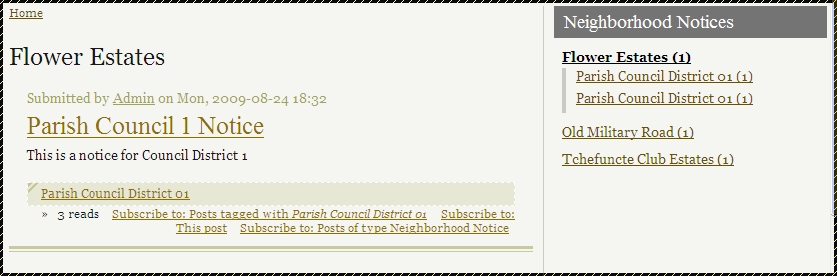
When clicking on a top-level (parent) taxonomy_menu item the node and page titles of the resulting page (example: taxonomy/term/13 20 23 18 25) show the parent term and all of the descendant terms separated by commas, resulting in very cluttered node and page titles. How can I suppress the display of the descendant terms and leave just the parent term in the node and page titles, but still show all posts for both the parent and the descendant terms on the page?
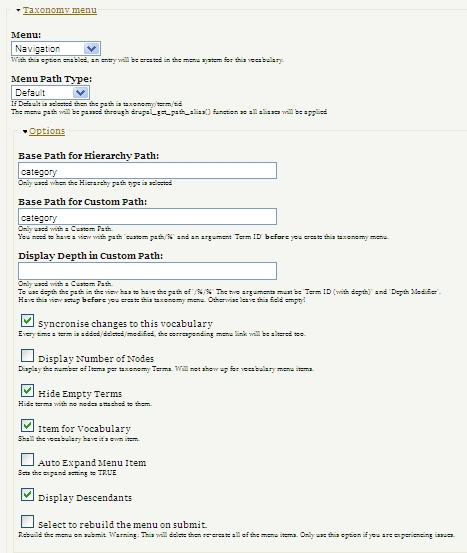
I've attached an image of the Taxonomy Menu section of the Edit Vocabulary page that results in the above.
| Comment | File | Size | Author |
|---|---|---|---|
| #4 | 1.EditVocabulary.jpg | 123.3 KB | BayouBill |
| #4 | 2.VocabularyTerms.jpg | 154.76 KB | BayouBill |
| #4 | 3.EditView-Showing-Path-and-Arguments.jpg | 169.99 KB | BayouBill |
| #4 | 4.Argument-Default.jpg | 238.42 KB | BayouBill |
| #4 | 5.Argument-Validator.jpg | 271.11 KB | BayouBill |


Comments
Comment #1
indytechcook commentedTaxonomy Menu creates the URL for the menu link. All of the content is handled by other modules. By default, the taxonomy module handles the page callback.
You can use Views. Have you looked at "PATH TYPES and INTEGRATION WITH VIEWS MODULE" in the readme?
http://cvs.drupal.org/viewvc.py/drupal/contributions/modules/taxonomy_me...
Comment #2
BayouBill commented"Have you looked at..."
Thank you for pointing me in the right direction. I have followed the instructions in the Readme and now have a custom view working with a "custom" menu path type for my vocabulary. I can produce a page with a static title (like the "Terms" title example in the Readme instructions). What I would like to do, though, is have the page title be just the first term in the %1 title parameter. When using a hierarchical taxonomy, the %1 parameter is constructed as a concatenation of all the relevant terms ("parent_term+child_term1+child_term2" etc.). Using %1 in the title field shows all those terms, resulting in a very messy title. Is there some way to parse out just the first term (parent_term) and use it as the title, and still display all the content for the entire hierarchy?
Comment #3
indytechcook commentedWell, you have a few options (don't you love drupal) many of the require custom code. Here is a patch that might help #424160: Module for adding a custom path for the vocabulary only inserts garbage chars (%252F) before the vocab name.
Sorry there isn't an easier answer. I'll keep this issue active if anyone has a better idea.
Comment #4
BayouBill commented"many...require custom code"
Thanks again. That got me started, and I noodled my way to this post, which I used as a starting point: http://drupal.org/node/365418.
The attached images should explain what I did. If they don't, post back with questions.
My code works, but I'm still a rudimentary PHP coder, so any suggestions on how to tighten up the Validator code would be appreciated.
"don't you love drupal"
Yes, I do!
Edit: Yes, image #6 shows the "duplicate terms" problem as described in http://drupal.org/node/514640.
Comment #5
TRex2003 commentedThis means, you create a view as a "proxy"? I'm also looking for a stable solution.
Comment #6
BayouBill commented"This means, you create a view as a 'proxy'?"
Not sure how you are using the term "proxy", and I'm a Views newbie, but I think the answer to your questions is Yes. The key is the "path" field in the view, which says, "any time a page with this path construct is referenced, render it with this view". In this case, the only thing the View changes (via the Validator code) is the way the title is displayed.
"I'm also looking for a stable solution."
I guess this approach can be considered "stable" as long as the Views module and the path construct generated by Taxonomy Menu are "stable".
Comment #7
indytechcook commentedThis is good work BayouBill. I know it will help others.
Comment #8
TRex2003 commentedGreat job, works good and helped ;)
I'm also a complete views newbie, just clicking through the options and try to get something useful..but it's not impossible to understand.
Comment #9
arlinsandbulte commentedThanks for the how to, BayouBill.
One question: What does the stuff in the Argument-Validator do? What is the purpose of the code there?
I am a drupal and php newbie, just starting to learn...
Comment #10
BayouBill commented"What does the stuff in the Argument-Validator do?"
See commented code below.
Comment #11
arlinsandbulte commentedAhh, thanks for the explanation to this newbie.
So the validation really is not doing any validation. It is just a convenient place to put some code to alter the view output, right? Cool.
Can this issue be marked fixed?
Comment #12
BayouBill commented"So the validation really is not doing any validation. It is just a convenient place to put some code to alter the view output, right?"
Correct
Comment #13
kirkcaraway commentedThanks for this workaround. I was able to get rid of the ugly string of every term that showed up on my parent menu item.
However, I can't seem to get the taxonomy term to show up on any of the child term pages. They all say "Notice for "
Am I missing something?
Thanks again.
Comment #14
selinav commentedHello,
I don't know if I'm in the good post.
I don't really understand how to alter the title of the vocabulary item.
When I'm on page of the vocabulary item, my title is term 1 + term 2 + term 3 + ...
How to change only this title?
Thanks in advance.
Comment #15
PePiToO commentedSame here, didn't really understand the concept
Couldn't find anything to change the title for only a vocabulary page/link.
It would be much more relevant to call this page the same as its vocabulary name instead of displaying all its terms name.
Comment #17
dstolOld issue closing