

Closed (fixed)
Project:
Experience Builder
Version:
0.x-dev
Component:
Page builder
Priority:
Normal
Category:
Task
Assigned:
Unassigned
Reporter:
Created:
29 Apr 2025 at 12:10 UTC
Updated:
28 May 2025 at 14:49 UTC
Jump to comment: Most recent, Most recent file
 Show commands
 changes



Comments
Comment #3
larowlanWorks great, nice one
Comment #4
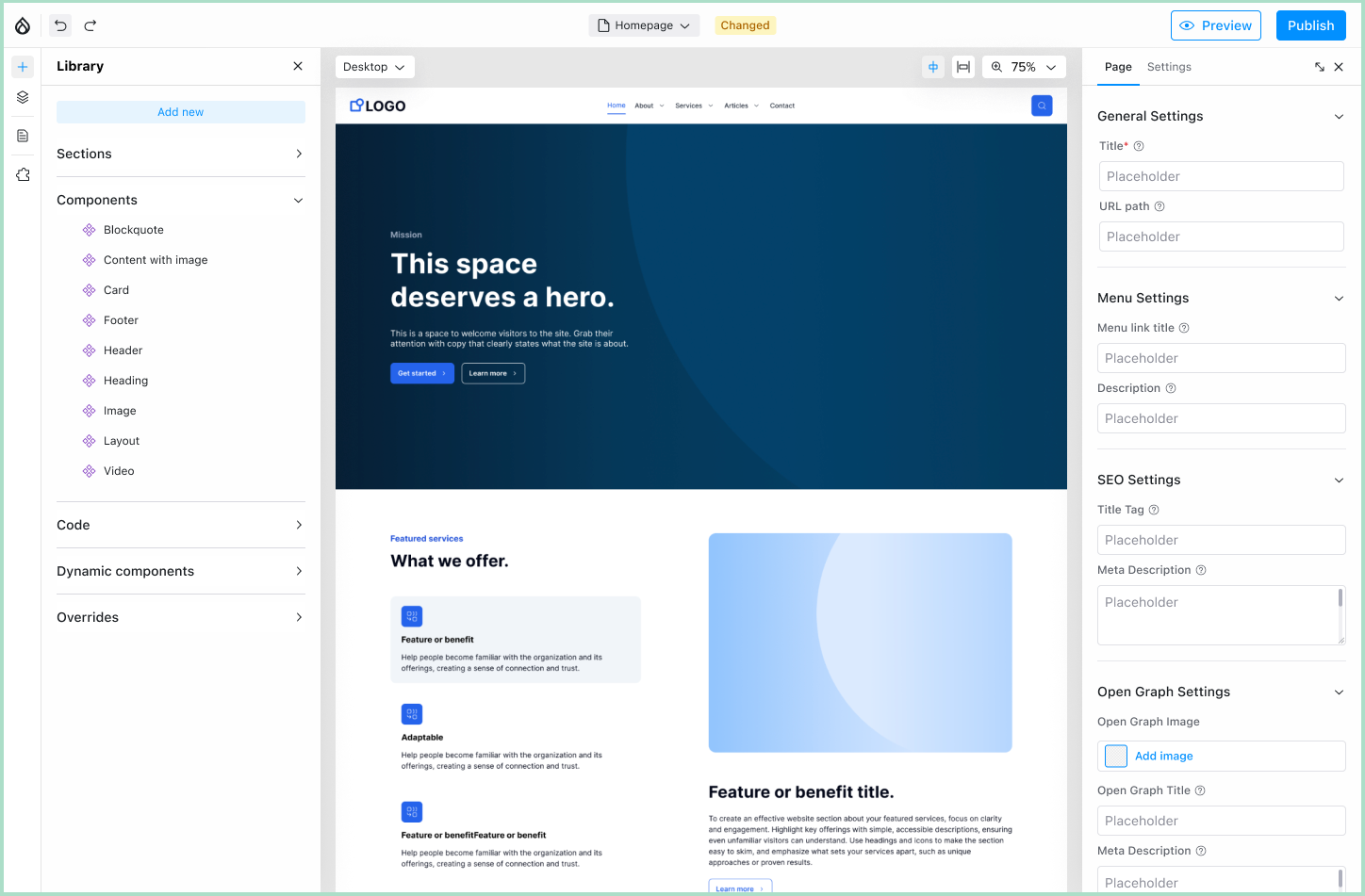
heyyo commentedSome questions about this new UX which looks great !
1. Why it was an issue to have sidebars on top of canvas ? It was/is still possible to drag and zoom.
2. Will it be still possible to see desktop and mobile at same time ? It's quite handy to have both at the same time.
3. Any plan to make right sidebar (maybe left too) resizable ? I can image a prop with ckeditor could need lots of space for example
Comment #6
jessebaker commentedRE: #4
1. Why it was an issue to have sidebars on top of canvas ? It was/is still possible to drag and zoom.
It is (and will remain) possible to pan/drag/zoom even with the new "locked" sidebars. The change was to free up more space on smaller screens. We wanted to make better use of the limited space the experience builder UI should take up on the page by reducing the large gaps around the panels. This change also addresses some usability issues with the browser scroll bar being on the right-hand side of the page, right of/behind the right panel.
2. Will it be still possible to see desktop and mobile at same time ? It's quite handy to have both at the same time.
This is unlikely to still be possible however the current UX designs allow for a quick switch between different sizes. Once we show only one viewport size at a time I would like to (at some point) make the iFrame manually resizable. The changes are for 2 main reasons
a) When you have two views side by side, quite often the content doesn't line up. Once the content on a site is fairly long, the mobile view tends to be significantly longer than the desktop due to being much narrower and as a result you can't easily view the same piece of content in both viewports at the same time anyway
b) performance of rendering the site multiple times (with our overlay that shows all the borders etc on hover) was starting to be a limitation.
3. Any plan to make right sidebar (maybe left too) resizable ? I can image a prop with ckeditor could need lots of space for example
Yes! See point 9 in the summary of #3521714: [Meta] Application "Shell" design refactor and have a sneak peak at some of the designs (still subject to change)!
Further to the above, this is just one step towards a fairly big redesign of the overall layout that is more future proof because it frees up space and sets in place a number of UI patterns (such as the new side menu) that will allow us to more easily add more features over time.
Comment #7
jessebaker commentedComment #8
heyyo commentedThank you for your detailed explanation, makes totally sense.
Really nice design, and I see and will be able not to only resize the sidebar, but to also to close both sidebar and to minimize, and maximize the right one too :-)
One of a client didn't want to use XB for Article page because of this, he wanted to be able to write article in full page.
Comment #9
hooroomooleft some comments, looks great, looking forward to seeing the subsequent work
Comment #11
jessebaker commented