Problem/Motivation
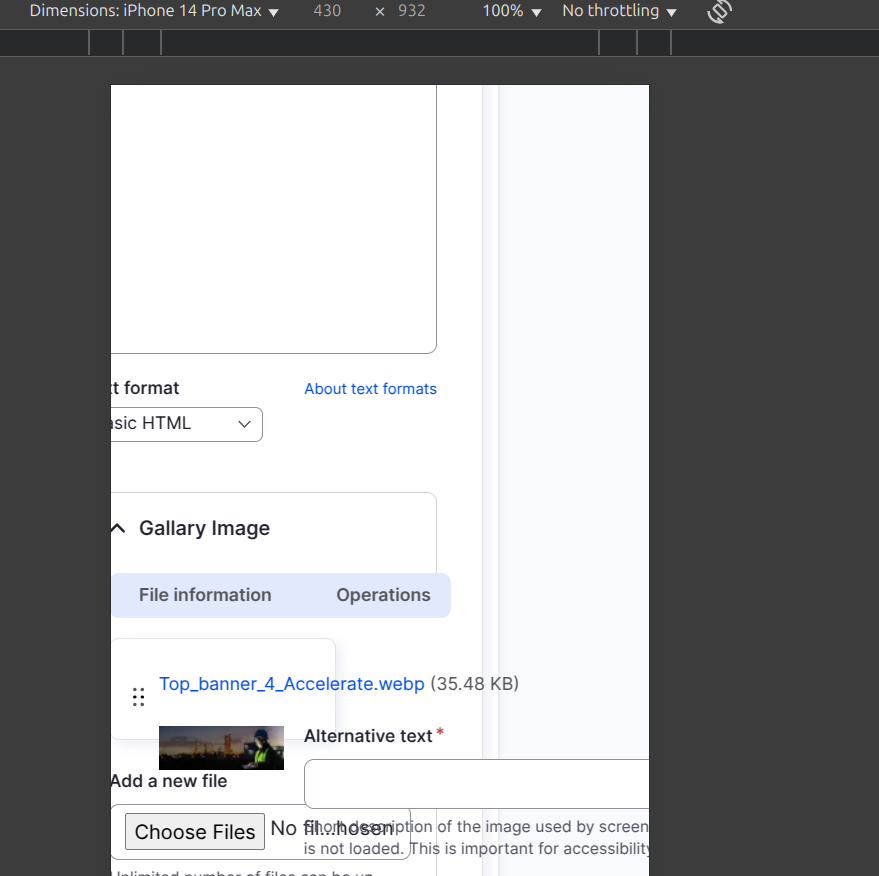
With the latest two releases (rc14 and rc15) thumbnail images from a multivalued image field inside a paragraph do overlap rendering the widgets unusable.
Steps to reproduce
Install the latest (rc15) version of gin and place a multivalued image field inside a paragraph.
Proposed resolution
My suspicion of what's going on: A style rule in claro is setting the height of the td to some calculated value. Gin tries to override it, but claros rule wins because of higher specificity.
Add a second selector to the css rule in gin.css in order to properly override claro.
Remaining tasks
I am not familiar with the build process of gins css files, so the attached patch just works on the css. Someone with more knowledge of the build process should please backport it to the scss code.
User interface changes
none
API changes
none
Data model changes
none


 Show commands
 changes




Comments
Comment #2
piridium commentedComment #3
piridium commentedSorry, I somehow managed to upload an empty file...
Comment #4
piridium commentedComment #7
piridium commented@christosgeorgiadis Thanks for the merge request. However, I think you have not implemented the original patch correctly. The 'table' itself has the class '.table-file-multiple-widget' and its child td should be set to 'height: auto'.
Your solution works, but only because the table in question is a child of another table. I can imagine that there may be situations in which this is not the case.
Comment #8
christosgeorgiadis commentedI don't know much scss so I can't proceed any further to address your requirements. Someone more experienced should make a commit to the MR so that the patch is implemented properly.
Comment #10
ahsannazir commentedComment #11
saschaeggiWaiting for an RTBC here. Thanks!
Comment #12
christosgeorgiadis commentedI've tested the MR and while it does fix what it was trying to, I feel like we should address that the Alternative Text textbox, description and remove button can overflow outside if the browser window gets too small. Or should this be another issue of its own?
Comment #13
christosgeorgiadis commentedComment #14
simhag commentedI´ve tested the
MR !548and it fixes my Problem!Because of a nesting within a paragraph I was not able to click the button for further elements due to the bug.
Applying the patch makes the UI conform to my expectations, thank you very much. I would suggest the RTBC Status.
Comment #15
sandip commentedI think the drag button should be in middle instead of top. I am working on it to fix.
Comment #16
sandip commentedPlease review the changes.
Before:

After:

Comment #17
mudasirweb commentedNoticed a couple of issues:
1. The layout breaks on mobile and iPad resolutions.
2. The "Remove" button is too close to the title and alt fields.
3. It would make more sense to display the image name below the image.
Comment #18
mudasirweb commentedComment #19
mudasirweb commentedFixed mobile and iPad resolutions. Also aligned remove button and image name.
Please review.
Before:


After


Comment #20
mudasirweb commentedComment #21
sandip commentedHI @mudasirweb, Thanks for your work however, I have a couple of doubts that I would like to clarify
1. Here below i attached ss for Single image field. So in case for multiple image field we should also maintain this design and try not to put the image title at the bottom.
2. Could you please compile the SCSS file thoroughly? It seems to be causing a pipeline failure.
Comment #22
mudasirweb commentedFixed pipeline failure.
Comment #23
mudasirweb commentedComment #24
sandip commentedHi @mudasirweb,
I noticed that the image title is still positioned at the bottom. As I mentioned in #21, it should maintain integrity with the single image field. If I am mistaken, could someone kindly verify it?
Comment #25
mudasirweb commentedMoved image title to top in-order to maintain integrity with the single image field.
Comment #26
piridium commentedThank you @mudasirweb and @sandip-poddar for taking care of further adjustments. However, I think it would be primarily important to get the original patch into a release, as the bug blocks the use of multivalued fields. We already have a confirmation for RTBC in #14. @saschaeggi could you please include this in a release?
Further adjustments like the centered drag handles and the title should imho be discussed in a separate issue.
Comment #27
tirupati_singh commentedHi all, I've tried replicating the issue, and it reproduced. I've applied the provided MR as a patch, and it applied cleanly without any errors. After applying the patch, the multivalued image field overlap issue got resolved successfully, along with the mentioned issues in the comment #17. Now, the multivalued image fields occupying the required space and are not blocking the usage of multivalued fields, as mentioned by @piridium.
Thanks to @mudasirweb and @sandip-poddar for resolving further designing issues while using this theme. Initially, the drag handler is center-aligned for the theme for all fields/tables, so it would be better if consistency is maintained for the theme. As changes made for the handler are not affecting the other functionality while using the theme, hence moving the issue to RTBC. I've attached the screenshots of before and after fixes for reference.
Thanks!
Comment #28
piridium commentedStatus set back to ‘needs review’. As already mentioned in #26, the patch in #3 solves the problem. The other adjustments introduced in the MR introduce new problems. Once again, I explicitly ask you to stick to the original problem of overlapping fields!
The application of MR548 leads to large layout errors with nested paragraphs. I have also attached screenshots showing the situation before and after the application of patch #3 and the MR458.
Comment #29
piridium commentedComment #33
piridium commentedI have created a new merge request that addresses the problem much more simply and makes better use of the existing CSS properties. Please review and test.
Also, for passing the tests, someone with knowledge of SCSS should compile the source properly, I guess.
Comment #34
mudasirweb commentedHi all I attempted to replicate the issue, and it still occurred even after applying #3. I then applied the provided PR, and it was applied cleanly without any errors. After applying the PR, the multivalued image field overlap issue was successfully resolved, along with the issues mentioned in comment #17. The multivalued image fields no longer interfere with the use of multivalued fields.
Result #3 Patch
https://www.drupal.org/files/issues/2025-04-15/%233-patch.png
Result after PR 3493765-widget-for-multivalued
https://www.drupal.org/files/issues/2025-04-15/Issue-fork-3493765-widget...
Can someone please take a look.
Comment #35
piridium commented@mudasirweb: Please also test MR608. It contains more than patch #3 and also solves the problem with the drag handle and the overflow.
In MR548, for example, @sandip corrected the drag handle with
transform: translateY(-50%). That can't be right. We have adisplay: flexhere and the correct way would be imhoalign-self: center.Comment #36
mudasirweb commentedHi @piridium, I tested MR608 and I’m still seeing the Remove button overflowing the border, and the image along with the drag handle are misaligned.
It looks like the issue stems from some internal gaps and margins within the image widget itself. I don’t believe
align-self: centerwill resolve this.That said, it no longer interferes with the use of multivalued fields, so I think MR568 is a good solution for now.
Screenshot after applying MR608
https://www.drupal.org/files/issues/2025-04-15/MR608.png
Screenshot after applying #3
https://www.drupal.org/files/issues/2025-04-15/%233-patch.png
Screenshot after Applying MR568
https://www.drupal.org/files/issues/2025-04-15/MR-568.png
Comment #37
szeberli commentedThanks for the patch from gin-3493765 ‘MR !608’ this works perfectly for me!
Thank you very much!
Comment #38
sandip commentedHi @mudasirweb, the overlapping issue is resolved by the
MR 608andalign-self: centeris used here to center the drag button that is totally correct. Now you are coming with the issue of responsive that is okay but the previousMR 548fixes the responsive issue but it brings more issues that @piridium mentions in the MR with a image. I think we can go with the MR 608 it is fine. If we want to fix the responsive issue i observedwidth: 1pxis applied to thetd.file-operations-cell. This causes the input tag inside it overflow. Now this css is coming from claro. If somehow we remove thiswidth: 1pxthen our job is done. See the image i have attached then it will be clear.But in my point of view the main motive of this issue was to resolve the overlapping issue See this image and that gets fixed by the
MR 608.cc: @piridium
Comment #39
sandip commentedThis is the issue that i was talking about see the attached image. But I believe this responsive issue we can deal in a separate ticket.For now let this issue to handle only the overflow issue.
Comment #40
piridium commentedThanks @sandip, I totally share your view that we should open a separate issue for the problematic Claro styles.
Do I understand you correctly that you also agree we should set the status to RTBC?
Comment #41
szeberli commentedYes, I think we can put it on RTBC.
Comment #43
sandip commentedYes @piridium, it is RTBC but we need to compile the SCSS properly.
Use
npm installand thennpm run build. If someone want fix it they can follow this step. Otherwise I am not available right now but will do it tomorrow.Comment #44
sandip commentedFixed the pipeline now the MR is good to go.
Comment #45
piridium commentedThank you for your help! However, I have just noticed that I made a small mistake with the selector in the scss source. This has now been corrected and the MR is REALLY good to go. :-)
Comment #46
mudasirweb commentedHi @sandip, I understand your point — we're addressing one issue here and creating a separate ticket for the responsive issue. However, the goal isn’t just to get the MR merged, but to find the right solution.
If we look at MR568, it actually resolves both issues, and I genuinely wonder why we can't consider merging it. I've attached a screenshot after applying MR568 for reference:
https://www.drupal.org/files/issues/2025-04-15/MR-568.png
I believe the community should take a moment to review both MRs and make a decision that best addresses the problem comprehensively.
Comment #47
mudasirweb commentedComment #48
piridium commented@mudasirweb I’m assuming the reference to MR548 was intended, as that seems to fit the context. When looking at MR548, it appears that the ‘Remove’ button would be better placed in the ‘Operations’ column to maintain consistency. However, we should probably discuss that in a separate issue. Also, I’m not entirely convinced by the use of
translateY(-50%);I still believe thatalign-self: centerwould be a cleaner and more appropriate approach.Comment #49
sandip commentedAlso this line is not making any required changes in MR548. It is not needed.
Comment #50
sandip commentedHi @piridium, @mudasirweb
Meanwhile the best solution for this issue has landed on this issue https://www.drupal.org/project/gin/issues/3522015. Also the remove button is properly aligned with the operation button.
We do not need to apply this above for fixing the overflow issue. Please see this issue and share your perspective.
Here is the image after the fix: https://www.drupal.org/files/issues/2025-05-02/Screenshot%20from%202025-05-02%2011-26-20.png
Comment #51
piridium commented@sandip: Thanks for finding this related issue! That actually solves the problem on a higher level and leads to a better outcome.
But the drag handles aren’t centered there either. :-) I tried to add it, but was not successful. Even if the alignment is not solved right away, that’s totally fine for now — this can easily be addressed separately.
I’m closing this issue as a duplicate. If anyone disagrees, feel free to reopen.
Comment #52
dieterholvoet commentedComment #53
nazir.sharifi commented#3 worked for me.
Drupal Version: 10.4.5
PHP Version: 8.2.28
Comment #54
alxgl commentedPatch #3 does not apply anymore on Drupal 11.3.2 / Gin 5.0.12 but the bug is still there.
Anyone else is reproducing ?
Comment #55
yonailo commentedYes I've got still the same issue, attached an updated patch based on #3
Comment #56
alxgl commentedThanks for the quick patch ! #55 works perfectly fine on Drupal 11.3.2 / Gin 5.0.12