Problem/Motivation
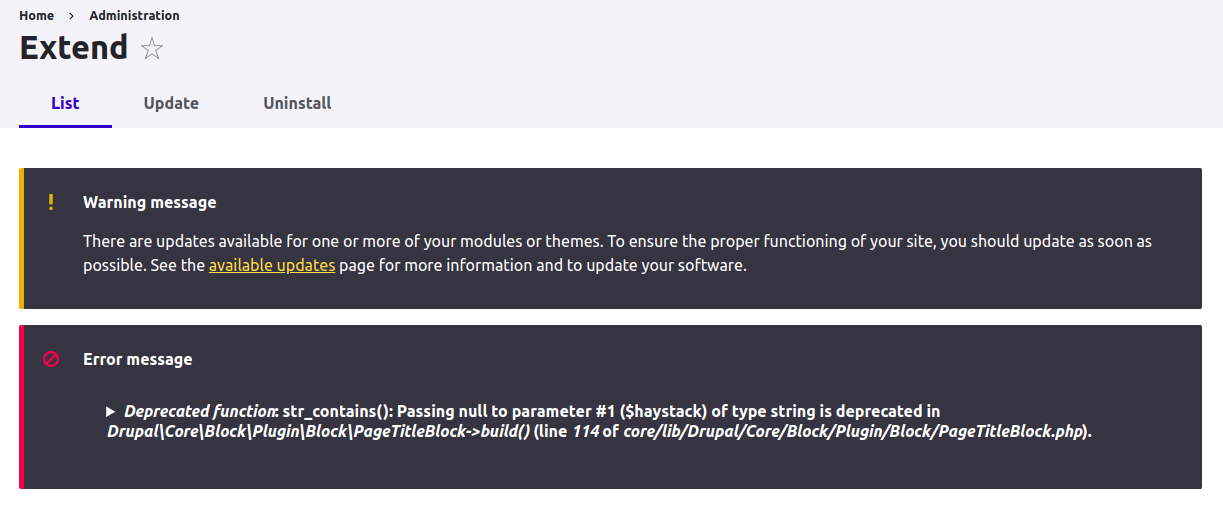
- I see this warning when installing WxT 5.2.0 (PHP 8.2) and going to /admin/modules:
Deprecated function: str_contains(): Passing null to parameter #1 ($haystack) of type string is deprecated in Drupal\Core\Block\Plugin\Block\PageTitleBlock->build() (line 114 of /var/www/html/html/core/lib/Drupal/Core/Block/Plugin/Block/PageTitleBlock.php)
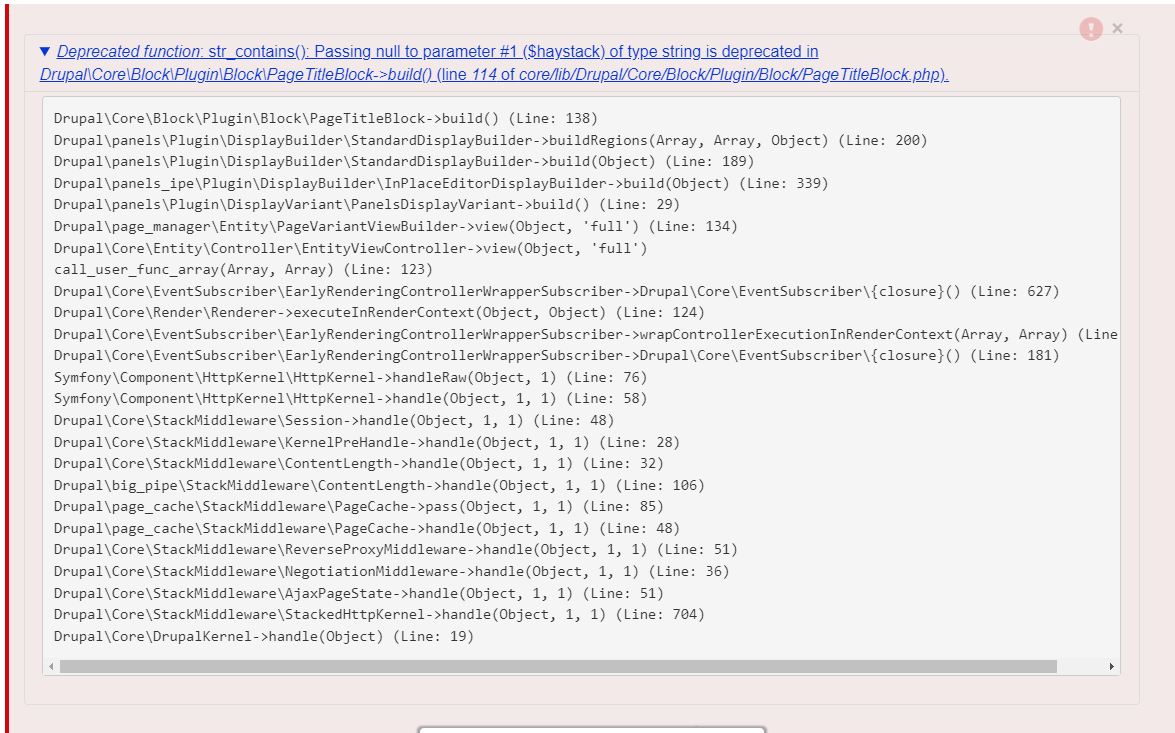
#0 /var/www/html/html/core/includes/bootstrap.inc(164): _drupal_error_handler_real(8192, 'str_contains():...', '/var/www/html/h...', 114)
#1 [internal function]: _drupal_error_handler(8192, 'str_contains():...', '/var/www/html/h...', 114)
#2 /var/www/html/html/core/lib/Drupal/Core/Block/Plugin/Block/PageTitleBlock.php(114): str_contains(NULL, 'MoveBlockContro...')
#3 /var/www/html/html/core/modules/block/src/BlockViewBuilder.php(171): Drupal\Core\Block\Plugin\Block\PageTitleBlock->build()
#4 [internal function]: Drupal\block\BlockViewBuilder::preRender(Array)
#5 /var/www/html/html/core/lib/Drupal/Core/Security/DoTrustedCallbackTrait.php(111): call_user_func_array('Drupal\\block\\Bl...', Array)
#6 /var/www/html/html/core/lib/Drupal/Core/Render/Renderer.php(858): Drupal\Core\Render\Renderer->doTrustedCallback('Drupal\\block\\Bl...', Array, 'Render #pre_ren...', 'exception', 'Drupal\\Core\\Ren...')
#7 /var/www/html/html/core/lib/Drupal/Core/Render/Renderer.php(421): Drupal\Core\Render\Renderer->doCallback('#pre_render', 'Drupal\\block\\Bl...', Array)
#8 /var/www/html/html/core/lib/Drupal/Core/Render/Renderer.php(493): Drupal\Core\Render\Renderer->doRender(Array)
#9 /var/www/html/html/core/lib/Drupal/Core/Render/Renderer.php(240): Drupal\Core\Render\Renderer->doRender(Array, false)
#10 /var/www/html/html/core/lib/Drupal/Core/Template/TwigExtension.php(475): Drupal\Core\Render\Renderer->render(Array)
#11
Steps to reproduce
- Install WxT 5.2.0 and go to /admin/modules, you should see the warning there.
Proposed resolution
It seems like this patch needs some extra casting to the 1st parameter when calling str_contains(), attached the same patch with the extra casting.
Remaining tasks
User interface changes
API changes
Data model changes



Comments
Comment #2
danrodComment #3
danrodComment #4
danrodComment #5
joseph.olstadI also fixed this, however, in the upstream issue.
See my interdiff upstream
#2938129-42: PageTitle block is non-functional when not handled directly by \Drupal\block\Plugin\DisplayVariant\BlockPageVariant
INTERDIFF patch 41 to patch 42
AND
new patch upstream
Comment #6
liam morlandWe were having this problem as well. Switching from patch 41 to 42 fixed it for us.
Comment #7
joseph.olstadThanks @Liam Morland for rolling the wxt update to use the new patch 42
Comment #9
sylus commentedThanks for this everyone!
Committed and attributed the patch to core!
Comment #10
kevin.bruner commentedWhat's the most appropriate way to include this patch in my drupal sites?
I haven't done a lot of patch inclusions in my composer.json.
I'm using the wxt-site example with this line: "drupalwxt/wxt": "5.2.x"
Comment #11
liam morlandSee Patching projects using Composer.
Comment #12
kevin.bruner commentedI don't think my issue so much is that I don't know how to actually insert it into my composer.json, it's that I'm pulling this upstream by using the site-wxt example rather than using a custom composer.json of the wxt composer.json. It's a conceptual issue for including this patch in my implementation that I struggle with rather than the concept of patching entirely.
Comment #13
liam morlandYou can add the patch to your top-level Composer file.
Comment #14
kevin.bruner commentedI've done so, I believe. And my site builds correctly, however, the issue persists. This is why I'm thinking I must have done something wrong
"patches": {
"drupalwxt/wxt" :{
"fix for title issue":
"https://www.drupal.org/files/issues/2024-01-22/wxt-update_patch_2938129-..."
}
},
This is from a fresh build with a re-import and update of the database on a dev server.
Comment #15
joseph.olstadKevin, you'll want to modify your directive, it's a core patch
Example:
In this case it's pretty simple, it's a patch for core, (patch ignores gets more complicated as you have to do wrapping and pay a bit more attention but in this case you just need to add a patch).
You got mixed up because Liam is making a patch to fix wxt build, not for core, it's a bit tricky to explain why it doesn't help you.
Try the suggested patch mentioned , patch 42 of 2938129 for core.
***EDIT***
The easy solution here is to not use a patch and switch to the drupalwxt/wxt 5.2.x-dev
However if you are adventurous you can add a patches ignore for patch 41 and then add patch 42 , this will allow you to stay on a tagged release and get the fix. Patches ignores are a bit trickier , they'll be embedded in drupalwxt/wxt directives with the project name inside, in this case drupal/core.
***END EDIT***
Comment #16
kevin.bruner commentedUpdate: I have gone with the dev branch. Seemed like a simpler solution with lower maintenance since I'd surely forget to remove these patches when next I update 😁
****
Thank you! This makes sense to me conceptually and I thank you for taking the time to explain it. I hope this thread can illuminate for anyone else like me.
Comment #17
joseph.olstad@kevin.bruner
Cool, thanks for the followup! Anything is possible with composer if you spend enough time working with it. With that said, you've got a working solution and that is most important!
Comment #18
joseph.olstadya since you're on the drupalwxt/wxt 5.x-2.x release already you should be able to just run an update to update your build.
This gets everything:
composer up -WOr if you only want to update drupalwxt/wxt components and maybe say, core, you could try this:
composer up drupalwxt/wxt drupal/core symfony/* twig/* drupal/wxt_library drupal/wxt_bootstrapif there's some dependency warning, just add it to the parameter list.
Sometimes you may need to unlock something in your composer.json if it's in conflict. Composer does a good job of illustrating the conflicts. It takes a bit of practice to see how to read and learn how to react.
This command can help explain issues:
composer why namespace/projectname