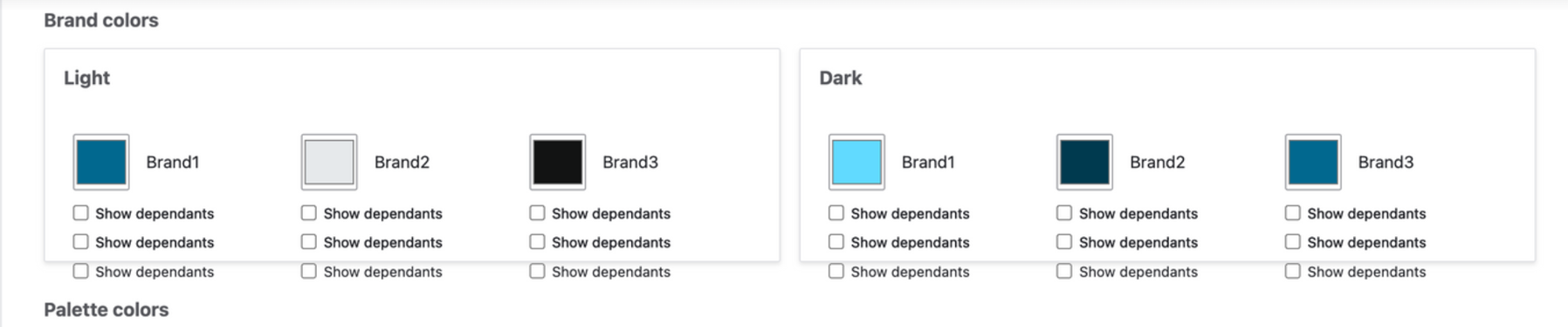
In GovCMS SaaS, after creating a sub-theme, it sometimes shows duplicated checkboxes for dependent colours.

a

Steps to reproduce

1. Install GovCMS SaaS
2. Install CivicTheme by copying the latest dev release into `themes/custom/civictheme`
3. Create a sub-theme in the sibling directory to `themes/custom/civictheme`
4. Login to the site, navigate to the Sub-theme settings page and observe the duplicated checkboxes

Comments

alex.skrypnyk created an issue. See original summary.

alex.skrypnyk’s picture

Issue summary: View changes
fionamorrison23’s picture

Assigned: Unassigned » joshua1234511
Issue tags: +civictheme-release-1.7
fionamorrison23’s picture

Issue tags: -civictheme-release-1.7

alex.skrypnyk’s picture

Status: Active » Fixed

Status: Fixed » Closed (fixed)

Automatically closed - issue fixed for 2 weeks with no activity.

alex.skrypnyk’s picture

Issue tags: +civictheme-release-1.7

Implemented, tested and will be released in 1.7

alex.skrypnyk’s picture