Problem/Motivation
It would be really helpful if the module provided a way to import terms using a CSV File. Using a CSV would help because we can have the terms better structured than using simple text. Besides that, it's hard to deal with text when we are importing a massive number of terms.
Proposed resolution
My propose it's that the user can configure the mode to import terms: using text import (the current mode) or using a CSV File. When using the CSV mode we'll be able to upload a CSV File and import the terms. Something similar that we had in the Hierarchical Taxonomy Import module (D7). After uploading a CSV like this:
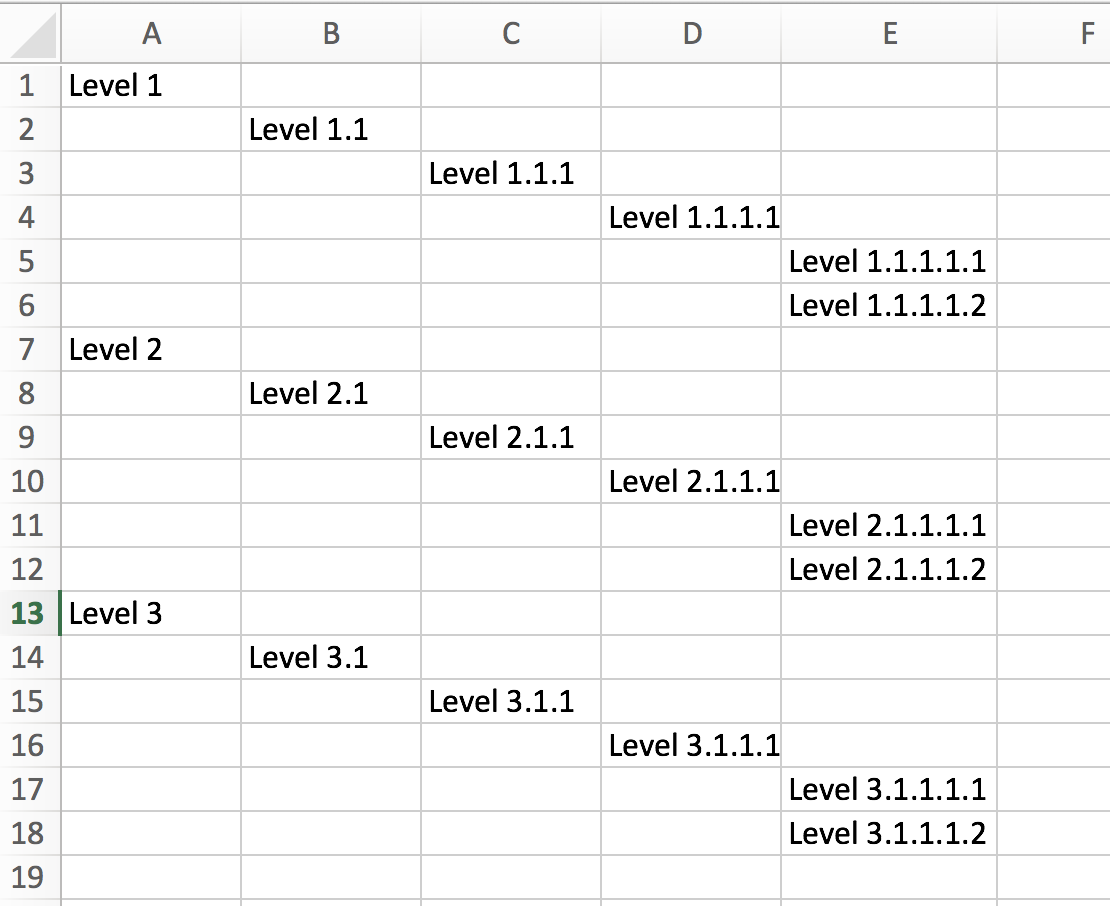
We would have the following terms imported:

User interface changes
When user change the import mode to CSV a new form will be displayed. Instead of a form with a textarea input, we'll have a form with a file input, this way the user will upload its CSV file and the terms will be imported.


 Show commands
 changes




Comments
Comment #3
rrmontuanComment #4
rrmontuanComment #5
rrmontuanHey, folks!
I've added the CSV upload feature.
Now, we're able to select the input mode (text/csv):
Using the CSV mode, when you click to add new terms, the modal form will have a field to upload a CSV file:
Please, review it.
Comment #6
rrmontuanComment #7
sokru commentedNeeds at least reroll.