

 The 2026 Drupal Business Survey is open. Your response will help shape the future of the Drupal business ecosystem.
Problem/Motivation
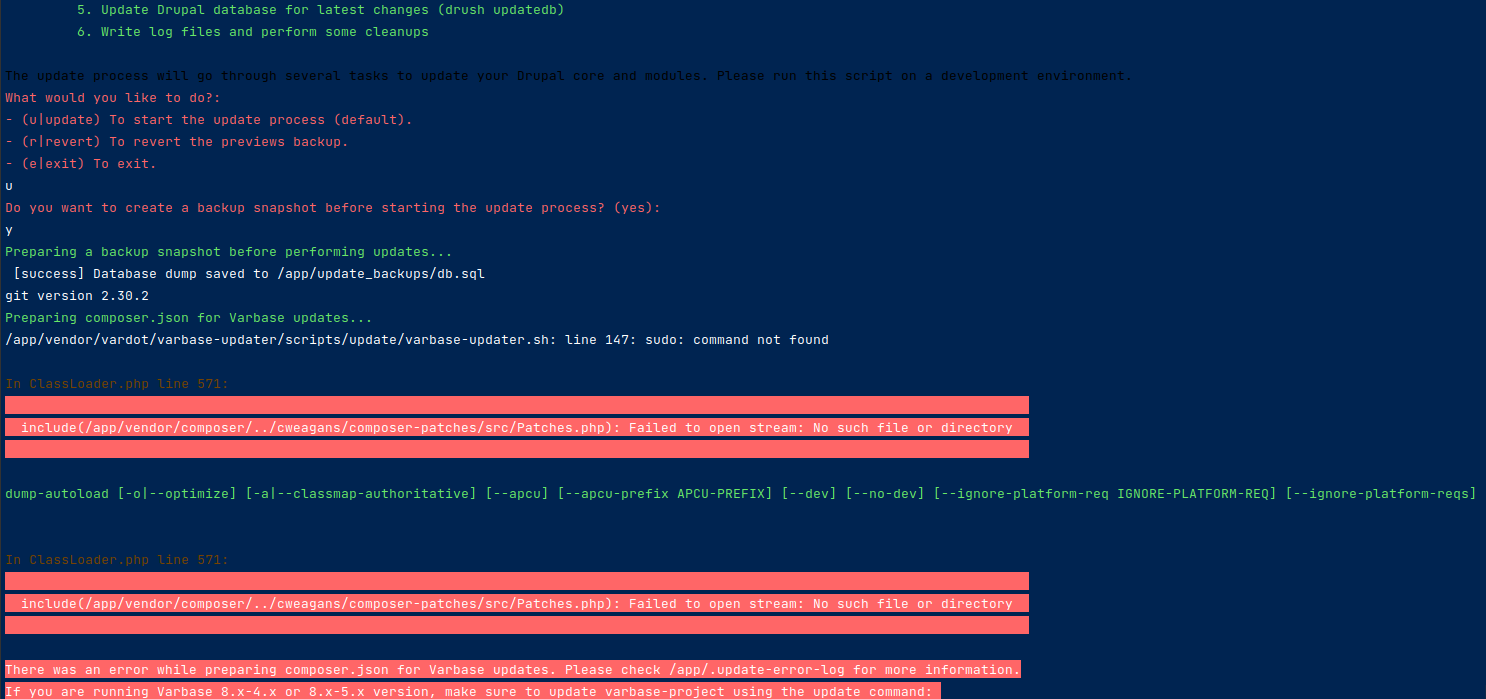
hi i am getting bellow error (more details in attached file) when i try to use the automated update script
Preparing composer.json for Varbase updates...
/app/vendor/vardot/varbase-updater/scripts/update/varbase-updater.sh: line 147: sudo: command not found

In ClassLoader.php line 571:

  include(/app/vendor/composer/../cweagans/composer-patches/src/Patches.php): Failed to open stream: No such file or directory
Steps to reproduce
./bin/update-varbase.sh from project directory
Thanks
| Comment | File | Size | Author |
|---|---|---|---|
| #2 | composer_update error.png | 73.11 KB | delacosta456 |

Comments
Comment #2
delacosta456 commentedComment #3
rajab natshahAre you allowed to use
sudoon the system?Updating a Varbase Site
Updating Varbase should always be done in a local or development environment. Once the update process is properly done and tested you can push your code and build to your production site.
DO NOT update Varbase directly when in production.
The Varbase Updater tools requires write permissions to the project directory. Please make sure that the write permissions are active in order for the updater to work.
Comment #4
delacosta456 commentedhi
unles i am wrong..sudo is not available in my dev environment build with lando.
-- running the script (./bin/update-varbase.sh) directly from my terminal was complaining about php with the messge
/usr/bin/env: php: No such file or directoryand stopping the process. So i decided tolando sshinside the container to run the script.(no more **php** msg but now **sudo** ) issue.Thanks
***EDIT *** And out of that it looks like composer can not access a file.. this is the error (as shown in attached image)
Comment #5
rajab natshahFrom which version of Varbase you are trying to update?
Using the basic update steps could help if the gap is not too far between versions
Try not to use
bash ./bin/update-varbase.shIf the site is already on the latest9.0.13version.Comment #6
delacosta456 commentedhi
yes i am on 9.0.13.
I was doing this because i have schedules that remind me to always keep update all my Drupal instance .
I will try and if no issue will keep in mind for next time to be doing the direct update method (if the gap is not too far between versions)
Thanks
Comment #7
delacosta456 commentedhi
Did the direct update .. almost everything goes as expect.
Only the default_content module throw two errors:
Thanks
Comment #8
rajab natshahComment #9
rajab natshah