

Closed (fixed)
Project:
Paragraph blocks
Version:
4.x-dev
Component:
Code
Priority:
Major
Category:
Bug report
Assigned:
Unassigned
Reporter:
Created:
7 Mar 2023 at 19:15 UTC
Updated:
26 Dec 2025 at 13:31 UTC
Jump to comment: Most recent, Most recent file
 Show commands
 changes
Comments
Comment #2
l.b. commentedComment #3
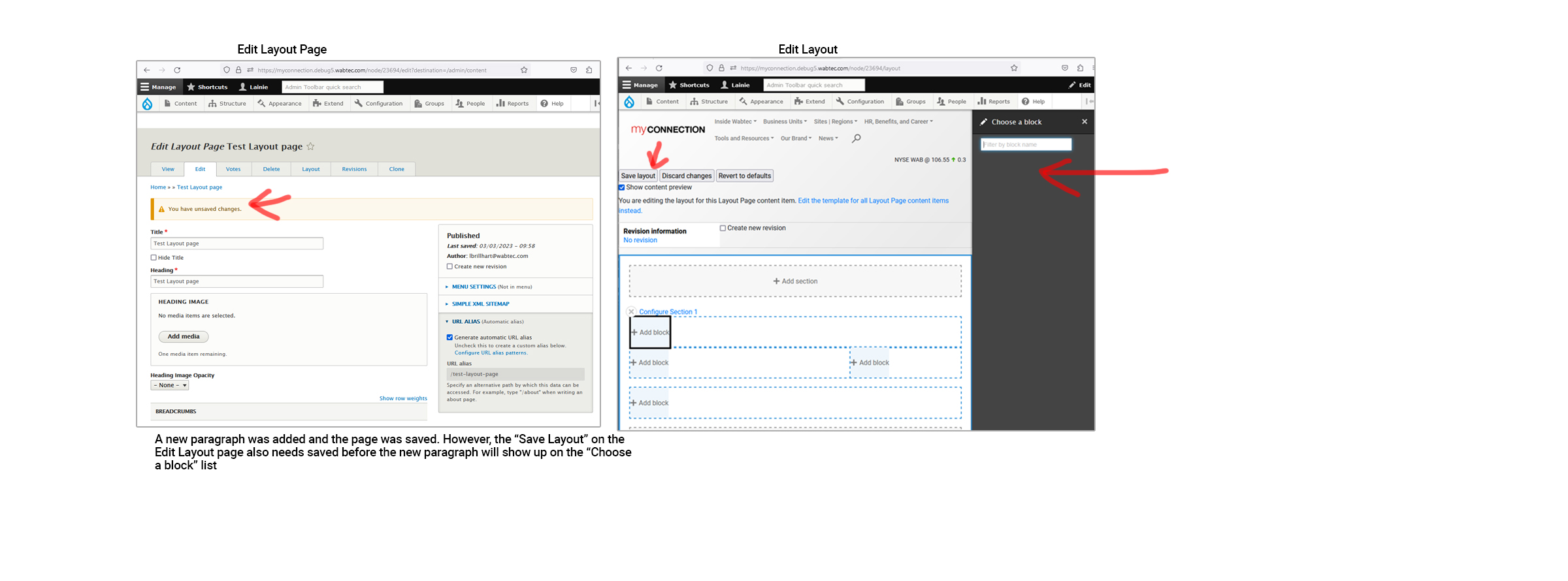
dalemoore commentedSeeing this too.If you add a paragraph, then view the node, the paragraph will be there. However, if you go into the Layout Builder, it won't be until you save and then reload Layout Builder.However, if instead you add a paragraph, go into Layout Builder, and revert to default WITHOUT saving, it will actually remove the paragraph you added to the node! So it actually causes data loss if you don't go to the Layout Builder and save immediately after adding a paragraph and decide later to revert to defaults.Nevermind. The Paragraph deletion is happening WITHOUT Paragraphs Blocks at all on my test site. So must be a problem with Paragraphs or my site. I got this site mixed up with another site I had Paragraphs Blocks installed on.
Comment #4
smustgrave commentedUpgrading this to a major as I'm experiencing this too.
Added 2 paragraph bundles
Went into layout builder 0 appear
Add to click save layout for any of them to show.
Comment #5
smustgrave commentedWonder if there could be conflicts with the internal_dynamic_cache module of core?
Comment #6
basvredelingYes, this is quite annoying. Thanks for the bug report. I'll have a look.
Comment #10
basvredeling@smustgrave @L.B. @dalemoore could you please test / review MR 6 in comment #8.
Comment #11
smustgrave commentedSure!
Has anyone figured out those the exact scenario this gets triggered? For me it's random.
Comment #12
basvredeling@smustgrave as far as I can tell you should create a node with content moderation enabled. If you do you can pretty easily recreate the problem by adding a paragraph to that node that when that node has either: a) no published revisions at all or b) the latest published revision is not the latest revision.
Comment #13
smustgrave commentedSo the way I triggered it
Installed internal_dynamic_cache
Created a page with a pargraph block - in draft
Saw the component in layout builder.
Edited the page adding another component but saving as published
In layout builder the new component is missing even with the patch.
Comment #14
basvredelingI've merged MR 6 because it solves this issue on my end. And I have trouble reproducing this issue as described in #13. As far as I can tell, the alter hooks triggered in \Drupal\Core\Plugin\FilteredPluginManagerTrait::getFilteredDefinitions() are running correctly and this list is not cached in the LayoutPluginManager.
@smustgrave Can you check if the route response is cached on your end? Try to bypass it by overriding the
layout_builder.choose_blockroute and setting theno_cache: TRUEoption.Comment #15
basvredelingRelease 3.1.4 of the paragraph_blocks module contains the fixes in MR6. I'll keep this issue open for the time being for you all to report your findings. Hopefully this issue is fixed despite not dealing with the cache issues.
Comment #16
smustgrave commentedTested again but still seeing the bug
Create a page with a block, saving as draft
Verified I see block
Edited page adding a new block, saving as draft
Verified I see both blocks
Edited page adding a new block, saving as published
Actually only see the first block now, not block 2+3
Comment #17
basvredeling@smustgrave I believe the behaviour only occurs if the workflow has been configured incorrectly. Can you please check if the workflow is configured to apply to the content type in question?
If that fixes the problem on the latest dev release, we probably need to add this to the readme.
Comment #18
smustgrave commentedNo issue with the workflow
Comment #21
basvredeling@smustgrave I do believe this issue has been fixed in the latest commits in #19 / #20. Can you confirm?
Comment #22
basvredelingMoving these fixes to a release. I've tested use case #16 and was able to reproduce and fix it. Please re-open if issue resurfaces in a different use case.
Thanks all for your contributions.
Comment #23
basvredelingComment #24
peterhebert commentedUsing release 3.1.8 - issue still exists, I inspected the code, and confirm all of the code changes from this thread are present. I do not have Workflows module installed on the site. I cannot see new paragraphs as blocks in Layout Builder, until I save the layout as well. In addition, paragraphs that have been removed on the Edit form are still appearing in the list of available Paragraph blocks.
Comment #25
basvredeling@peterhebert are you using some aggressive caching mechanism?
Comment #26
basvredelingRe-opened becaused this also resurfaced in 4.x
Comment #27
basvredelingnot sure how to reproduce
Comment #28
timaswan commentedI'm seeing this same issue. It appears that any paragraphs added after I initially use Layout to place blocks on a node aren't registered with the Paragraph Blocks module and aren't available to be placed from there on out.
Comment #29
basvredelingComment #30
siramsay commentedI am getting the same.
Paragraph Block 4.1.4
I'll test some more.
Comment #31
basvredelingComment #33
basvredelingHi all, I know this issue has been open for a long time. It's been quite tricky to reproduce reliably. I think I have a working solution in MR 29. Could you spare some time to test it?
There are 3 key points here to know about when testing:
The MR fixes points 2 and 3 and should work with both content moderation enabled and disabled.
Comment #34
basvredeling@siramsay could you verify this is no longer an issue with latest 4.x-dev?
Comment #36
siramsay commented@basvredeling
I installed drupal/paragraph_blocks dev-4.x 3f86fe8 Drupal Paragraph Blocks module
I tested before on the site, and I could still reproduce the issue after all this time. As you say, it probably was because of an unsaved Layout.
Anyhow, I tested again with the dev version, and even if I haven't saved a layout and go to the node edit page, add a new paragraphs instance and then go to the layout page, either using save button or the save and edit layout button (module), the new paragraph blocks are available in the add block tray.
Comment #37
basvredelingThanks for testing @siramsay.
This has been pushed to stable as part of the 4.2.0 release.