Problem/Motivation

I installed the module, setup settings in settings.local.php, disable toolbar integration.

Expectation:
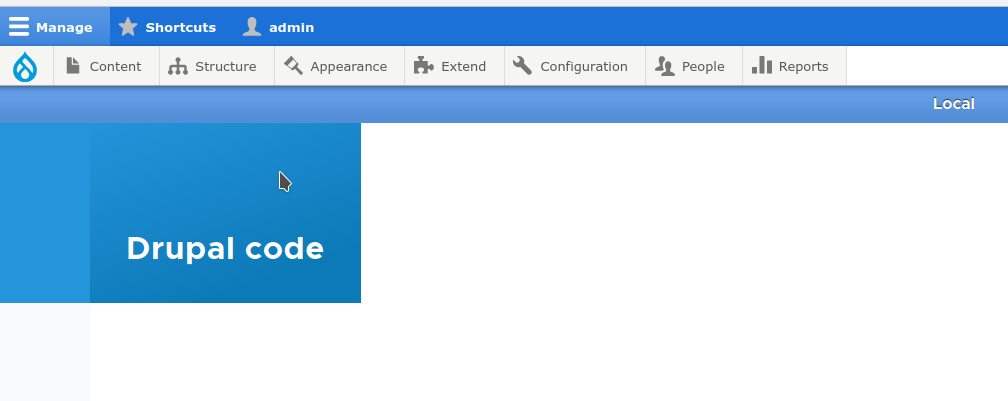
See only colored bar

Reality:
Toolbar is also colored

screenshot

Steps to reproduce

Install module as usual

Add settings to settings.local.php

$config['environment_indicator.indicator']['name'] = 'Local';
$config['environment_indicator.indicator']['fg_color'] = '#ffffff';
$config['environment_indicator.indicator']['bg_color'] = '#1C71D8';

Disable toolbar integration

screenshot

Clear drupal cache

Command icon Show commands

Start within a Git clone of the project using the version control instructions.

Or, if you do not have SSH keys set up on git.drupalcode.org:

Comments

ivnish created an issue. See original summary.

rsnyd’s picture

rsnyd’s picture

@e0ipso, @mrfelton, @isholgueras, Changes made to origin/3341110-toolbar-is-colored branch that fix the disabling of the toolbar integration.

ivnish’s picture

I created MR from @rsnyd branch

ivnish’s picture

Version: 4.0.14 » 4.x-dev
Category: Support request » Bug report
Status: Active » Needs work

I manually tested this MR. With this code toolbar is never colored.

ivnish changed the visibility of the branch 3341110-toolbar-is-colored to hidden.

ivnish’s picture

Status: Needs work » Needs review
krakenbite’s picture

Status: Needs review » Reviewed & tested by the community

Looks good for me. Please commit

trackleft2 made their first commit to this issue’s fork.

  • trackleft2 committed 91751365 on 4.x authored by ivnish
    Issue #3341110 by ivnish, trackleft2, rsnyd, krakenbite: Toolbar is...
trackleft2’s picture

Status: Reviewed & tested by the community » Fixed
trackleft2’s picture

Granting credit

Status: Fixed » Closed (fixed)

Automatically closed - issue fixed for 2 weeks with no activity.