

Closed (fixed)
Project:
Module Filter
Version:
4.x-dev
Component:
Code
Priority:
Normal
Category:
Feature request
Assigned:
Unassigned
Reporter:
Created:
7 Jan 2023 at 11:10 UTC
Updated:
6 Feb 2023 at 19:49 UTC
Jump to comment: Most recent, Most recent file
 Show commands
 changes


Comments
Comment #2
jonathan1055 commentedIt is easy to filter on the permission text in addition to the module name, in js/module_filter.permissions.js, by changing
However, this results in all the permissions being shown without the corresponding module name:
I think what we really need is to also show the module name for any match in the permission name. What's the best way to do that?
Comment #3
jonathan1055 commentedPushed the one-line change to get the discussion started. I can visualise what we need to do: For every matching description element we need to traverse up the hierarchy and display the parent module name element, in addition to the actual matching description element. Hopefully someone with good javascript/jquery skills will have some ideas on how to do this.
Comment #6
smustgrave commentedTested this out and it does seem to filter by description but got some weird behavior
Filter by administer and the permissions seem to combine to 1 group.
Comment #7
jonathan1055 commented"... but got some weird behavior. Filter by administer and the permissions seem to combine to 1 group"
That is exactly what I said in #2 and commented on in #3. It's not weird, it is just that all the different module names are not shown because they do not have the word 'administer' in the module name. We need to do some clever jquery/javascript to show the parent module name element for each description element which is matched on. I'm sure this can be done, but I have not studied the code to work out how to do it.
Comment #8
jonathan1055 commentedAdding the
div.permissionas above breaks the current functionality. Before, without this change, if a module is matched we get all of the permissions for that module. Now when adding the filter on permission text, the permissions of matching module names become hidden.I'm going to add a javascript test to protect the current behavior, before we can make progress on the new functionality.
[editted]
Comment #9
jonathan1055 commentedNow that I've added a test for the existing permissions filter, this MR should show a test failure.
Comment #10
jonathan1055 commentedGood. As expected the new test (which passes on the 4.x branch) fails here, showing that the initial commit as shown in #2 causes the existing functionality to fail.
The problem is that the javascript was checking for empty text to determine if the item was a module or a permission using
item.isModule = item.text != ''This worked fine before, because all of the permission elements returned '' for text. But now that we are selecting the permission text elements for matching, they have a text value. Hence everything was being treated as a module name. But we can simply use the element class to determine if it is a module or permission
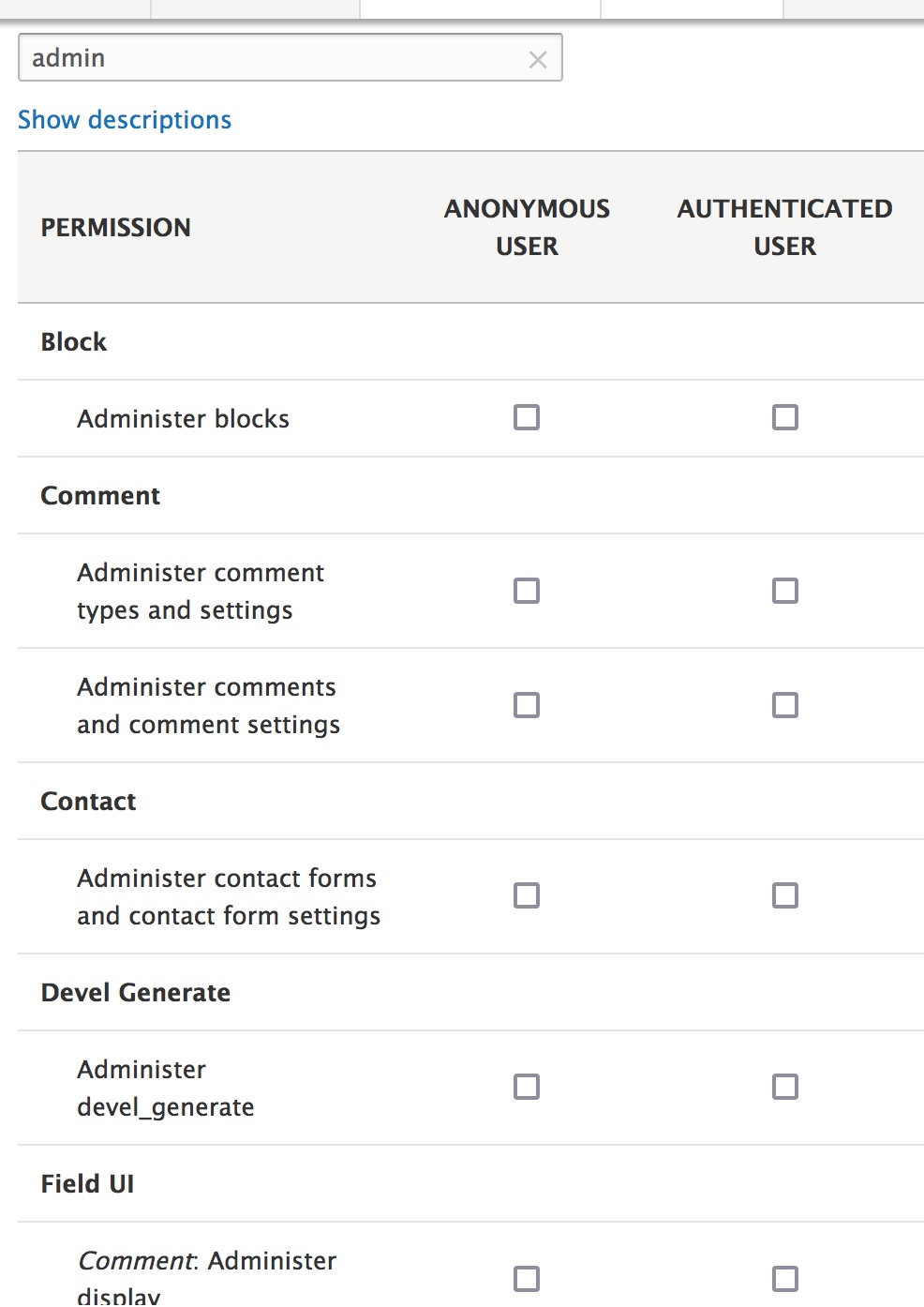
item.isModule = item.element.has('.module').length;This also solves the problem of the module name not showing when a permission is matched. We already have code to display the module name when the item is a permission (maybe left over from when matching on permission was attempted before? in 7.x?). So now that 'isModule' is set correctly we get the module names being shown when a permission they contain matches the input, even if the module name does not match the input. Attached is a new screengrab when filtering on 'admin'. Compare this to the screen in #2 and #6
Comment #11
jonathan1055 commentedI have also expanded the existing test to cover matching on the text of the permission.
And the placeholder now says 'Filter by module or permission'
Comment #12
smustgrave commentedTested by filtering for
administer blocks and it got treated as searching for 2 words separately (which is true search to me)
Then I searched "administer block" and got just the permission for blocks
Great work!
Comment #14
jonathan1055 commentedAh, I never thought about testing for two words. Most of the work was done already, I only had to fix the
isModuleproblem.