

 Come together with the global Drupal community in Rotterdam, 28 Sept – 1 Oct 2026. Sessions, contribution, connection, and Early Bird savings until 8 June.
I'm not entirely sure if this is an issue with OG or with Views, so I apologize if this is posted in the wrong place. I've just added OG to a site (originally 6.x-1.0-rc7, now on rc8, but same issue with both) and enabled the Group search block. If I do a search, though, I don't get any results, but am just redirected to the home page (mysite.com/?keys=searchterm). However, if I go to the editing page for the view (og_search) and do a preview, it shows the correct search results. So the filtering seems to be ok, but the results are not being displayed. Is there something I need to configure to get this to work or is this some type of bug? Any help/advice would be appreciated. Thanks!
| Comment | File | Size | Author |
|---|---|---|---|
| #58 | og_views-fix-search-view-333072-2.patch | 2.11 KB | mstef |
| #39 | screenshot.jpg | 59.74 KB | mhawker |
| #36 | og.og_search.view_.txt | 3.9 KB | mstef |
| #25 | og_views-fix-search-view.patch | 2.02 KB | mstef |
| #24 | og.og_search.view_.patch | 2.01 KB | mstef |

Comments
Comment #1
moshe weitzman commentedclear cache on admin/settings/performance? this was fixed in rc8.
Comment #2
ajross commentedNope, I'm afraid that doesn't fix it. I also tried installing the latest version (rc9) of OG on a different test site (that didn't have OG installed previously), and I still have the same problem. Any thoughts on what else I should try or if there might be other modules or settings that are causing a problem/conflict?
Comment #3
kulfi commentedI am also experiencing this with v 5.x-7.3.
Comment #4
ariflukito commentedhi I managed to get it to work by adding page display to the og_search view settings.
Comment #5
ajross commentedthat fixed it (#4) - Thanks!!!
Comment #6
Peter Swietoslawski commentedI can confirm this is still an issue.
Creating page under og_search view fixes this issue as mentioned by ariflukito at #4. However this results in having duplicated search form on search result page view and in search block. That's a bit awkward especially if you have Group search block embedded above result page as I have on my site. You basically end up with two search forms one under the other.
The workaround for this is to use path for search result display that is not group related (as Group search block is context sensitive and by default displays only on group related pages) but then you loose context and breadcrumbs won't make sense. Other option is to restrict Group search block to display only on specific group related path like group/* while Search result page path should point to node/groupID/search.
All in all I don't think this is the intended behavior of Group search block and page.
Clean installation:
Drupal 6.10
Views 6.x-2.3
OG 6.x-1.1
Comment #7
Peter Swietoslawski commentedOk I've did some testing and Group Search results behaves awkward (I'm using installation described in previous post).
I've created one Group and added following post to this group:
Title:
First post to group developer
Body:
Somewhere along the way, we broke Group Search. If you use type in a key word and hit the group search box (no longer enabled in production), then it takes you to the home page instead of giving you search results.
Next I've reindexed the site, run cron and use site-wide search with the following search strings:
And I got correctly my only post as a search result.
If I use the same search strings for Group search numbers: 1, 3, 5, 6 don't return anything???
Looks like this might be connected to #362228: Search Terms Filter Misses Results. However moving views to dev version (2009-Feb-26) as suggested there didn't help at all. On contrary it produced some SQL errors.
Anyone can shed more light on this?
Comment #8
bjhardin commentedSubscribing
Comment #9
bjhardin commentedWe had the same problem and hired a freelance programmer, who wrote a module to fix it. I don't know how to create a patch yet so I'm attaching the module as written. Hopefully, some of you better coders out there can analyze this and let me know how it works, and if we got our money's worth! It definitely seems to fix the problem.
We're currently running Drupal 6.10 and Organic Groups 6.x-1.1.
Comment #10
toddchris commentedDoes anyone have an update on this? Also, I'm not sure what to do with the module mentioned above. When I extract it, all I get is one file of code. It looks like it didn't archive correctly. Could you repost it?
Thanks,
tc
Comment #11
saccard commentedI've extracted the archive with 7zip (under Windows). The extracted file has the name search_in_group.tar__0. Rename it to search_in_group.tar and you can unpack the module folder.
Comment #12
ariflukito commentedChanging back the title
Comment #13
saccard commentedups, sorry, my fault.
Comment #14
jzornig commentedsubscribe. I have the same problem.
Comment #15
deadman commentedI had the same problem, but got round it by adding a "page" display (and appropriate path URL) to the view (as detailed above) and then changing the "exposed form in block" setting to "yes".
Changing the exposed form setting, detaches the search form into it's own block which means it won't show up twice if you're already using the group search block that comes with OG.
Comment #16
marcp commentedMarked #434934: Og search takes me back to home page as a duplicate of this issue.
Comment #17
marcp commentedThis is still an issue with the latest 6.x-2.1 code. Steps to reproduce:
1. Install Drupal 6.16
2. Install Views, CCK, OG
3. Enable core search module, all Views modules, all CCK modules (except Content Permissions), OG, OG Actions, OG Views Integration
4. Create a Group content type
5. Create a Post content type (standard OG group post)
6. Create a group node
7. Create a few post nodes in your group
8. Run cron
9. Using the site-wide search box that appears by default in Garland, ensure that Search is working
10. At admin/build/themes/settings/garland, turn off the search box
11. At admin/build/block enable the Group Search block
12. While viewing your group node, search for something in the Group Search block
13. You'll get redirected to your front page
Comment #18
marcp commentedPretty sure this is a bug at this point, not a support request.
Comment #19
endiku commentedReporting the same problem as #17. Group search results in front page redirect.
Comment #20
this_is_it commentedsame problem...
Comment #21
sharrison commentedsame problem
Comment #22
ludo1960 commentedReporting the same problem as #17
Comment #23
mstef commentedThis is very simple to fix. For some strange reason, the view ships WITHOUT a page display. Adding one fixes everything. You can use a path like og/search. Also, the view sorts by POST DATE instead of SEARCH SCORE.
Attached is what og.og_search.view should be. I'd suggest replacing it with my copy.
Comment #24
mstef commentedHere's a patch...
Comment #25
mstef commentedBetter patch
Comment #26
mhawker commentedFor someone trying to get this to work as well, but unfamiliar with using a patch, how do I use it?
Do the + and - in the patch denote adding or deleting that line in the .view file? What do I do with @@ -16,12 +24,14 @@ and @@ -118,13 +128,31 @@?
Comment #27
mstef commentedcd into the og_views directory (og/modules/og_views).
For more info: http://drupal.org/patch
Comment #28
mhawker commentedThanks, no idea I'd do it for the command line.
Ok... screwed that up... When I ran the command it talked about hunk#1 worked, but hunk#2 and #3 failed.
Now when I edit/save the view I get...
*************** *** 145,156 **** $view->disabled = FALSE; /* Edit this to true to make a default view disabled initially */ $handler = $view->new_display('default', 'Defaults', 'default'); $handler->override_option('sorts', array( - 'created' => array( - 'id' => 'created', - 'table' => 'node', - 'field' => 'created', 'order' => 'DESC', - 'granularity' => 'second', 'relationship' => 'none', ), )); --- 153,166 ---- $view->disabled = FALSE; /* Edit this to true to make a default view disabled initially */ $handler = $view->new_display('default', 'Defaults', 'default'); $handler->override_option('sorts', array( + 'score' => array( 'order' => 'DESC', + 'id' => 'score', + 'table' => 'search_index', + 'field' => 'score', + 'override' => array( + 'button' => 'Override', + ), 'relationship' => 'none', ), )); *************** *** 247,259 **** 'type' => 'perm', 'perm' => 'search content', )); $handler->override_option('title', 'Search'); $handler->override_option('empty', 'No posts found.'); $handler->override_option('empty_format', '1'); - $handler->override_option('items_per_page', 50); $handler->override_option('use_pager', '1'); $handler->override_option('row_plugin', 'node'); $handler->override_option('row_options', array( 'teaser' => 1, 'links' => 1, )); --- 257,287 ---- 'type' => 'perm', 'perm' => 'search content', )); + $handler->override_option('cache', array( + 'type' => 'none', + )); $handler->override_option('title', 'Search'); $handler->override_option('empty', 'No posts found.'); $handler->override_option('empty_format', '1'); $handler->override_option('use_pager', '1'); $handler->override_option('row_plugin', 'node'); $handler->override_option('row_options', array( 'teaser' => 1, 'links' => 1, )); + $handler = $view->new_display('page', 'Page', 'page_1'); + $handler->override_option('path', 'og/search'); + $handler->override_option('menu', array( + 'type' => 'none', + 'title' => '', + 'description' => '', + 'weight' => 0, + 'name' => 'navigation', + )); + $handler->override_option('tab_options', array( + 'type' => 'none', + 'title' => '', + 'description' => '', + 'weight' => 0, + 'name' => 'navigation', + ));
...printed on the screen. Site still functions, but restoring to a previous DB didn't stop this error.
Sorry for the trouble, but can I fix this?
Comment #29
mstef commentedredownload og
redownload the patch to og/modules/og_views/
cd to og/modules/og_views/
Comment #30
mhawker commentedThanks, the patch seems to have applied successfully this time. (I think, no hunk #1, etc.)
But the site was still writing the error. I used the -b flag this time when patching and went into the og_views/views folder and saw the search.view, search.view.orig and a search.view.reg. I renamed search.view.orig and deleted the others and now the error is gone, whew!
Now I've followed the directions again to best of my knowledge, applied patch successfully, the search.view view has all the right changes. I enabled the group search block and went to the og homepage and did a search, but I still get my homepage with my homepage URL plus, ?keys=whatIsearchedFor.
Exactly the same behavior before I started trying to get the patch to work? Any guidance on what I'm missing?
Comment #31
mstef commentedsearch.view.orig is the original file. that's why nothing changed.
Comment #32
mhawker commentedDidn't explain well, sorry. I deleted search.view and renamed search.view.orig to search.view. That fixed the errors, then I reapplied the patch, which ran fine this time, no errors anywhere and the view has the changes from the patch. I'm just missing something though...
I enabled the default Group Search block. When I search from my og hompage, I get: www.example.com/og_homepage?keys=whatIsearchedFor, basically a reload of the page.
The og/search page exists (no posts found ...?), but the search and the page display don't seem connected. No body else seems to still have this problem. I'm hoping it's just something everyone else knows/assumes that I don't.
Comment #33
mstef commentedclear your cache after the patch and try again. or does "nope" mean it didn't work?
Comment #34
mhawker commentedNope, I always just get my page URL with ?keys=mySearch added to the end.
Comment #35
mstef commentedI'm telling you to clear your cache so the view gets reloaded. Try it..
Comment #36
mstef commentedpatch works fine for me..here, just take my .view file..then clear cache
Comment #37
mhawker commentedSorry to frustrate you, nope meant I flushed all caches, ran cron, ran update.php, etc. I'd flush anything at this point, I'm not trying to annoy. I did all this before trying the search the first time.
Thanks for the search.view, I'll do a diff and take a look.
Edit: No difference between my search.view and the search.view.txt attachment...ugh! I'm using an Acquia network account for search, maybe that's a problem. I'll post at Acquia
Comment #38
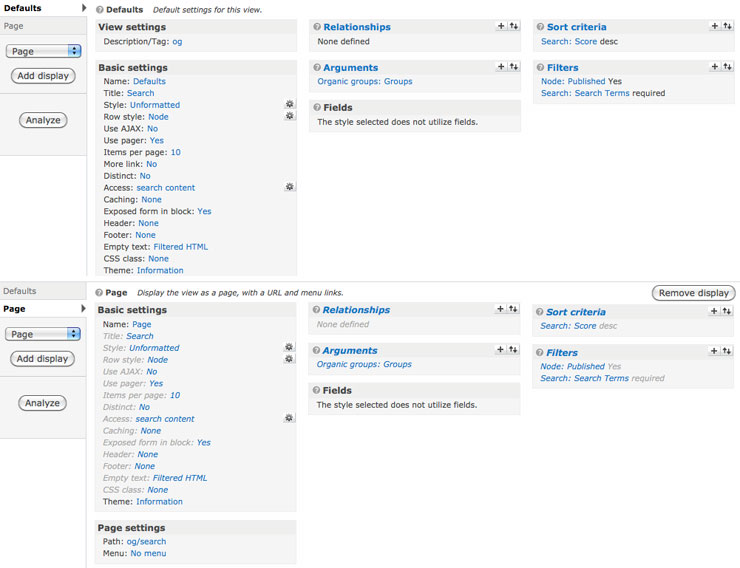
mstef commentedI'm running Acquia Search too. That shouldn't be a problem. Go into the Views UI - open up this view, and snap a screenshot for me.
Comment #39
mhawker commentedThanks for continuing to look at this. Screenshot attached
Comment #40
mstef commentedDo me a favor...install a completely clean Drupal installation with just Views and OG stuff. Add my patch, and see if it works. I'd be shocked if it doesn't. I have a feeling there is something else interfering with this on your site.
Comment #41
mhawker commentedThat's a great idea. I'll give that a try and post back, it might not be until next week though. Thank you for continuing to follow-up on this, I appreciate it.
Comment #42
mstef commentedNo problem. Here to help..
Comment #43
mhawker commentedGood advice mikestefff,
I did a clean install with just og and views added, then ran your patch. Group search worked perfectly.
I suppose I just start adding modules until it stops working, unless there's a different approach you'd recommend.
Comment #44
amitaibuI have committed a fix that adds a Page View and that makes sure that the block redirects to the page
Comment #46
protoplasm commentedSo if 'og/search' is hardcoded, you can't change the path in the view? When I try, I get my error page, but 'og/search' works. What is also happening is that my search results page is not respecting the group theme. I don't know if this is a conflict with another module or a new bug?
Update: I've disabled all conceivable modules that would still leave the search box and og functional. I found no module conflicts.
Comment #47
jgoodwill01 commentedI opened this issue back to active because it doesn't work after update.
I am still experiencing issues with Group Search. I updated form version 6.x-2.1 to 6.x-2.x-dev and I can see this function in the og_views.module file
But it doesn't appear to be taking effect. Can you provide some information on how to get the group search block to update to accept this?
$form['#action'] = url('og/search/' . $node->nid);
Everything I try just pulls the keys to the group page and doesn't return any results. Any suggestions?
Can anyone else confirm that they are having difficulties with Search in this module using the DEV version?
Comment #48
mhawker commentedIf I understand you correctly, that's what I'm seeing. I get my group URL with "2?keys=my-search" added on when searching from an OG homepage. If I use Search Group from a group node I'm correctly taken to the results page.
For me, Search Group works as long as I'm not on a group homepage, but I've been seeing that with the recommended version as well, not just the dev. I was thinking that's the correct behavior?
Comment #49
mikekelly commentedCan somebody clarify if this is expected behaviour - the og search failing on the group homepage (surely not?) or is it down to a module conflict?
Thanks,
Mike
Comment #50
jgoodwill01 commentedI am experiencing this same issue.
When searching from a Group main page lets say our IT Group. the URL Changes to
it-group?keys=something
when I am inside a node that is part of a group and I search i receive this
/og/search/11125?keys=something
I'm not certain why the location that the search is made is causing the path to be different.
Any suggestions for a fix for this? I would really like all of the group search blocks to search the complete group content.
Comment #51
LiuShaz commentedWorkaround... Works for me :)
Comment #52
mhawker commentedI did a clean install of Drupal 6.20 and installed the dev version of OG and group search works as expected, both on the group homepage and on group pages. No workarounds, just enabled the module, created group, created content with Devel.
The only contrib modules activated were Devel, Chaos Tools, Views, Organic Groups (6.x-2.x-dev).
Installed on the existing site that used OG, still didn't work. OG was added to the site after many other modules, not sure where the conflict would be. That's my experience...
Comment #53
vrajak@gmail.com commented#4 worked for me. Must add a page display to the og_search view, and give it a path like og/search
Thanks!
Comment #54
dropded commentedI've finally found the two problems we were having that was keeping searching for organic groups from working properly.
#1) After we added a page display to the view og_search, we still had a problem where a search in a group would not go to the path specified in the page display for the view, but to the home page for the group. The problem turns out to be in og_panels.
If we comment out the last line of the code ($form['#action'] = url($_GET['q']);) then og_search works properly (i.e. goes to a page /og/search/[group node id]?keys=[search string].
#2) We had cloned og_search and renamed it og_search_fcla. Don't do this, it breaks something in the code, which I noticed in some places explicitly mentions the view name og_search. Re-enabling the view og_search made it work again (with the page display added to it).
I'm still actually trying to figure out how to write a fix for the og_panels problem (I'm sorta new at this) as commenting out a line of module code isn't a very elegant solution...;-).
Comment #55
greg.1.anderson commented#4 / #53 worked for me too. Seems like og_search used to work for me; something deleting the 'page' view? That would be odd. No good ideas about cause at the moment.
Comment #56
ezra-g commentedThe 6.x-2.x branch has a page view for the search page and I'm able to get search results within a group after running cron on my site.
If you're still having problems with group search *with the 2.x dev version of OG and you have run cron* please re-open this issue with a description of the problem you're having.
Comment #58
mstef commentedRe-rolled patch to apply against the module root.
Comment #59
cooldeeponline commentedThanks mike... your views did it for me... Although I'd all the configuration and also set page display in view don't know why what was the bug... anyway thanks for your view.. saved lots of time for me!
Comment #60
ezra-g commented@cooldeeponline, Please see the issue tag guidelines.