

 Come together with the global Drupal community in Rotterdam, 28 Sept – 1 Oct 2026. Sessions, contribution, connection, and Early Bird savings until 8 June.
I have a local Drupal instance (drupal4). Updated settings.php file
global $content_directories;
$content_directories['sync'] = $app_root.'/content/sync';
(My code is directly in D://xampp/htdocs/drupal4)
But getting this error
The directory D:\xampp\htdocs\drupal4/content/sync is not writable.
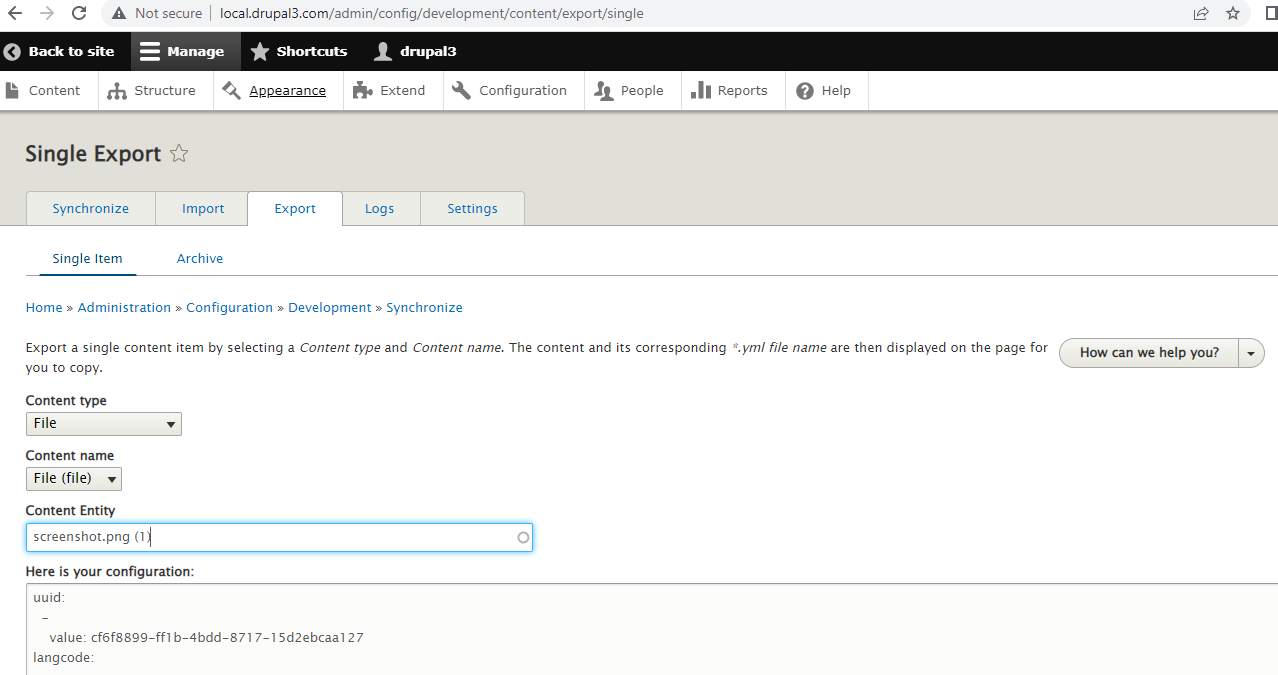
Also images are not moving when tried with Drupal UI (Image attached). The yml for file is created but image is not moved.
Tried Drush command "drush cse --entity-types=file" for exporting the image but after importing this archive the image is still not rendering.
| Comment | File | Size | Author |
|---|---|---|---|
| content_sync_image_issue_UI.PNG | 49.99 KB | abhay.agarwal | |
| content_sync_issue.PNG | 23.18 KB | abhay.agarwal |


Comments
Comment #2
abhay.agarwal commentedComment #3
blanca.esqueda commentedYou have to make sure that the folder in this path $app_root.'/content/sync' is writable.
When adding it on setting.php, you have to create it and make it writable.
About the files, there is a drush option that handle how the file is exported.
https://www.drupal.org/docs/8/modules/content-synchronization/drush-comm...
--files
A value option to export media/files.
Values: none, base64, folder
none: means not file is moved, only the content configuration yml file
base64: put the data of the file on the yml file so it can be imported
folder: move the file to the content/config folder
example:
ddev drush content-sync:export --entity-types=file --files=base64
--------
I'm updating the title of this Issue, to reflect that the UI of exporting/importing a file needs to have the options that drush have.
Comment #4
blanca.esqueda commentedClosing this task as it is a duplicate of:
https://www.drupal.org/project/content_sync/issues/3232551#comment-15788438