Problem/Motivation
Sometimes layout plugins may wildly varying functional behavior, yet have configuration forms that look identical to others. It may help content creators to know exactly which type of layout is being configured.
As a concrete example, say we have a FullWidthLayout, which renders all blocks that are dropped into it. We also have a FullWidthRandomizedLayout that only renders a single block chosen at random on page-load. When a content editor is adding blocks to the layout, one could get confused if they add multiple blocks to an existing FullWidthLayout while thinking that it was a FullWidthRandomizedLayout.
This confusion could be prevented by adding in a bit of info to the configure form.
Steps to reproduce
See Problem/Motivation for a compelling use case.
Proposed resolution
Add the layout plugin human readable name to the dialog title, perhaps in parenthesis following the layout administrative label.
Remaining tasks
- Decide if this is a feature worth implementing
- Open MR
- Review
- Get UX sign-off
- Get subsystem maintainer sign-off
User interface changes
Before:
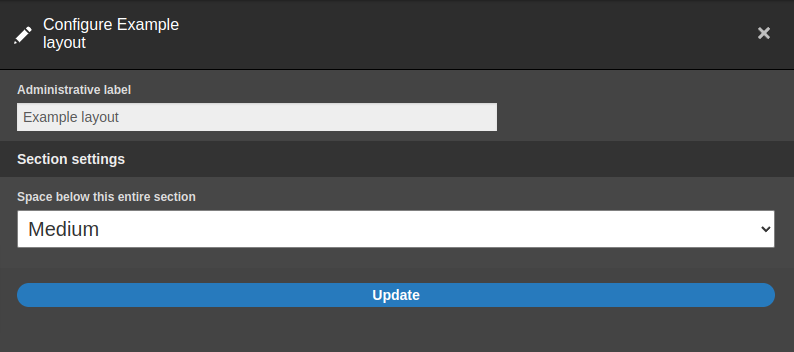
After:

API changes
None
Data model changes
None
Release notes snippet
TBD


 Show commands
 compare


Comments
Comment #3
tim.plunkettPotential duplicate of #3182661: Display layout info in ConfigureSectionForm?
Comment #4
anjali rathodYes , it looks like the duplicate of the above mentioned issue.
Comment #5
luke.leberAgreed. My googling ability has once again failed.