Problem/Motivation
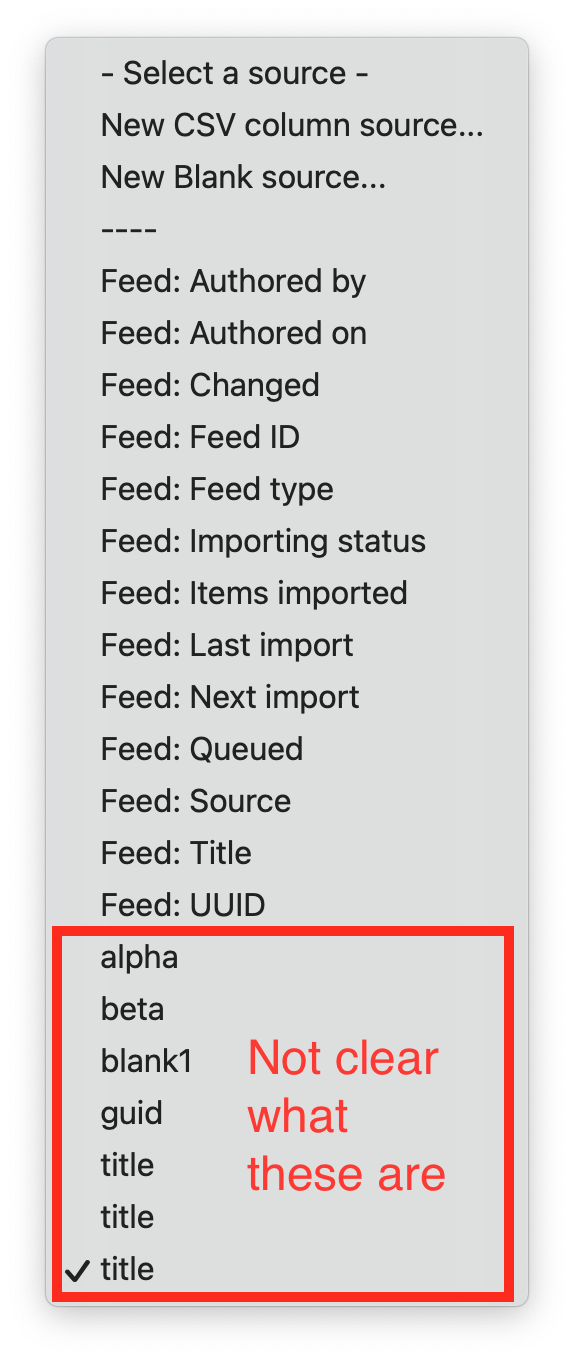
When using the XML or CSV parser, some people seem to pick "Blank source" instead of "CSV column source" or "XML Xpath source" and then wonder why no data gets parsed.
Additionally, I think the list of source options could be improved more when using categories.
| Before | After |
|---|---|
You cannot easily see which are CSV sources and which are blank sources.
|
![]() |
Some sources belong to the RSS parser, other are from the feed entity.
|
![]() |
Steps to reproduce
- Create a feed type, select the CSV parser.
- Go to the mapping form.
- Select a target.
- Inspect the dropdown in the column "Source".
You potentially see a long list of options.
Proposed resolution
- At least add a help text under the text box that appears when selecting the option "New Blank source..."
- Categorize the source options so that it becomes clear which ones are blank, which ones are CSV, which ones are from the feed entity.
Remaining tasks
- Use custom source label as category name in source selector
User interface changes
- On the mapping form, an additional help text will be displayed for blank sources.
- The options from the source selection list will get categories.
API changes
The FeedsSource plugin type gets an additional key called "category".
Data model changes
None.
| Comment | File | Size | Author |
|---|---|---|---|
| #4 | feeds-sources-categorized-2.png | 121.92 KB | megachriz |
| #3 | feeds-sources-categorized.png | 83.18 KB | megachriz |
| feeds-sources-2.png | 410.94 KB | megachriz | |
| feeds-sources-1.png | 215.43 KB | megachriz |
Issue fork feeds-3303166
Show commands
Start within a Git clone of the project using the version control instructions.
Or, if you do not have SSH keys set up on git.drupalcode.org:


Comments
Comment #3
megachrizNow the source options list can look like this:

Comment #4
megachrizPut before/after images in table in issue summary.
Comment #6
megachrizMerged the code!