

Needs work
Project:
Drupal core
Version:
main
Component:
block.module
Priority:
Normal
Category:
Bug report
Assigned:
Unassigned
Reporter:
Created:
3 May 2022 at 01:19 UTC
Updated:
24 May 2023 at 14:04 UTC
Jump to comment: Most recent, Most recent file
 Show commands
 changes





Comments
Comment #2
bsnodgrass commentedTitle change
Comment #3
bsnodgrass commentedConfirmed same issue in 9.4.0-dev
Not sure what version should be reported on the Issue Summary. Latest version confirmed?
Comment #4
Saurabh Srivastava commentedHere Unable to find the Error on Drupal versions 9.3 and 9.4 with two different browsers Chrome and firefox. for references, I am Attaching the Screenshot.
Comment #5
bsnodgrass commentedThanks for adding the screenshots. Changing status back to active, since there is no fix.
Comment #7
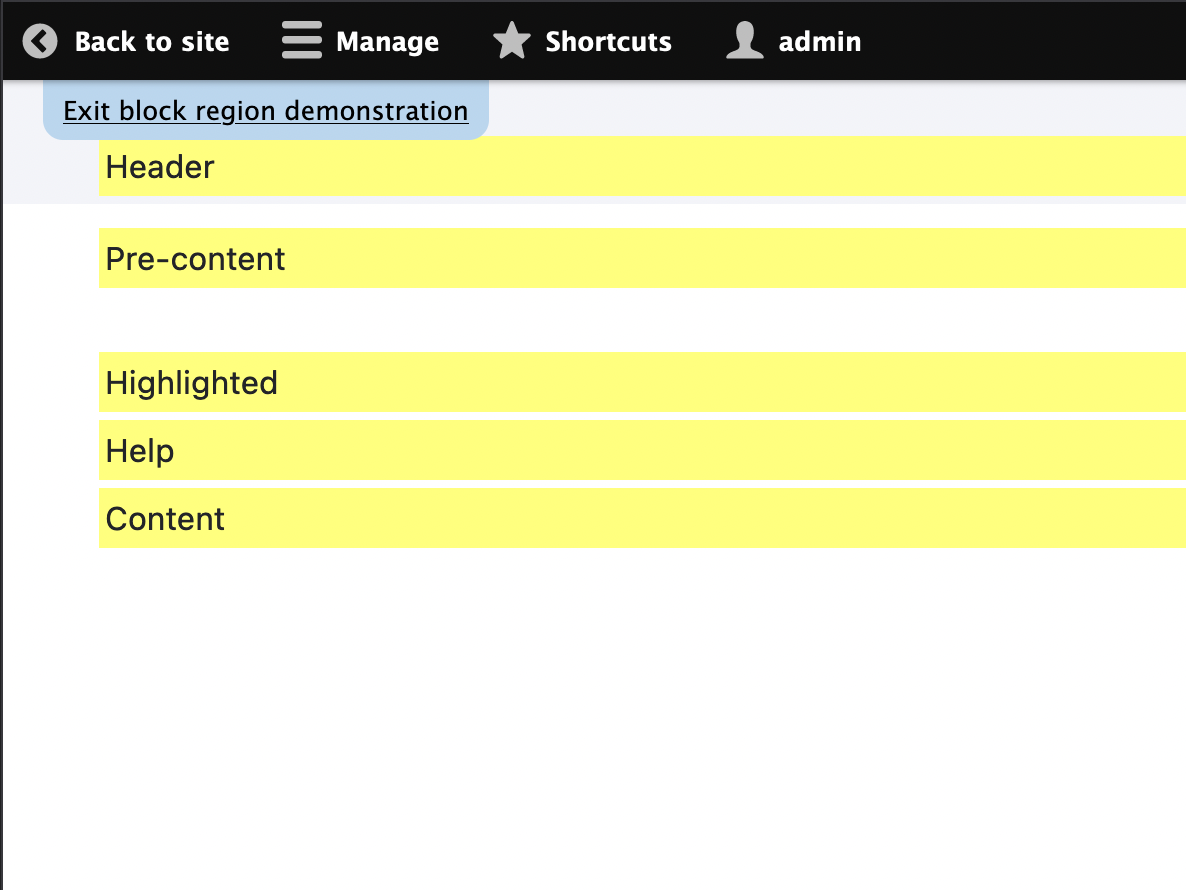
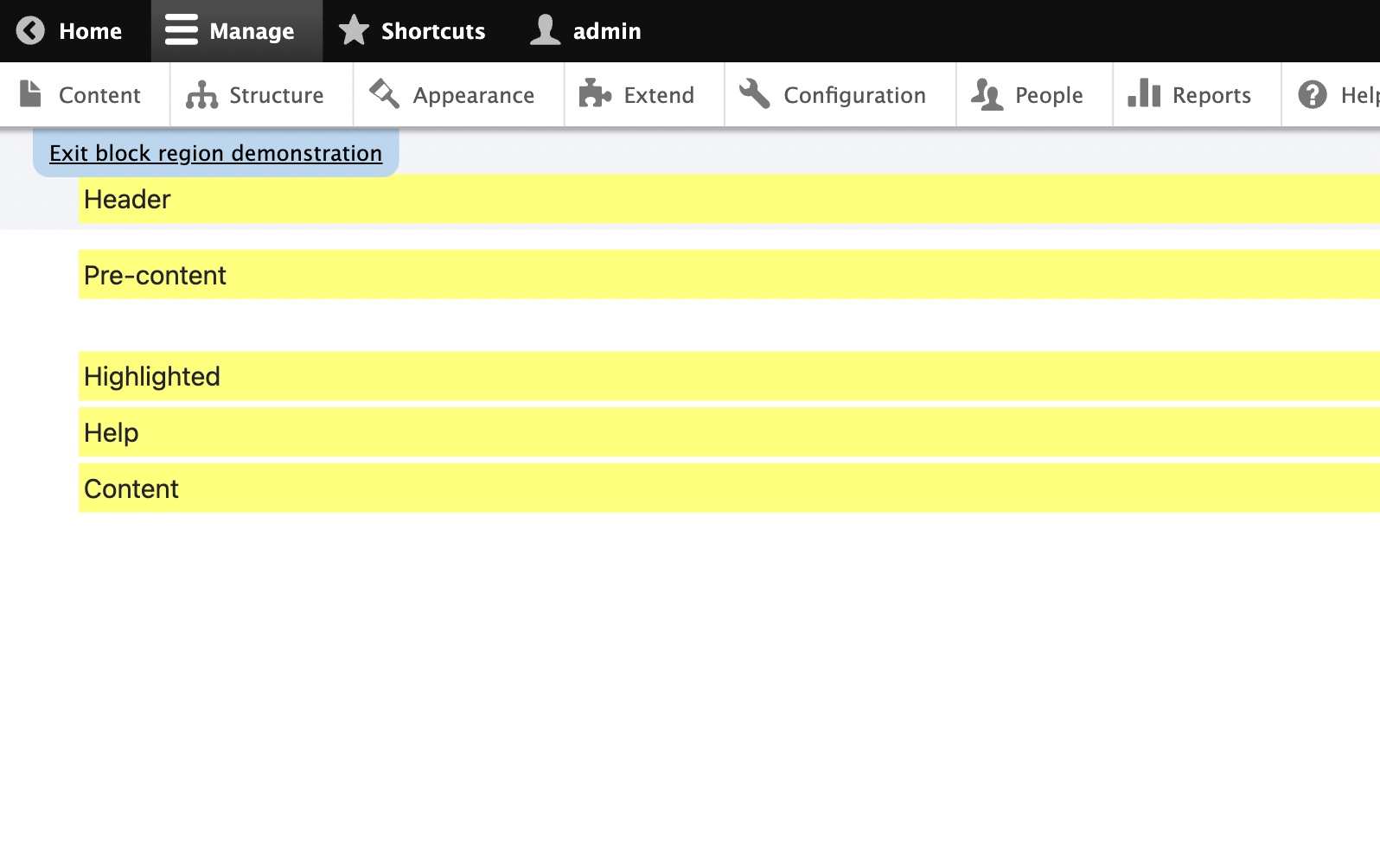
rkollerThe issue still applies to 10.1.x (tested on Safari, Firefox and Edge on MacOS). I've attached a brief video to illustrate the issue switching between the horizontal and vertical toolbar. But i think the component should be set to olivero and not claro since the region preview is shown in the default theme? and in regards of olivero it looks like when the admin toolbar is set to the vertical orientation the
position: fixedon theexit block region demonstrationlink is the reason why it stays hidden behind the toolbar?Comment #8
rkoller...or maybe i was a little bit premature. i've switched the default theme to claro afterwards. the issue applies there as well. different layout but the problem in general is the same. so would the component in concern be the
blockmodule instead wherefunction block_page_topis located which contains the backlink that is hidden by the vertical admin toolbar? and it looks like theposition: fixedcould be found in line 21 inblock.admin.css. so would it be the correct step to switch the component to the block module?Comment #11
gauravvvv commentedComment #12
rkollerThanks @gauravvvv for working on a fix! I've applied the patch and tested the following details:
- first with the admin_toolbar module installed i've tested in olivero. the


exit blockis shown. the only detail is that when the admin_toolbar is set to the vertical toolbar there is a horizontal scrollbar. but that happens without the patch applied in olivero as well.- with claro as default theme that scrolling doesnt happen and the
exit blockis displayed in the same way like with olivero.- same for the bootstrap barrio 5 theme. there only the
skip to main contentlink is also shown. but that is an issue with the barrio theme. but the functionality of theexit block region demonstrationlink is reachable.- the results are the same with the admin_toolbar module uninstalled for each of the aforementioned themes set as the default theme.
the fix works and is straight forward. nice! the only detail i wonder if it would make sense (or if it is even necessary) to add a test to check if the link is visible and not covered and hidden by any other element? i am just not sure if you use
isVisiblein nightwatch if that is checking if the element is visible and not something likedisplay: noneis applied or ifisVisibleactually tests if an element is in the visible viewport and not covered nor hidden? i'll set the status to needs work. in case a test isn't necessary here i would consider the issue RTBC and the status could be changed to that.and since the patch changes code within the block module only, i'll change the component to the block module also.
Comment #14
dsandhya commentedPlease review the patch.