Hello,
Today I updated to 8.x-3.0.0-beta1 (via composer). The gin_toolbar has also been updated to 8.x-1.0.0-beta21.
After these updates, the admin interface was broken :
- page was displayed to all the window width
- the left side of the page was under the toolbar
- the theme was 'white' with no style effects, without gradient...
- the buttons were 'invisible', white, without border, the label text was white
- the icons of the toolbar disapears on hover
...
So the theme was totaly broken :( and i had no error in logs...
For me, the only solution has been to downgrade to these versions:
- drupal/gin 8.x-3.0.0-alpha37
- drupal/gin_toolbar 8.x-1.0.0-beta20
Thanks for your help to resolve this problem.


Comments
Comment #2
kumkum29 commentedComment #3
saschaeggiClear the cache (browser, drupal, varnish) and try again :)
Comment #4
kumkum29 commentedHi saschaeggi,
However, I have cleared the cache several times without success...
I will try another update tomorrow ;)
Comment #5
nishruu commentedI had the same problems. I had to go to the theme settings page and check a toolbar style, and it worked. An option should probably be checked by default if the setting form changed between alpha and beta.
Comment #6
frank.dev commentedThe problem described here occurs with the current version of the theme in connection with the Advagg module. If I deactivate the module, the theme works without errors.
Comment #7
saschaeggiWhich would be another indication of caching. I'm also running with AdvAgg running on my test setup without issues.
Which AdvAgg version are you running?
Comment #8
boulaffasae commentedHello @saschaeggi
I run into the same issue when enabling JSqueeze ~600ms at /admin/config/development/performance/advagg/js-minify (only with JSqueeze)
Comment #9
boulaffasae commentedMaybe this has nothing to do with Gin Admin Theme. Check this:
Original JS (no minification)
JS with JSqueeze (minification)
Well, this is very wrong. I recommned using https://github.com/tedious/JShrink ^^ (Last update on 18 Sep 2021 vs JSqueeze last update on 19 Apr 2016)
Comment #10
saschaeggi@boulaffasae JSqueeze is an abandoned project and no longer supported. It has been last updated 6 Years ago and should be avoided.
See https://github.com/tchwork/jsqueeze & https://packagist.org/packages/patchwork/jsqueeze, The AdvAgg issue queue also has a lot of issues regarding JSqueeze: https://www.drupal.org/project/issues/advagg?text=JSqueeze
Solution: Use JShrink instead.
Btw same goes for YUI Compressor for CSS, see #3213732: Remove YUI Compressor
Comment #11
boulaffasae commentedThank you @saschaeggi
Another question what do you think about using @babel/preset-env (I'm sure you know Drupal core use babel to transform ES6 to compile Javascript files)
Comment #12
saschaeggiI've created: https://www.drupal.org/project/advagg/issues/3270337
Comment #13
saschaeggi@boulaffasae we use
@babel/preset-env.Side node: Gin doesn't support IE11 at all.
Comment #14
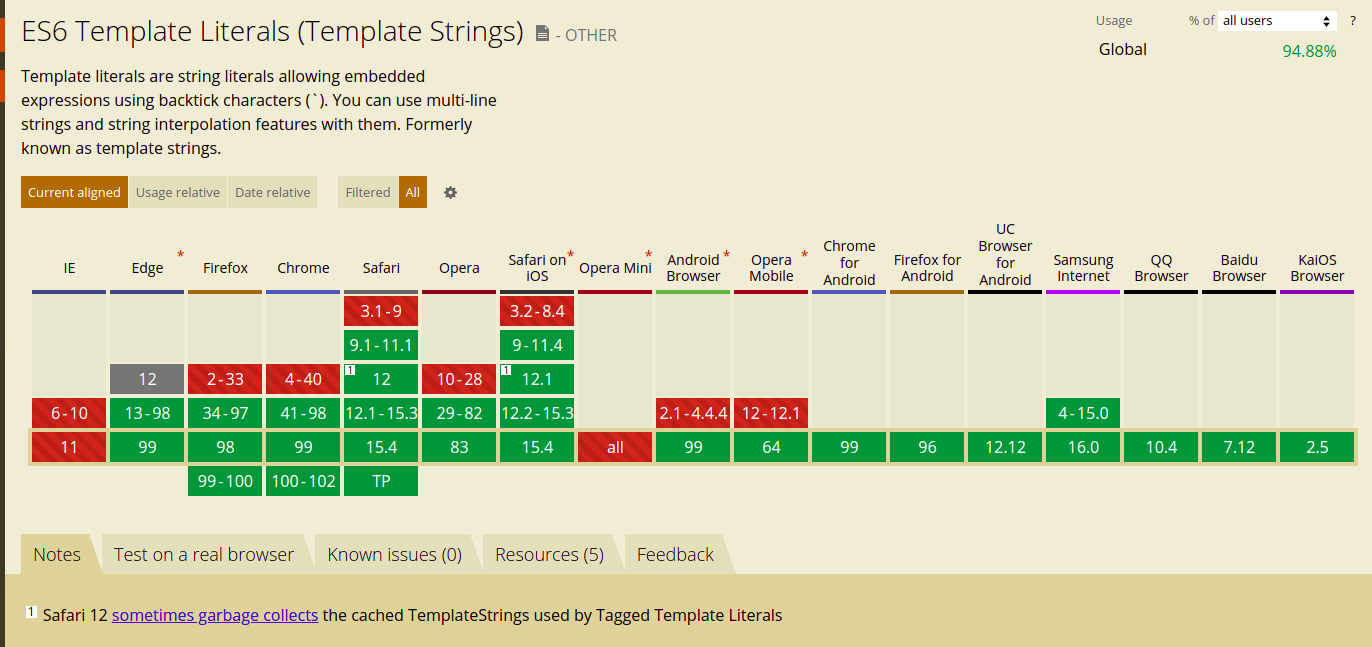
boulaffasae commentedES6 Template Literals (Template Strings) are not supported on 5% of Global browsers 🙈 lol
https://caniuse.com/template-literals#:~:text=Template%20literals%20are%....
Comment #15
saschaeggi@Frank.dev @kumkum29 can you confirm that you may also run on AvgAgg with
JSqueeze?If so, does it fix the problem to change it to
JShrink?Comment #16
frank.dev commented@saschaeggi
Yes, I use Advagg with JSqueeze. However, when I switch to JShrink, my website is no longer accessible and I only get the following error message:
(function(){var settingsElement=document.querySelector('head > script[type="application/json"][data-drupal-selector="drupal-settings-json"], body > script[type="application/json"][data-drupal-selector="drupal-settings-json"]');window.drupalSettings={};if(settingsElement!==null){window.drupalSettings=JSON.parse(settingsElement.textContent);}})()
I know that the problem with JShrink is probably no longer your module, but Advagg's.
Comment #17
saschaeggi@Frank.dev where you able to find the issue?
Comment #18
frank.dev commentedI'm not sure if I understand your question correctly:
After I select JShrink in the Advagg module, after several minutes of waiting, a white page is returned with the message listed above.
Comment #19
saschaeggi@Frank.dev I wanted to know if you were able to figure out what the problem is (or to solve it), as it seems not related to Gin - just I'm curious :)
Comment #20
frank.dev commentedNo, no solution so far. I also posted in the Advagg forum.
Comment #21
saschaeggiI'll close this in favor of the AdvAgg issue which got created.
But @Frank.dev please keep me posted what the issue was on your end!
Comment #22
rfmarcelino commentedI think this issue should be on the Gin Toolbar module and not on the Gin theme.
Comparing the markup on a prod env with the prior version and a local env with the new version, we see that the region-meta, available on the BE, is now available on the FE with an additional class region-meta--frontend.
Is this a feature lacking stylings or should not be visible on the FE?
It was added a few months ago, but probably only recently released:
https://git.drupalcode.org/project/gin_toolbar/-/commit/29b661370b70a95f...
@saschaeggi we are seeing this in projects without AdvAgg as well.
Comment #23
rfmarcelino commentedCreated an issue in the Gin Toolbar project:
https://www.drupal.org/project/gin_toolbar/issues/3270959
Comment #24
saschaeggi@rfmarcelino
The meta region was added on purpose, and we have a follow up to provide more specific classes here & to make it a setting here.
Therefore I closed the newly opened ticket as duplicate of #3262963: Meta region styling is influenced by frontend theme
I assume the issue with the WSoD is related to this: #3269424: Call to a member function getTitle() on null in gin_preprocess_page_title() -> try out
8.x-3.x-devto verify.Comment #25
rfmarcelino commentedNo change using the latest dev versions, but I can confirm that reverting to the previous version will make it disappear 🙂
"drupal/gin": "3.0.0-alpha37",
"drupal/gin_toolbar": "1.0.0-beta20",
Comment #26
saschaeggiComment #27
thalemn commentedI am also having an issue with missing icons. Just installed Gin 8.x-3.0-beta1 via composer. Turn on Drupal css and js aggregation and icons are gone. Turn off aggregation and they reappear. I am not using varnish nor any other compression modules. I have not enabled the Gin toolbar, just the admin theme.
Comment #28
saschaeggi@thalemn I guess you are using the deprecated AdvAgg CSS Minification YUI setting. The solution is to change it to "Core" CSS minification setting.
See also #3213732: Remove YUI Compressor.
Comment #29
thalemn commentedAs I noted, I am only using Drupal core performance css and js aggregation (I am not aware of using AdvAgg CSS Minification YUI setting, or what that is). Maybe I am missing something?
Comment #30
thalemn commentedFurther testing...using Firefox (latest release) on Mac: inspecting the console has CORS errors. Installed Cross Domain extension and enabled /.*/ and now icons appear. No issues found using Chrome (latest release) on Mac. These are the only two browsers I use.
So it looks like FF's locked down access to the icons, which is frustrating since the urls to the icons are on the same server. I don't think this is an issue with your theme (which is lovely, BTW).
Comment #31
saschaeggi@thalemn didn't think about CORS tbh. But glad you found it and it works now!
Comment #32
frank.dev commented@thalemn: The cause and solution for my problem is described here: JShrink incompatible with PHP 8