Problem/Motivation
I am using the Opt-in with categories mode and have two categories. Each category is associated with a Javascript file in the "Disable the following JavaScripts when consent isn't given" section. Within the EU cookie banner, if I select the first category, click "Save preferences", then select the second category, and then click "Save preferences" again then all is fine; both Javascript files load as expected. But if I select the second category first, click "Save preferences", then select the first category, and finally click "Save preferences" again then only the Javascript file for the second category loads.
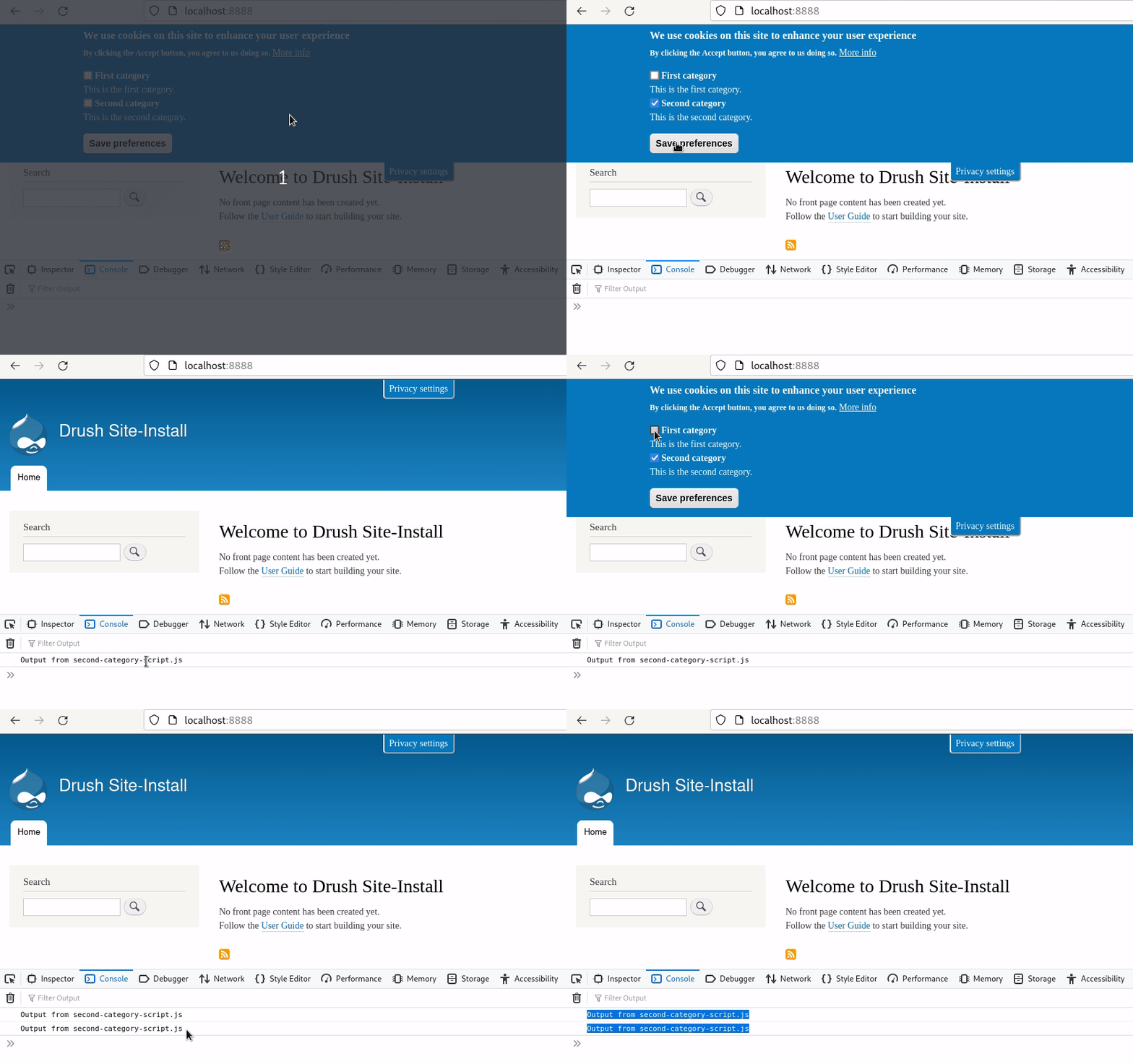
Steps to reproduce
Banner setup
- Select Opt-in with categories as the consent method.
- Add two categories with the following machine names: first_category, second_category.
- Create two Javascript files called first-category-script.js and second-category-script.js. Place these inside the sites/default/files/js/ directory. A simple debug statement should suffice as their content. Sample contents for the first and second script given below.
- Add this in the "Disable the following JavaScripts when consent isn't given" section:
first_category:public://js/first-category-script.js
second_category:public://js/second-category-script.js
- Select the "Enable floating privacy settings tab and withdraw consent banner" and "Put the "Withdraw consent" button on the cookie information banner." options in the WITHDRAW CONSENT section.
Alternatively, import the given config from /admin/config/development/configuration/single/import. Choose "Simple configuration" as the Configuration type and "eu_cookie_compliance.settings" as the Configuration name in the import form.
Interaction
- Open the homepage.
- The Cookie banner should reveal itself.
- Select the "Second category" and click the "Save preferences" button. The debug output from sites/default/files/js/second-category-script.js should appear in the Javascript console.
- Select the "First category" and click the "Save preferences" button. The expected Javascript console output is the debug string from sites/default/files/js/first-category-script.js. But instead the debug string from sites/default/files/js/second-category-script.js gets repeated. This is the bug.
Content of eu_cookie_compliance.settings.yml
langcode: en
uuid: cd73859d-0a87-4428-ab60-39dd88caf5bc
popup_enabled: true
popup_clicking_confirmation: false
popup_scrolling_confirmation: false
eu_only: null
eu_only_js: null
popup_position: true
fixed_top_position: true
popup_info:
  value: "<h2>We use cookies on this site to enhance your user experience</h2>\r\n\r\n<p>By clicking the Accept button, you agree to us doing so.</p>\r\n"
  format: full_html
mobile_popup_info:
  value: ''
  format: basic_html
popup_info_template: new
popup_agree_button_message: Accept
popup_more_info_button_message: 'More info'
mobile_breakpoint: 768
popup_agreed_enabled: false
popup_hide_agreed: false
disagree_button_label: 'No, thanks'
popup_agreed:
  value: "<h2>Thank you for accepting cookies</h2>\r\n\r\n<p>You can now hide this message or find out more about cookies.</p>\r\n"
  format: full_html
popup_find_more_button_message: 'More info'
popup_hide_button_message: Hide
popup_link: '<front>'
popup_link_new_window: true
popup_height: null
popup_width: 100%
popup_delay: 1000
show_more_info: true
popup_bg_hex: 0779bf
popup_text_hex: ffffff
domain: ''
domains_option: 1
domains_list: ''
exclude_paths: "/admin\r\n/admin/*\r\n/batch\r\n/node/add*\r\n/node/*/*\r\n/user/*/*"
exclude_admin_theme: false
cookie_session: 0
set_cookie_session_zero_on_disagree: 0
cookie_lifetime: 100
use_mobile_message: false
use_bare_css: false
disagree_do_not_show_popup: false
reload_page: false
reload_options: 0
reload_routes_list: ''
cookie_name: ''
exclude_uid_1: false
better_support_for_screen_readers: false
method: categories
disabled_javascripts: "first_category:public://js/first-category-script.js\r\nsecond_category:public://js/second-category-script.js"
automatic_cookies_removal: true
allowed_cookies: ''
consent_storage_method: do_not_store
withdraw_message:
  value: "<h2>We use cookies on this site to enhance your user experience</h2>\r\n\r\n<p>You have given your consent for us to set cookies.</p>\r\n"
  format: full_html
withdraw_tab_button_label: 'Privacy settings'
withdraw_action_button_label: 'Withdraw consent'
withdraw_enabled: true
withdraw_button_on_info_popup: true
save_preferences_button_label: 'Save preferences'
accept_all_categories_button_label: 'Accept all cookies'
enable_save_preferences_button: true
domain_all_sites: false
settings_tab_enabled: false
containing_element: body
cookie_policy_version: 1.0.0
cookie_value_disagreed: '0'
cookie_value_agreed_show_thank_you: '1'
cookie_value_agreed: '2'
accessibility_focus: false
Content of sites/default/files/js/first-category-script.js
console.debug("Output from first-category-script.js");
Content of sites/default/files/js/second-category-script.js
console.debug("Output from second-category-script.js");
Proposed resolution
Patch with minor changes attached.
Remaining tasks
N/A
User interface changes
N/A
API changes
N/A
Data model changes
N/A



Comments
Comment #2
progga commentedComment #3
svenryen commentedThat's odd. Thanks for the report, I'll take a look this weekend.
Comment #4
svenryen commentedComment #6
svenryen commentedNice fix! Thanks for the contribution, I just committed this to the branch.