Having just upgraded my Dupal 5 with the new Date and Calendar modules (from ver. 1.8 til 2.3), everything seems to work perfectly accept for this:
After having
1) set the short date format in the Date and Time confugration screen to "18 okt 2008 - 14:13" (I'm using a Norwegian language version of Drupal, so the Date and Time screen as weel as the date formats come correctly in Norwegian), and
2) set the date input format for a date field in one of my node types also to "18 okt 2008" (it also shows up correctl in the CCK dropdown menu in the field management configuration screen), and
3) entered a date (for example 1 okt 2008) in the node and saved it,
the date displays correctly (as 1 okt 2008), also when I refresh or come back to the node later.
BUT: when I open the node to edit it, the date entered as 1 okt 2008 now displays 1 Oct 2008. If I don't change it back to the Norwegian format, but save and quit the edit mode, it then displays wrongly TODAY'S date (18 okt 2008), but CORRECTLY in the Norwegian defined input format.
By the way, the same happens in the Calendar: if I open up to edit one of the entered calendar nodes without chaning the date format back to Norwegian, the item will move to today's date (!).
I very much appriciate some help with this, after having spent a whole day searching for a remedy. And with 2000 nodes, each having up to 6-7 dates, this is pretty annoying.
inestore
One of my node types has a date field that I have configured in the CCK field managment configuration screen (for example 1 okt 2008) for a date field fbelonging to one of my node types, the dates displays correctly when viewing the nodes. However, when I return to edit a node, the date displays as 1 Oct 2008 (English date format). If I don't change this back to 1 okt 2008, but just saves the node, today's date (18 okt 2008) will be used and displayed!


Comments
Comment #1
infotore commentedSome additional information to the above issue: In the mySql table, I note that the date fields in question all have the format varchar(20) with NULL as standard (default). The fields' timezone variables also have varchar(20) and with GMT as standard. Changing to DATE or DATETIME seems to have no effect, eben after reentering the dates in the node.
As for the modules, all Date/Time modules except for Date PHP 4 and Date repeat API have been activated, and update.php has been run as well as poormanscron. My host in Bluehost (PHP 5.2).
inestore
Comment #2
infotore commentedA final piece of information: the dates are stored like this in my MySql tables: 2008-10-17 00:00:00.
Also, please disregard the the last partagraph in my first comment (on top), it was a first draft text that I just did not see was included when I posted the comment.
I will now awaiit your assistance...
inestore
Comment #3
infotore commentedComment #4
infotore commentedOK, I have temporarily solved the problem by setting input date format to dd.mm.yyyy, thus avoiding any language confusion. For the output (display) format I still use the Norwegian format (for example 29 okt 2008), which works perfectly.
To summarize: If I choose a Norwegian input date format (from the dropdown meny), for example 13 okt 2008 23:12:24, Drupal accepts input with this format. However when I open a node to re-edit it, the date is in the English format (13 Oct 2008). If I save the node without setting the date back to Norwegian format, TODAY's DATE (!) will be saved (but displayed in the Norwegian format).
If anyone would like to dig into this bug, it will certainly be appreciated. But for the time being, I can survive using the "international" langauge neutral input format.
inestore
Comment #5
alex72rm commentedSame problem arises with Italian language, and in a different core version.
Thanks to infotore for the temporary workaround.
Comment #6
Morn commentedSame problem with the german version (Drupal 6.10, Date 6.x-2.x-dev from March 26.)
Comment #7
alex72rm commentedI think this problem arises with all languages, except native language: English.
I hope it's a problem only with date module, 'cause a lot of work was made on Drupal 6.x branch for real internationalization.
Comment #8
karens commentedBoth the system for formatting dates and the system for handling translations of date elements has changed totally since this was reported. Then #5 took a very old report for Drupal 5 and switched it to a report for Drupal 6, which handles all these things totally differently.
I have absolutely no idea what version people are using and which of these comments apply to Drupal 5 and which to Drupal 6 and which are actually still issues. Nor do any of the more recent reports provide any information whatsoever about what kind of date field they are using or how they are set up. 'Same problem' tells me nothing.
Comment #9
Morn commentedOk, a little more data: Drupal Version 6.11
Date Version 6.x-2.x-dev 2009-Mai-11
Format of the date field: Montag, 1. Mai 2009 -21:11 (german)
When viewing the Node I see :Mon 11. Mai 2009 - 18:30
Editing the node displays: Monday, 11. May 2009 (!!en instead of de!!)
After saving the node (without any change) I see: Don 11. Dez 2008 - 18:30 instead of Mon 11. Mai 2009 - 18:30
every edit session changes this field again
Only workaround is to use a Format like 11.5.2009 - 21:11
Comment #10
Morn commented.sign
Comment #11
blueminds commentedExactly the same problem as #9
Moreover I am unable to set 24 hour format while using pop-up calendar + js field for setting time. Even if using the "workaround" format of 11.5.2009 - 21:11, I am not able to set other than AM/PM values in the time input box. After submitting following values:
From date: 14. May 2009 - 12:27 (this value is achieved as default one)
To date: 14. May 2009 - 02:30PM
on submit I get an error that To date has to be further in future than the from date. Assuming from this, the application logic works somehow different than displaying the values.
Furthermore, when submitting AM/PM values, they do not get persisted, instead a 00:00 value is written to db.
This time format problems are only specific for the pop-up calendar + js field. When using drop-downs it works just fine.
Comment #12
blueminds commented...just to provide detailed info
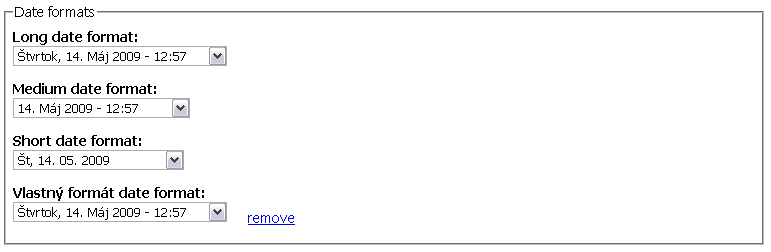
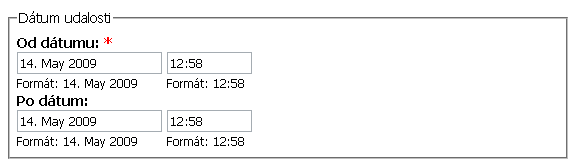
I upgraded to the last dev version (May, 13) and no change in this matter. I also enclose two screenshots.
date-time_formats.png - the config form where you can see that dates are localized
node_add_form.png - form to create a node. In there only english shows
Comment #13
Morn commentedChanged title: this problem arises with all languages, except native language: English
Comment #14
vthirteen commentedsubscribe
Comment #15
SORM commentedI have an exactly problem such in #9 post.
The problem has solution:
1)Go to "Manage fields"
2)Choose Input format like "11.5.2009 - 21:11" for you data field
3)Set "Default Display" to "Long"
5)Save settings
6)Go to Display fields, choose your data fields and set display format to Long for teaser and node
7)Save settings
8)Go to admin/settings/date-time/formats
9)Set long format like "DayOfWeek, Day month, 2009 - 23:22" ("Monday, 9 May, 2009 - 23:22" ---- For example)
in the issue:
1)i have a long format in display on Russian language every time (also after editing)
2)year shift disappeared
p.s. in case, sorry for my english :)
Comment #16
AdrianB commentedI have the same problem as well, this time in Swedish.
The problem for me is that the date value is slightly changed when I open the node edit form, from the Swedish date format to an English date format (see below) that can't be saved.
1) Add a date field with "Text Field with Date Pop-up calendar".
2) Choose an input format with text like "10 dec 2009 - 22:09".
3) Create a new node and choose a date with the pop-up calendar. The date from the datepicker in this case would be "10 dec 2009" since I don't use hours and minutes.
4) Save the node. So far everything works as expected.
5) Edit the saved node.
6) Notice that the date field shows "10 Dec 2009" instead of the saved value "10 dec 2009" (a change in case on the month name).
7) Try to save the node without editing any field.
8) Receive an error saying the date field format is not valid.
9) Change to lower case in the month name ("10 Dec 2009" -> "10 dec 2009").
10) Save the node. Works just fine!
So every time I edit a node with a date field I have to manually change the casing of the month name if I want to be able to save the node again.
A work-around until this bug is solved is to use date input formats without any locale text (like "2009-12-10").
I'm using the latest releases as of today (Drupal 6.14 and Date 6.x-2.4).
Comment #17
pedrospsubscribe (same in Spanish)
Comment #18
carlitus commentedI've the same problem (in Spanish)
Comment #19
squall6969 commentedsubscribe (same in French)
Comment #20
yngvewb commentedSame problem in Norwegian
Comment #21
mani.atico commentedsubs
Comment #22
marcvangendSubscribe. I'm surprised I didn't come across this bug before, since it has been around for so long... Fortunately, the workaround (using something like "02/08/2010" instead of "2 augustus 2010") is fine.
Comment #23
Marko B commentedHaving same problem here, Hmm ok its a workaround but i wouldnt say "is fine" as i would like to use locale date name when choosing. Guessing its not big bug, just something needed to take a look and fix, hope its solved soon.
Comment #24
Anonymous (not verified) commentedAnd here's another Swedish user with this problem. Could it possible that some remaining use of date() instead of strftime() is lingering about?
Up to date system.
Comment #25
asb commentedSince there's no activity in this issue for several years, I think it should be closed; there's simply too much change from some Drupal 5 module in 2008 and date-6.x-2.x as of today.
If there's anything left from this issue in date-6.x-2.10 or date-6.x-2.x after March 2014, please reopen this issue or open a new issue.
Also, there might be some leftovers for those who upgraded through different releases of date module, e.g. #2230167: Date field values not visible on node editing form & altered date formats on configuration page.