Problem/Motivation
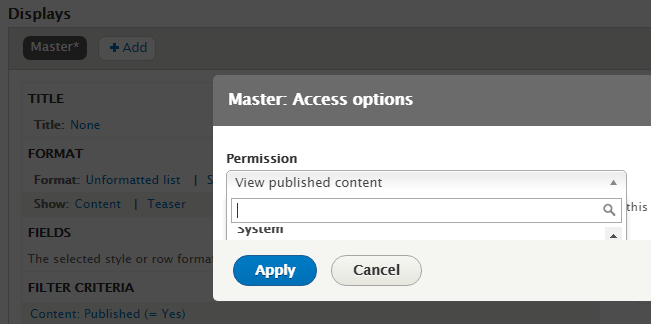
When configuring a view and edit options in the dialog options that appear if chosen is triggered, the results are hidden.
Steps to reproduce
1. Create view. (/admin/structure/views/add)
2. Enter an some dummy text to get edit screen. (e.g. /admin/structure/views/view/test_view)
3. Open the permission selection screen, under access => view published content - Twice (chosen not loaded first time)
4. Note that the results are cut off.
ISSUE:
SOLUTION:
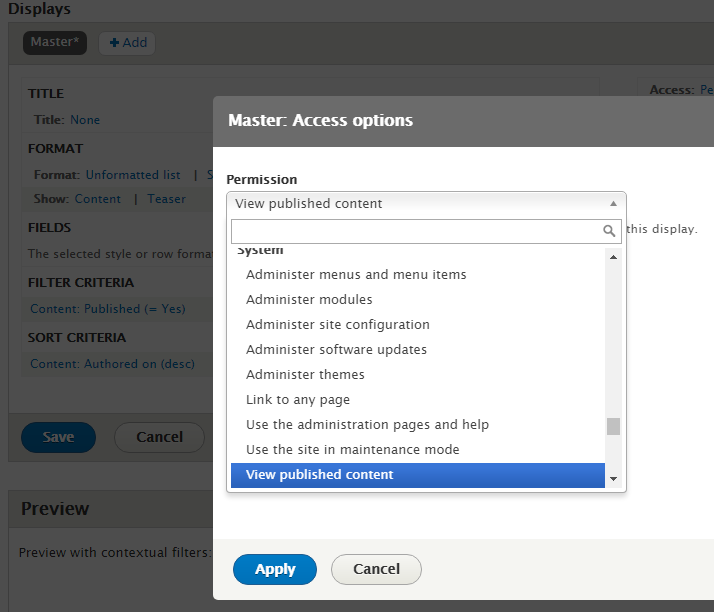
Proposed resolution
Detect if chosen is trigged in a Drupal dialog box, if so, resize the dialog on open/close event.
Remaining tasks
User interface changes
API changes
Data model changes


 Show commands
 compare


Comments
Comment #2
silverham commentedComment #3
silverham commentedComment #4
silverham commentedRemove console.log().
Comment #5
silverham commentedLess changes to other line + filter to only parents #drupal-modal
Comment #6
drupatz commentedFixed the patch for Drupal 9.5.10
Comment #8
nebel54Patch #5 works like a charm. Thanks for that!
Personally I would have stored the reference to the chosen drop element in a variable instead of using jQuery a second time to find it, but I assume it does not really make a difference. Eg.
Comment #9
nagy.balint commentedThe patch did not work for me on the top section of the dialog that is under the permission link of a views edit page.
What about the following patch?
Comment #10
nagy.balint commentedRelated issue #3327290: Claro views ui-dialog hides overflow
Comment #11
nagy.balint commentedComment #13
nagy.balint commented