

Closed (fixed)
Project:
Barrio Bootstrap 5 Theme
Version:
8.x-4.x-dev
Component:
User interface
Priority:
Critical
Category:
Bug report
Assigned:
Unassigned
Reporter:
Created:
20 Jun 2020 at 08:38 UTC
Updated:
26 Jul 2020 at 13:59 UTC
Jump to comment: Most recent, Most recent file


Comments
Comment #2
chema_ commentedComment #3
hatuhay commentedIf no error messages on Drupal or JavaScript, I suggest to check if custom buttons are enabled.
Comment #4
chema_ commentedhi hatuhay
how do I check if custom buttons are enabled?
Comment #5
hatuhay commentedI mean "form widgets":
/admin/appearance/settings/SUBTHEMENAME
Components -> Form
Comment #6
chema_ commentedthat was the problem.
thanks hatuhay
Comment #7
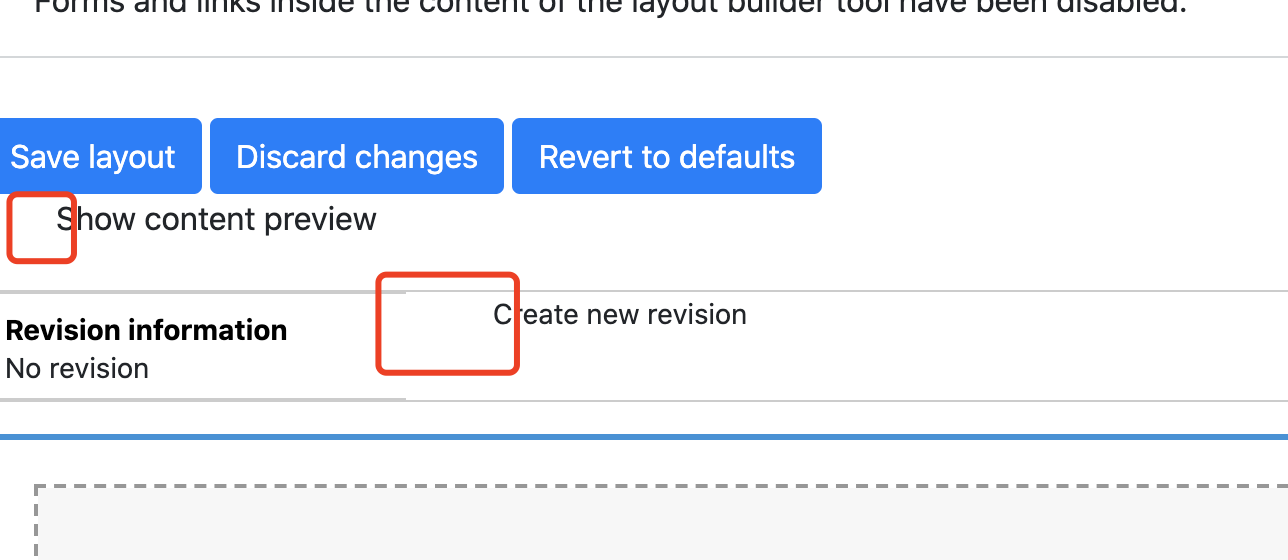
jurgenhaasI just ran into the same problem that checkboxes and radio buttons can no longer be selected by clicking on their label. After some investigation I found out that the reason is that the label element is missing the "for" attribute. This must have to do with templates/form/form-element.html.twig file and I'm looking further, how to fix that.
Comment #8
jurgenhaasOK, the problem is that
does not output any attributes. I don't know why that is but as a quick fix and workaround I have changed that code to
which at least outputs the "for" attribute and brings back proper functionality.
Comment #9
lawxen commentedI have this issue after update bootstrap barrio
Comment #10
lawxen commentedConfig like this make my layout builder's checkbox can work
Comment #11
bunty badgujar commentedFor some reason variable "input_attributes.id" is not set in
"bootstrap_barrio_preprocess_form_element" andsetAttribute('for', input_attributes.id)doesn't return empty attribute.Here is the commit where condition added :- Git commit [Issue #2892364]
Patch to return empty "for" attribute if
input_attributes.idnot set in preprocessor.Comment #12
Smokvin commentedCustom type does not work.
Patch above can fix the clickable area for Standard type label, but Custom type has still invisible checkboxes (only labels are visible).
It looks like the real checkboxes are hiding with css, but Bootstrap4 custom pseudo-checkboxes do not appear on the page.
5.0.0-beta2
Comment #13
dropa commentedI can't relate to the original issue, but I came here because of #3137559, after which checkbox labels has no parameters at all.
Can confirm #11 fixing the issue I'm having. My exact issue was that behat test couldn't find checkbox from the site (also using webform) since label was missing "for" attribute.
Comment #14
aalin commentedI confirm that this is related to #3137559
The issue is that checkbox labels are using label_attributes which is not initialized.
Patch added to initialize it and to use an optional #label_attributes key element.
Comment #15
ccarrascal commentedI have the same problem, after updating to 4.30, the attributes for the labels are gone, and patch in #14 is working for me with Drupal 8.9.1.
Thanks a lot!
Comment #16
ccarrascal commentedAfter checking the other issue #3137559 , I am thinking that probably a better fix for this issue will be just initialising the label_attributes in the template itself, as it's done in the other ticket:
Any comments on this?
Comment #17
ruslan piskarovComment #18
michèle commented#12 + #16
Adding {% set label_attributes = create_attribute() %} to the form-element.html.twig Template (in a subtheme) fixed custom checkboxes!
Many thanks!
Comment #19
volker23 commentedPatch in #14 works.
Comment #20
ccarrascal commentedI am submitting a patch following my comment in #16.
What i am doing is checking if the label_attributes variable is initialised in the template file. This has two benefits:
* The value of the variable can still be preprocessed, but there is no initial need for it.
* If the preprocessing somehow removes or set to null that variable, the template will still works.
I have tested it in my site and seems to work fine with 8.9.1
Thanks
Comment #23
hatuhay commented