

 The 2026 Drupal Business Survey is open. Your response will help shape the future of the Drupal business ecosystem.
Hi,
thanks for this great module. I would love to get it running but can´t get on with it.
I installed version 1.2 of the library and the module.
I added a few articles with images. But testing the examples views - no image is displayed.
What can I try?
Thanks for any hint.
| Comment | File | Size | Author |
|---|---|---|---|
| #13 | 3143585-broken-at-layout-defaults-13.patch | 4.76 KB | gausarts |
| #7 | gridstack-console-error.png | 472.48 KB | inst |
| #5 | gridstack-1.png | 144.11 KB | inst |


Comments
Comment #2
gausarts commentedI have updated project home documentations.
Please check out and verify what you have or haven't done based on:
https://www.drupal.org/project/gridstack#gridstack-installation
https://www.drupal.org/project/gridstack#gridstack-troubleshooting
Be sure to include screenhots if persists, and or follow the links provided there. Let me know.
Comment #3
inst commentedHi,
ok I did this:
1) Composer install of Blazy, activated Blazy and Blazy UI
2) Composer install of GridStack, activated GridStack UI, GridStack Example, GridStack Layouts
3) downloade gridstack library from here https://github.com/gridstack/gridstack.js/releases and used version v1.1.2
4) made a new directory gridstack and put dist in there
3) Drupal report says Gridstack library installed
5) at /admin/structure/gridstack/ui I choosed Bootstrap 4 as Grid Framework (nothing eles changed) (I use I subtheme of Bootstrap 4 Radix Base theme)
6) did not change anything at /admin/structure/gridstack
7) I made 10 Articles – each with one image
8) in views I visited the example site: /admin/structure/views/view/gridstack_x?destination=/admin/structure/views
9) but no images are displayed in views
Unfortunately after going through the steps again - it did work. I don´t know why - may be it was a simple refresh.
---
Two things are unclear to me:
a) How can I change the layouts of the gridstacks?
b) when I go to http://localhost/admin/structure/gridstack/variant
Drupal shows this error message:
The website encountered an unexpected error. Please try again later.
Symfony\Component\Routing\Exception\MissingMandatoryParametersException: Some mandatory parameters are missing ("gridstack") to generate a URL for route "entity.gridstack_variant.config_translation_overview". in Drupal\Core\Routing\UrlGenerator->doGenerate() (line 182 of core/lib/Drupal/Core/Routing/UrlGenerator.php).
thanks!
Comment #4
gausarts commentedUnfortunately after going through the steps again - it did work.
Glad that one works :)
A. You can use Layout Builder, and select GridStack layout. Variants will be available to add or edit after saving layout builder form. Normally when you have layouts in place. If none visible, be sure to clear cache since layout registrations are permanently cached.
B. Does clearing cache help? Twice if needed?
If still an issue, the guy on the thread had luck with drush cr. But normally I avoided CLI during module dev just to ensure regular Drupal UI can handle issues like this so I can be inline with non-drush users.
Comment #5
inst commentedad A)
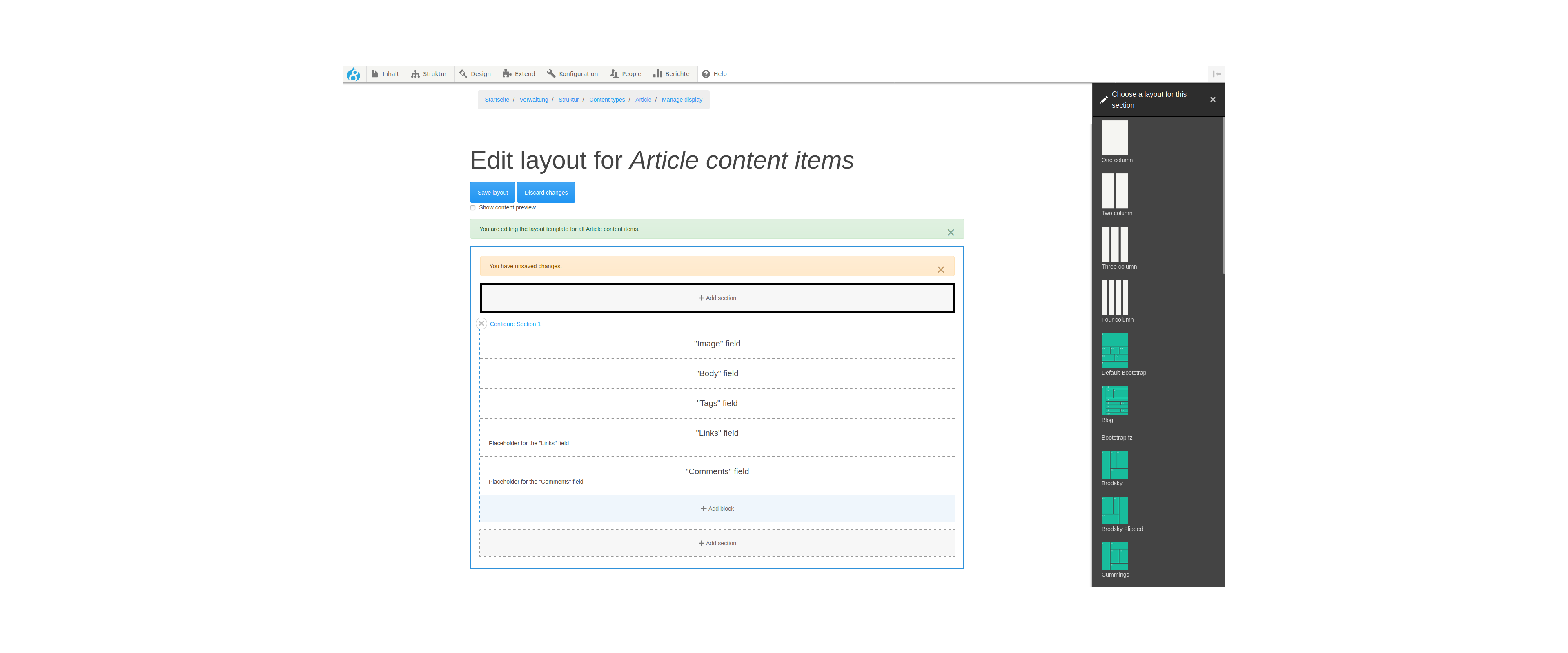
so I go to articles -> manage display -> add section
I see the gridstack layouts in green. But I can´ t choose them.
Comment #6
gausarts commentedOk, good to see them. Almost there.
Please press F12, find Console tab, and screenshot in case any useful errors.
Comment #7
inst commentedThanks for your patience. - So here a console print from the layout builder screen.
Comment #8
gausarts commentedThank you.
Looks like 2 issues:
1. Please switch theme to core Bartik for a while till you have a working GridStack there. Although it might not cause issues, you have errors in your theme JS.
2. Please create an Unlimited (multi-value) core Media field on your Manage field on the current content type, specific for Layout Builder integration. It is likely an overlook.
I have updated project home page, thanks to your findings. The layout Builder integration assumes a Media field available as it appears.
Let me know your findings with the above 2 fixes. And screenshot again in case we can figure out anything other issues.
Comment #9
gausarts commentedChanging to Bug due to the second error. Although should be fixed once the core Media field is provided.
Comment #10
gausarts commentedThis is the latest finding:
(This one works fine as long as Media field available)
(This one is still broken at 2.6)
You may want to ignore gridstack layouts at Layout defaults till further fix:
/admin/structure/types/manage/page/display/default/layout
The reason for the error is GridStack assumes to work with a content entity, hence node (/node/123/layout), which is not available at Layout defaults, relevant to the new Media field requirement.
Comment #11
inst commentedok, I did:
1. switch the admin and default theme to bartik
2. added a media image field to content type articel
3. added a media image to each of my 10 articles
But in layout builder I still see the green gridstac icons but can´ t select them.
But I can still add the standard layouts (white color) that come with drupal
Strange is that I see the images in the gridstack design in views.
Comment #12
gausarts commented> But in layout builder I still see the green gridstac icons but can´ t select them.
You are right.
Check out #10 above.
It is GridStack bug at /admin/structure/types/manage/page/display/default/layout or /admin/structure/types/manage/article/display/default/layout, etc.
But should be fine at /node/123/layout pages for now.
Comment #13
gausarts commentedLet's see if any issue.
Previously GridStack only works for Layout overrides (node/123/layout) pages.
The patch attempts to make Media Library available at non-content-entity, hence the Layout defaults pages.
Comment #15
gausarts commentedCommitted with few more adjustments. Thank you for contribution.