

 Come together with the global Drupal community in Rotterdam, 28 Sept – 1 Oct 2026. Sessions, contribution, connection, and Early Bird savings until 8 June.
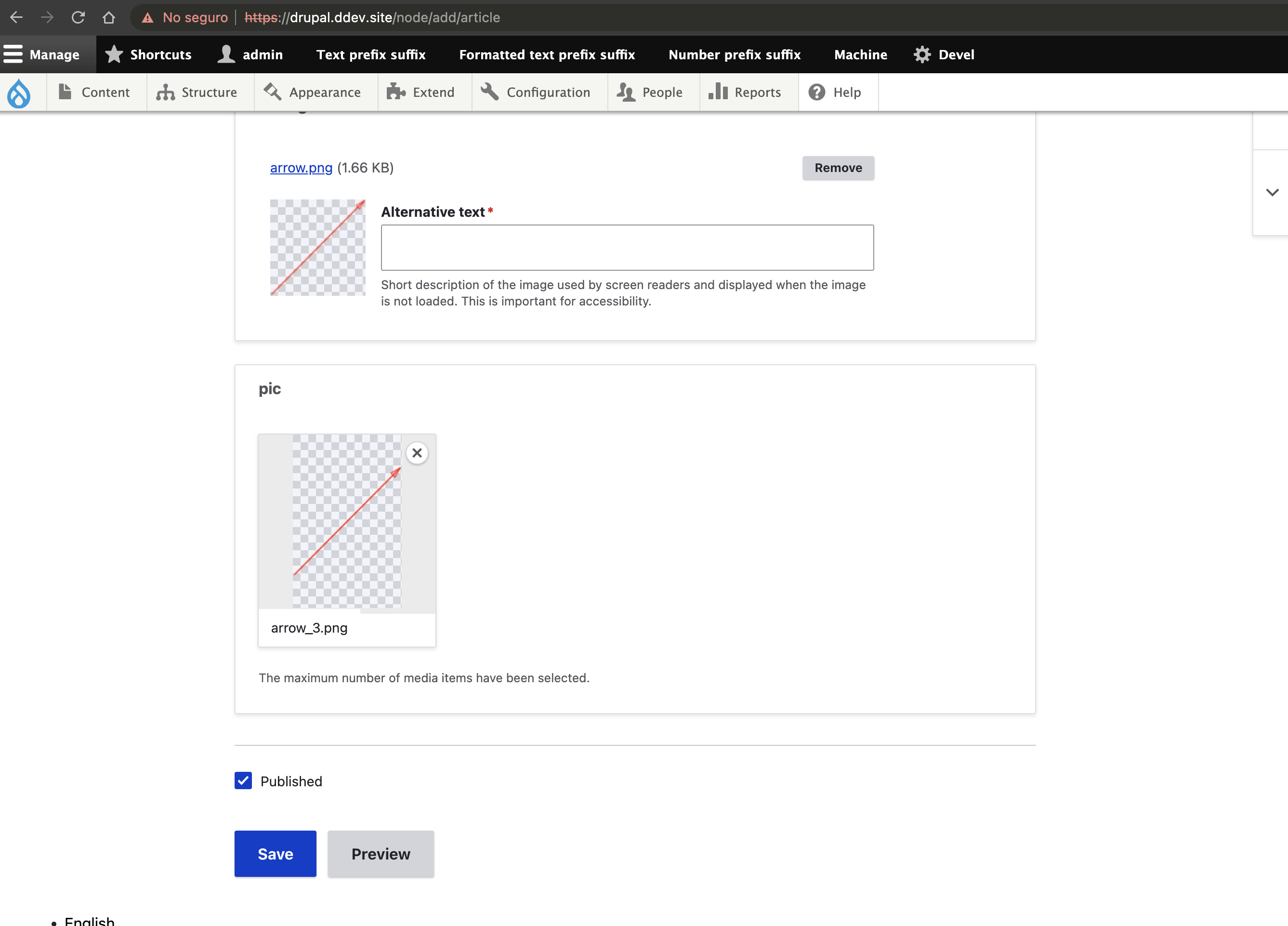
The image pattern proposed in #3072660: Allow white transparent pngs to be seen in image-preview and integrated with #3021092: Image field style update needs some minor improvements, to up-port some improvements from Gin #3278033: Add color pattern behind transparent images in Media Library, including:
- Use a non-white fallback color.
- The size of the squares in the checker pattern is
calc(7rem / 16)=>0.4375remand could be simplified to0.5rem. - The pattern should be applied to the Media Library views in addition to the image field upload widget.
Test steps:
- Enable "Media" and "Media Library" modules.
- On a default Drupal installation, edit the "Article" content type and add a media field of type "Image".
- Create or edit an "Article" node and add a png with transparency on the image field.
- Validate that the thumbnail preview is showing the background pattern correctly.
- Create or edit an "Article" node and add a png with transparency on the media field added on step 2.
- Validate that the thumbnail preview is showing the background pattern correctly.
- Go to the media content page at
admin/content/mediaand validate that the media preview is showing the background pattern correctly.
| Comment | File | Size | Author |
|---|---|---|---|
| #23 | 3087345-nr-bot.txt | 150 bytes | needs-review-queue-bot |
| #21 | 3087345-21.png | 507.39 KB | javi-er |
| #19 | 3087345-19-jpeg_png_test2.png | 528.54 KB | javi-er |
| #19 | 3087345-19-jpeg_png_test.png | 592.77 KB | javi-er |
| #19 | 3087345-19-media_thumb-image_field.png | 318.56 KB | javi-er |
Issue fork drupal-3087345
 Show commands
Start within a Git clone of the project using the version control instructions.
Or, if you do not have SSH keys set up on git.drupalcode.org:
 changes




Comments
Comment #2
huzookaComment #3
ckrinaComment #8
jwilson3What is particularly wrong with the background pattern? Is it just the color choice (ie, the shade of gray against white) that looks too lurid?
Comment #9
ckrinaNothing, it just that we decided we'd agreed in an specific pattern and we never did. But it can be removed and we can use Gin's pattern from #3278033: Add color pattern behind transparent images in Media Library as per Slack discussion.
Comment #10
jwilson3The pattern code in Gin for #3278033: Add color pattern behind transparent images in Media Library was lifted from Claro and is almost exactly the same, except for a few minor differences:
We could re-scope this issue to essentially up-port what we have from Gin and adapt colors back to the closest match from Claro color palette.
Comment #11
jwilson3Comment #15
javi-er commentedComment #16
javi-er commentedI started a merge request and added tests steps on the ticket description to follow up on this.
So far I adjusted the square size in the pattern to .5rem and replaced the white background color with
--color-gray-050. This covers the image field case:Regarding media library, it seems like that the thumbnail is displayed in the media content page at
admin/content/mediaandthe media embed dialog when creating an image. I think that a possible approach is creating a template for "Media Library thumbnail (220×220)" image style and adding the two classes that controls the pattern there (
image-preview__img-wrapperandimage-preview).Comment #17
jwilson3I originally just wanted to add the image-preview class to the views, however, the problem I found was that using .image-preview class on a wrapper was actually affecting other elements in the grid display.
You should also be aware that not all of the views in play here use the same method to display images. Some render thumbnail field, others render a media display mode.
Ultimately, the approach I took in Gin on #3278033: Add color pattern behind transparent images in Media Library was to simply work with existing classes that were available on media views, namely, I used
.media-library-item imgsimilar to how existing.image-preview imgwrapper class worked. However, even this approach wasn't enough, because one of the views didn't have the correct classes present. I opened a separate issue for this, which it would be appreciated if you wanted to review 🙏. #3279578: Media Library Page Table view should have same classes as Media Library Modal Table viewHonestly, I like the approach of an isolated new class, apart from trying to leverage image-preview, because image-preview has other unrelated baggage dealing with the image upload widget. If you disagree, then perhaps we could put up guardrails using a BEM-style modifier class to be explicit that there are two different places it is being used:
class="image-preview image-preview--media-library"class="image-preview image-preview--image-upload"Comment #18
javi-er commentedThanks @jwilson3, I'll review the gin implementation again to see how it was done in the different places, but the first thing I noticed is that Gin is using mixins for implementing it, in Claro it will not be possible since Post CSS doesn't support mixins as it's set up right now. I like the idea of having different image-preview classes, since the thumbnails in the file field and the media library have different sizes and it will allow to adapt for the different cases.
Comment #19
javi-er commentedI went with the simplest path, following how it was done in Gin and I added two lines for also applying the pattern to the media library items, since mixins aren't available on PostCSS, I had to add the existing media library selectors into image-preview.pcss.css , which is not ideal, but the alternative is duplicating the css properties in two files which is worse.
Media library is resizing the images which cause some blank space to be present on them, I think this is a different issue that maybe should be addressed as part of that component, but I'll defer others to decide if it should be addressed as part of this ticket instead.
png with transparency at the media dialog:

png with transparency at the media library:

media thumbnail and image thumbnail for the same image: (the aspect ratio is different because in the case of the media thumb, the height is set arbitrarily)

Testing media embed with jpegs:


In the case of images without transparency, the pattern is visible because as I wrote above, media images have their aspect ratio altered.
Comment #20
jwilson3It's strange, the checkered background issue isn't present in Gin theme, the images take up the entire space allotted in the various media library displays. I wonder what is different.
Seems like the ideal would be to properly crop the image so it fits into the media library displays.
Comment #21
javi-er commentedIn the case of Gin, the image it's being cropped to square with an

object-fit: coverwhich I think that it looks worse, I'm testing other alternatives.Comment #23
needs-review-queue-bot commentedThe Needs Review Queue Bot tested this issue. It either no longer applies to Drupal core, or fails the Drupal core commit checks. Therefore, this issue status is now "Needs work".
Apart from a re-roll or rebase, this issue may need more work to address feedback in the issue or MR comments. To progress an issue, incorporate this feedback as part of the process of updating the issue. This helps other contributors to know what is outstanding.
Consult the Drupal Contributor Guide to find step-by-step guides for working with issues.