Problem/Motivation
WCAG 2.1 introduced success criterion 1.4.12 Text spacing:
In content implemented using markup languages that support the following text style properties, no loss of content or functionality occurs by setting all of the following and by changing no other style property:
- Line height (line spacing) to at least 1.5 times the font size;
- Spacing following paragraphs to at least 2 times the font size;
- Letter spacing (tracking) to at least 0.12 times the font size;
- Word spacing to at least 0.16 times the font size.
The Seven theme pre-dates WCAG 2.1, so addressing this criterion in Claro is a great way to follow modern accessibility practices.
Note: Claro doesn't have to use these minimum dimensions in it's own stylesheets. Rather, this is about making sure Claro doesn't break when someone overrides the author styles with a user stylesheet (e.g. with a browser extension like Stylish).
Note that the word "paragraphs" in WCAG is the general English sense. It doesn't exactly mean the HTML <p> element.
Proposed resolution
Assess Claro's conformance with WCAG 1.4.12 Text spacing.
Apply the specified spacing dimensions, and see if anything breaks. Before-and-after screenshots are good evidence of testing.
Make child issues to fix any problems found for particular pages or components.
Useful tools
- Styleguide module.
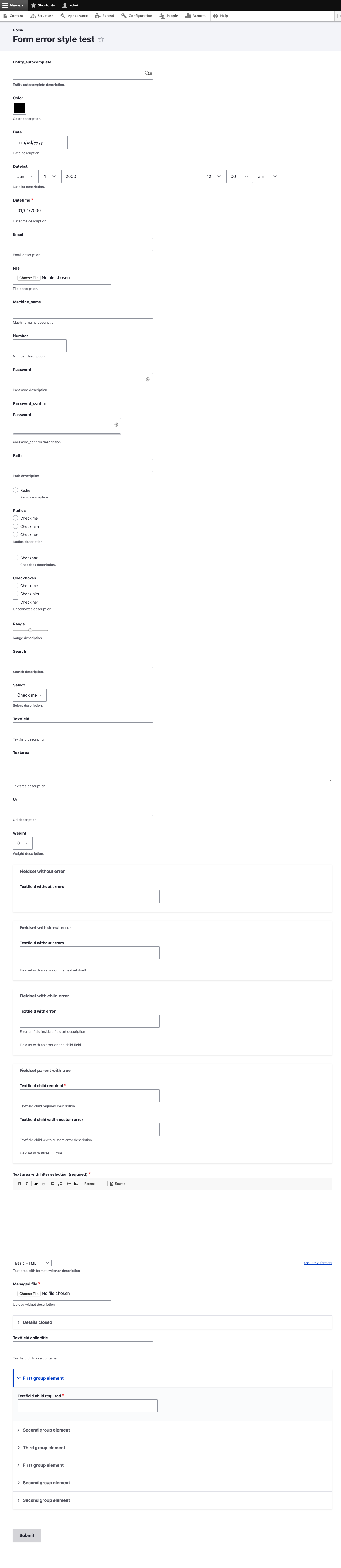
- Form Style module. This provides a page which has all core form elements. Press submit, and you them all marked with errors. Works with and without Inline Form Errors module enabled. The module was originally developed for manual testing of the Inline Form Errors module, but it's handy for robustness tests like this too.
- Dylan Barrell's Text Spacing Bookmarklet. When activated, this adds these brute force CSS rules:
* {
  line-height: 1.5 !important;
  letter-spacing: 0.12em !important;
  word-spacing: 0.16em !important;
}

p, li, h1, h2, h3, h4, h5, h6 {
  margin-bottom: 2em !important;
}
These are the sort of thing someone might put in their user stylesheet.
Note: the bookmarklet doesn't add 2em space after everything that might qualify as a paragraph under WCAG. It will be a good idea to test with 2em after DIV wrappers for things like form errors, form descriptions, and messages.
Background reading
These have examples of the kind of problems which can occur. Content hidden in overflows is a common problem.
Targets for Beta stage (should-haves)
Complete a first-pass survey of WCAG 1.4.12 Text Spacing. A few full-page screen captures from the styleguide test modules will provide a broad overview of how well the theme performs at beta stage.
- Basic typography. A full-page screen capture from the Styleguide module as evidence here.
- All standard form inputs. A full page screen capture from the Error Style module as evidence here.
- Inline form errors. Use the Error Style module again.
- Form descriptions.
Note the bookmarklet doesn't apply the 2em bottom margin to DIVs. Use browser dev tools to add 2em after the form description and inline form error DIVs.
Targets for Stable stage (must-haves)
Assess a full range of special components and pages. Include scenarios combining WCAG "Text Resize" and "Reflow" success criteria too.
Components
- Tables, e.g. the content or user listing, a draggable table, and a multi-value text field widget.
- Content inside dialogs, e.g. Views UI dialogs.
- Content inside vertical tabs. The emails templates on the user account settings.
- Content inside details/summary.
- The node meta details groups
- Message blocks.
- Help block at the start of a page
- drop buttons
- long breadcrumbs
Special pages
- The status reports page.
- Appearance (theme list)
- Extend (modules list)
admin/config- A Views config page
- Image style config pages.
- Others...?
Scenarios
- Test in combination WCAG 1.4.4 Resize text. Set the browser zoom to 200%, then apply the bookmarklet.
- Test narrow viewports. Suggested approaches:
- Viewport width somewhere in the middle of the portrait tablet breakpoint range.
- Viewport width in the mobile breakpoint range.
- Also 960px window width on desktop. This is a common scenario when using window tiling to half the screen width on (a.k.a. Windows "Snap") on a HD monitor.
- Test in combination with WCAG 1.4.10 Reflow. Use the bookmarklet in a viewport 1280 CSS pixels wide, at 400% browser zoom (or 960px at 300% zoom).
- Repeat these scenarios with and without the admin toolbar open in vertical orientation.
Must haves:
None added yet
Should haves:
#3164806: Purpose of filters fieldset on admin pages is unclear when zoomed in, and for cognitive accessibility
#3164587: Text resize on wide screen layout also causes reflow to single column, making the layout too wide
Could haves:
#3164800: Accordions on content form are difficult to understand when using system or browser zoom preferences




Comments
Comment #2
andrewmacpherson commentedComment #3
andrewmacpherson commentedComment #4
andrewmacpherson commentedComment #5
andrewmacpherson commentedComment #6
huzookaComment #7
andrewmacpherson commentedComment #8
katannshaw commented@andrewmacpherson: I did the initial testing for "Targets for Beta stage (should-haves)" with the text spacing bookmarklet applied and a 2em bottom margin. Here's my findings:
1. Styleguide with text spacing applied and 2em bottom margin:
Online screenshot: https://monosnap.com/direct/Ahss7g34O2PH8eStN3Dq9cPzdzWvyu
Attached screenshot: styleguide-text-spacing-10102019.png
CSS added to page:
2. Forms without errors
Online screenshot: https://monosnap.com/direct/tULfuCiNHI1WbN1QzEgDYyr6JRsTdp
Attached screenshot: errorfields-witherrors-text-spacing-10102019.png
3. Forms with errors
Online screenshot: https://monosnap.com/direct/vrgmaSEGShSvA3a9Z8E4ex0kt4pLnX
Attached screenshot: errorfields-withouterrors-text-spacing-10102019.png
CSS added to page:
Comment #9
huzookaTest env:
composer.json:drush en errorstyle styleguide -ydrush [th]en claro -ydrush config-set system.theme default clarodrush config-set system.theme admin claroI've updated the bookmarklet, it can be found here (repo). Changes:
2embottom margin (as described)2embottom marginScenarios runned (default state shots prefixed with
00):Missing scenarios (these should be specified first):
* 02: Viewport width somewhere in the middle of the portrait tablet breakpoint range
* 03: Viewport width in the mobile breakpoint range.
* All the test scenarios [1, 2, 3, 4, 5] with (vertical) toolbar.
Updated bookmarklet:
* Source code.
* GH page.
Comment #10
huzookaI forgot to add the partial resources.
Comment #11
huzookaComment #12
andrewmacpherson commented#8: Thanks @katannshaw - that's a great start. No issues in those screenshots/
#9: Cool, I'll try the new bookmarklet soon. BTW the original license for dylanb's bookmarklet is MIT. You should probably add that to your repo. See https://github.com/dylanb/dylanb.github.io
#10: Aha, that's a nice big zip file. I'll take a detailed look soon.
I don't see vertical tabs on any screen shot. I'd expect to see some at the bottom of the error style page. Is the vertical tabs issue included in what you tested?
Which version of Claro was used? Contrib 1.x, contrib 2.x, or the alpha just added to core?
There's an overflow issue on
05-Claro-admin_appearance_styleguide--960-300-bml.png. It's the grey box near the top of main content, with the big list of links. That's from the styleguide module. Do you think the overflow issue there is anything to do with Claro?Some of these screenshots will suffice for the Text Resize or Reflow survey issues.
TODO:
If we can get the vertical tabs, then I'd say we have all we need for the beta-stage survey. When vertical tabs has the extra summary message, that's a crowded thing that could break with extra spacing or zoom.
Comment #13
huzookaRe #12:
First of all, thanks for highlighting the missing license! I just fixed that :)
Vertical tabs is there. This is that:
Actually, we are using a really big media breakpoint for displaying the real vertical tabs, that's why you cannot find the expected UI neither on the 1280(CSS)px wide screenshots I've made.
The one that was merged into Drupal core 8.9.x [commit: 0fe72eb470].
Others:
I just noticed that the end of every screenshot is messed up. (No idea why, they look fine in Firefox browser.)
I think that I'll re-generate these screenshots manually tomorrow (I'm in CEST right now).
The ones I shared in #10 were taken in Firefox, with the built-in Firefox dialog.
In Chrome, I was unable to take page captures with lower or higher page zoom than 100%.
Comment #14
huzookaComment #15
huzookaSteps to reproduce my test instance:
56f670c861(8.9x):git clone --branch 8.9.x https://git.drupalcode.org/project/drupal.gitcomposer config repositories.'zolhorvath/errorstyle' github https://github.com/zolhorvath/errorstyle.gitcomposer require drupal/styleguide zolhorvath/errorstyleThis will trigger the installation of other required extensions as well.drush si standard -ydrush en errorstyle styleguide -ydrush [th]en claro -ydrush cset system.themes default claro -yScenarios I've runned (on Chrome):
Since the vertical toolbar is fixed for cases #3 and #5, I skipped these for the 'with-toolbar-vertical' screenshots.
The shots prefixed with 0 represent the default state, with 1400px browser canvas size.
Things I noticed during the test:
Comment #16
andrewmacpherson commented#15 - great, I see the vertical tab styles now.
Over in #3066007: Roadmap to stabilize Claro, I originally thought it would be best to survey WCAG "Text spacing", "Text resize", and "Reflow" success criteria in their own issues.
However, with the detailed plan and workflow that has emerged here, I think we can treat these as a combined survey. I've updated the roadmap issue to reflect that.
Comment #17
andrewmacpherson commentedIssue summary could do with a small update to explain the new scenarios from #15 and scope from #16.
Comment #18
katannshaw commented@andrewmacpherson and @huzooka: Looks like you guys are on a roll. Let me know if you need any testing after you've finished everything.
-Kat
Comment #19
andrewmacpherson commented@katannshaw - getting screenshots of the special pages mentioned in the issue summary is the next step to move this along.
Comment #20
fhaeberleShould we postpone this until the designs and implementations of the "special" pages are ready? Because this is currently blocked on the design and implementation of the updated page designs.
As note of those who weren't involved: In Claro's development we first focused on the components rather than redesigning the pages. Some of the pages already are ready because they only consist of the already finished components or were curical that Claro can be added to Core. Some of the pages aren't out of the components we already finished and additionally they define special layout or components like the status report page, therefore this needs to be designed and implemented (which is in the process right now and a stable blocker).
Comment #21
katannshaw commentedI've done additional testing for the "Special Pages" with the text spacing bookmarklet applied, a browser screen set to a 1400px width, and a 2em bottom margin using the following code:
My findings can be found in the attached zip file containing 16 before/after screenshots. I noticed that the arrows in the dropdown menus don't adjust properly when the text spacing is applied. You can see this in the Blocks, Image Style, and Views. The Edit Views page is also very scrunched up, but I believe that would be handled by the crew maintaining the Views module. I plan on working on the Scenarios pages next.
Comment #23
rainbreaw commentedI'm adding child issues to this issue, and will continue to update this comment with the specifics as the issues are created.
Must haves:
Should haves:
Could haves:
Comment #24
andrewmacpherson commentedJust a note to say that dmsmidt/errorstyle is no longer developed; it's been replaced with drupal//form_style. Basically we moved it to drupal.org to give it more prominence, and make it easier to install. I expect we'll use it to assess Olivero too. We changed the name of the module, because it's useful for testing form styling with or without errors. A few new features are in the works too.
Re. #20:
There's no value in postponing this issue, because it isn't blocked by those. Rather, assessing conformance here is something that can be done on an ongoing basis until Claro can be marked stable. What we already have could break at any time. Accessibility testing isn't something that we do at the end. Postponing it will just discourage people off testing as we go along.
When new pages are ready, the scope here grows.
Comment #25
dyannenovaUpdated description with new link to Form Style module and marked this as a meta issue, since it will be used for ongoing tracking of related accessibility issues.
Comment #27
katannshaw commentedPosted comment in wrong issue. This can be deleted. Sorry.
Comment #28
volkswagenchickAs per Comment #25, I am moving this issue back to active as it is now a meta issue for tracking related accessibility issues.
Adding @rainbreaw's child issues to the summary for wider visibility.
Tagging
Easy Out of the BoxComment #31
lauriiiI believe this issue should be considered as done. Marking as RTBC for visibility.
Comment #32
lauriiiThis has received significant testing by @katannshaw in #8 and #21, @huzooka in #9, #10, and #14, as well as @rainbreaw in #23. Issues have been filed for the bugs that have been discovered.