Problem/Motivation
The Drupal link CKEditor button can be used to add links to embedded media items. However, we can't guarantee that the rendered representation of that media item will be a single HTML element, or one that can be safely wrapped with <a> tags. As a result, editors can create links that have arbitrary HTML elements inside them.
Steps to reproduce:
1) Go to simplytest.me and spin a vanilla install of Drupal 8.8.x. Log in with admin/admin, install the "Media" and "Media Library" modules.
2) Go to /admin/config/content/formats/manage/basic_html?destination=/admin/config/content/formats and drag the "Insert from Media Library" button into the CKEditor toolbar. Enable the "Embed media" filter, and click "Save configuration".
3) Go to /admin/structure/media/manage/image/display and drag the "Authored by" field up into the visible fields area. Click "Save" to save this view display settings.
4) Go to /node/add/article to open the article node form. In the wysiwyg, click the "Insert from Media Library" button. Upload a file into the upload zone, give it an ALT text. Save and insert. At this point you will have something like this:
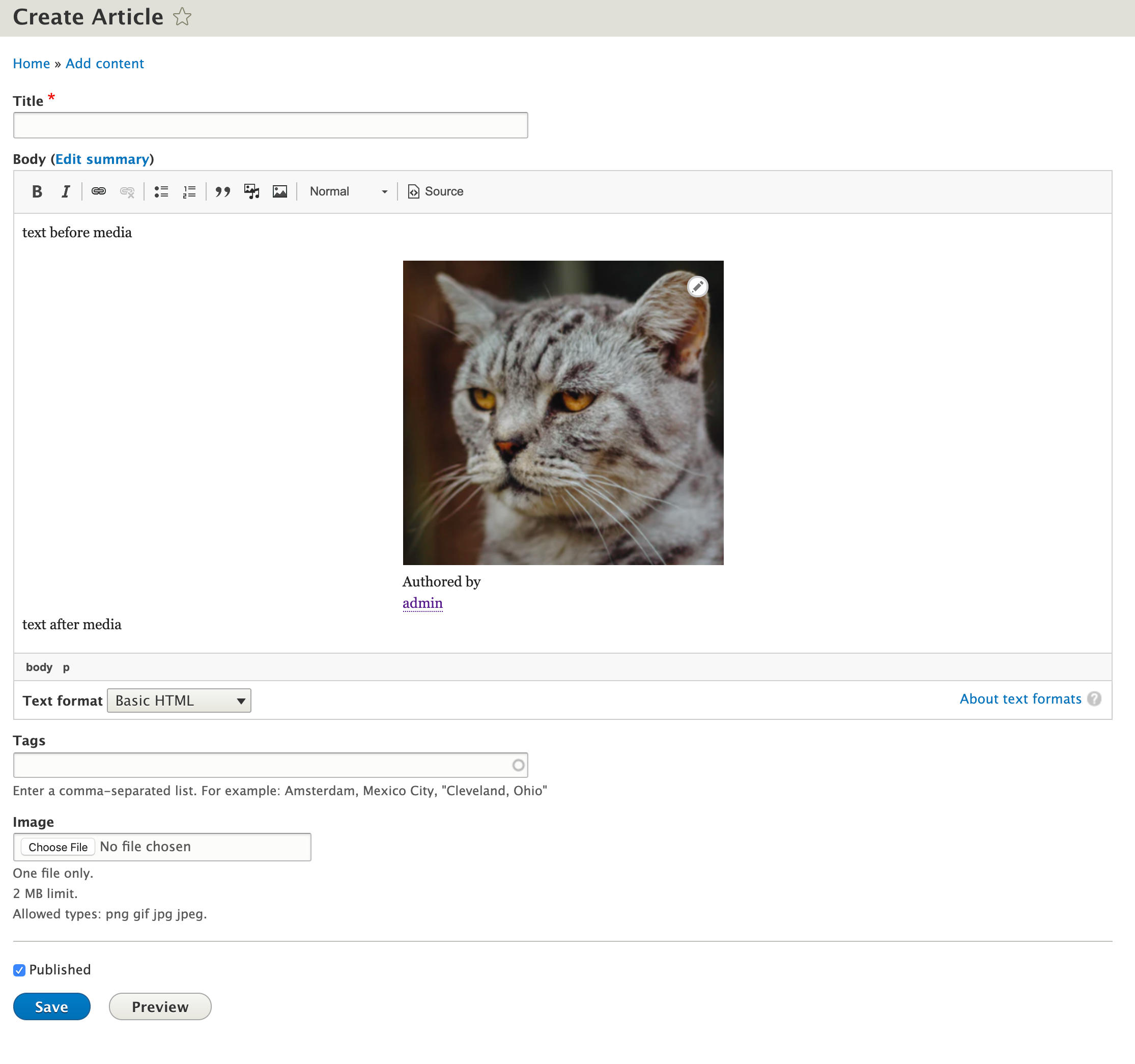
5) Click the media item to select it, then click the "Link" button from the CKEditor toolbar. Give it a random URL (such as https://drupal.org)
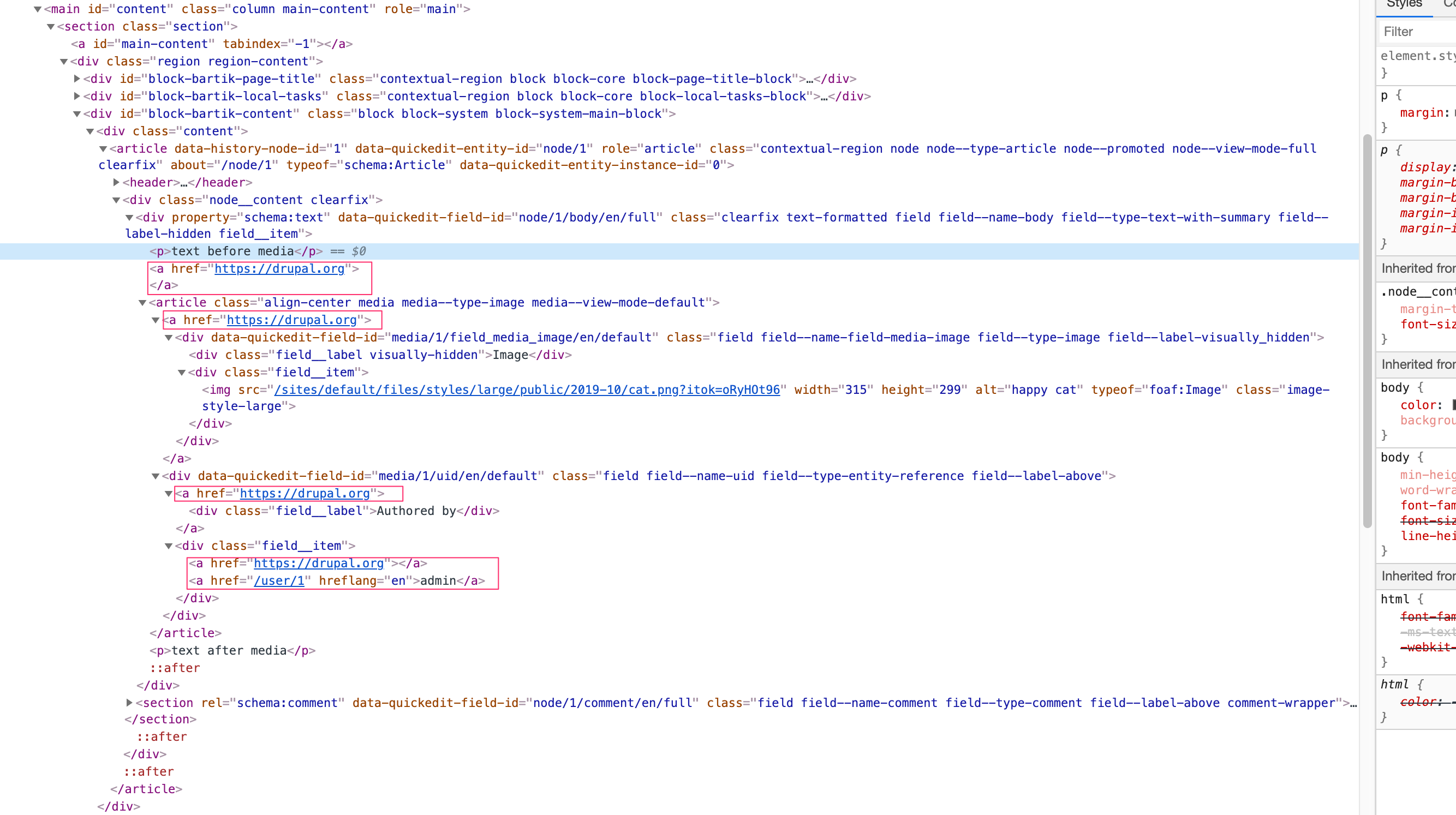
6) At this point, if you view the source markup you will have something similar to this:
<p>text before media</p>
<a href="https://drupal.org">
<drupal-media data-align="center" data-entity-type="media" data-entity-uuid="94a3ff34-a958-427c-ac51-127259cbc1e2"></drupal-media>
</a>

<p>text after media</p>
7) Fill in the required fields and save the node.
8) Inspect the markup of the node body, you will find something like this:
Proposed resolution
TBD
Remaining tasks
- Discuss and agree on a reasonable approach
- Implement it
- Review & commit
User interface changes
TBD
API changes
TBD
Data model changes
TBD
Release notes snippet
TBD
Original report from @wrd :
With the progress being made on #2801307: [META] Support WYSIWYG embedding of media entities, I've been playing with the new capabilities and have run into what seems like an important issue for typical users: after embedding some media entities, particularly images, a user will probably expect to be able to link the media to another page. At present, this doesn't really work.
- Perform a Standard install.
- Enable the Media and Media Library modules.
- Edit the Basic HTML editor. Enable the "Embed media" filter, remove the "Image" button, add the "Insert from Media Library" button.
<drupal-media data-entity-type data-entity-uuid> is added to the allowed HTML tags automatically.
- Create a new Image media entity in the Media Library.
- Create a new Basic Page.
- Use the "Insert from Media Library" button to embed an image in the body field.

- Click on the embedded image to select it.
- Click the Link button to link the image to a destination. I'll link it to https://drupal.org.

- When done, note that there's no visual indication that the embedded image has been linked to anything.

- Save and publish the node, and view it.
You'll see that the image is, indeed, linked to https://drupal.org. However, if you inspect the element, the <a> tag has been wrapped around the entire media entity:
<article data-history-node-id="1" role="article" about="/node/1" typeof="schema:WebPage" class="node node--type-page node--view-mode-full clearfix">
  <header>
    <span property="schema:name" content="Test Page 1" class="rdf-meta hidden"></span>
  </header>
  <div class="node__content clearfix">
    <div property="schema:text" class="clearfix text-formatted field field--name-body field--type-text-with-summary field--label-hidden field__item">
      <p>This is a test. </p>
      <a href="https://drupal.org">
        <article class="media media--type-image media--view-mode-full">
          <div class="field field--name-field-media-image field--type-image field--label-visually_hidden">
            <div class="field__label visually-hidden">
              Image
            </div>
            <div class="field__item">
              <a href="https://drupal88.dd:8443/sites/default/files/2019-08/pears_1.jpg">
                <img src="/sites/default/files/2019-08/pears_1.jpg" width="640" height="480" alt="Pears" typeof="foaf:Image" />
              </a>
            </div>
          </div>
        </article>
      </a>
      <p>This is only a test. </p>
    </div>
  </div>
</article>
While we can wrap block elements in <a> tags in HTML5, the result here is problematic. The image itself is (by default) linked to the raw image file, so we've got nested hyperlinks, which AFAIK isn't permitted in HTML5. And browsers (Safari, anyway) will ultimately render this as multiple separate <a> tags, most of them empty or wrapping whitespace.
It seems like the expected default behavior for a typical user would be that after using the Link button, there would be some kind of visual indication in CKEditor that the entity is linked, and the rendered page would simply have the image linked to the destination specified using the Link button.
However, to complicate matters, we have to anticipate the possibility that the media entity being embedded is more complex than just an image. For example, what if I have a custom media type that looks like the Image type, but has a few more fields:
- Copyright (date field)
- Location (geolocation field)
- Photographer (entity reference field)
...and a default view mode that displays the image, the copyright date, the location, and a link to the Photographer entity.
If I embed this entity, and then use the link button, the desired behavior is probably for the image to link to the URL entered using the link button, while leaving the link to the Photographer node untouched so that it still works.
I'm not sure if this more complex case can be handled in any reasonably generalized fashion that'll work for most users. However, the more basic behavior of simply linking an embedded image entity should probably work out of the box, shouldn't it?
I hope this is useful! Let me know if I can clarify anything.


 Show commands
 changes





Comments
Comment #2
wrd commentedIn case it's useful, the Entity Embed project recently dealt with the problem of adding this functionality. I'm not sure how portable the idea is to the core implementation:
https://www.drupal.org/project/entity_embed/issues/2511404
Comment #3
wim leersThanks for taking the time to open this issue!
\Drupal\Tests\media\FunctionalJavascript\CKEditorIntegrationTest::testLinkability()proves that it does work.Actually, there is, but it's subtle: those dotted lines below the image show it's a link. Plus, you can focus the embedded media and click the "link" button to edit the link, or right-click and choose "Edit Link".
This is why #3066802: Ensure that embedded image media items do not display at unreasonable sizes by default is important! That would solve this. I agree that embedding the view mode is problematic not only from a UX POV, but also a semantic HTML POV and hence also an accessibility POV.
This is indeed super super tricky. See #3061449: Prevent drupal links being added to embedded entities that contain links when rendered for prior discussion about exactly that.
Comment #4
wim leers#2: that issue ported the
DrupalImagelinkability support from Drupal core to Entity Embed. And that in turn is what #2994696: Render embedded media items in CKEditor added to Drupal core for embedded media.Comment #5
wim leersActually … I think we should mark this as a duplicate of #3061449: Prevent drupal links being added to embedded entities that contain links when rendered and move that into the Drupal core issue queue, since it was also you who triggered the creation of that issue, see #3061449-3: Prevent drupal links being added to embedded entities that contain links when rendered.
Or perhaps the other way around, since this now contains 10x more detail.
@wrd, @marcoscano, any preferences?
Comment #6
bkosborneOutside the box approach: When a media entity is linked in CKEditor, pass the link URL to the media entity and have the media entity deal with it somehow.
With this approach, if a user links a media entity that renders as an image with a caption, then the media entity render would choose to use that passed in link and just wrap its image in that link, and not the caption.
That's a lot of work, but I think that's an ideal scenario for how it could be handled. Just wrapping the entire media entity rendered HTML in a link is unlikely to work well in most cases.
Comment #7
wrd commentedTrue. More correctly, I should have said that the resulting markup isn't (I think) what a typical content-editing user is going to expect.
I thought I had tried this and not seen the "Edit Link" option. I'm running another test install; I'll double-check this when it's done.
This makes sense to me, and yes, this one probably contains more useful information. It may be that the other title is more descriptive? But this issue could be retitled in that case.
Am I remembering correctly that this is how Entity Embed approaches the issue? I recall a data attribute being set on the entity tag...but IIRC, some significant changes were made before it was completed.
Comment #8
aaronmchaleAgree with @bkosborne in #6 that passing the Link attributes as data parameters to the Embedded Media is probably a good approach. This can then be handled correctly in Twig templates.
Comment #9
aaronmchaleFixed the issue link the summary, should use LinkIt not raw HTML.
Comment #10
marcoscano#5:
(sorry, was on vacation, still trying to catch up)
I don't have a strong preference. Since the concepts (and actually, most of the implementation) are the same in core-embed and in entity_embed, I think we should fix it once, and then just port the solution to the other project. At this point I think it makes sense to keep working here, and when done we can do the same in entity_embed. I wouldn't close #3061449: Prevent drupal links being added to embedded entities that contain links when rendered though, since people using entity_embed now would likely first search for the issue there. IMO the cross-reference for the time being is good enough.
Comment #11
xjmComment #13
wim leersAgreed that the title is highly misleading, see #3 and #5.
Comment #14
marcoscanoUpdated title, steps to reproduce and a suggested approach. I'm also tentatively marking this as a bug since the markup can be really confusing in some scenarios.
I'm not really sure the best way to solve this in a generic way, that's why IMHO the best approach could be to avoid the problem entirely, by directly disabling the "Link" button for all embedded media items. It's gross, I know, but I don't know how else we could avoid the complex markup. The embedded media can end up being anything over time (and that's part of the beauty of rendered items...), so we can't even try to detect if there is a link in the preview, etc, because it could appear later on when that media is edited by authors or that viewmode re-configured by site admins.
As for #6, I like the idea, but I'm unsure how we could implement it without undermining the whole idea that "entity X rendered in viewmode Y" will always produce the same markup?
Maybe a JS-based approach could be good enough for some cases? 🤔
Leaving it still assigned to @phenaproxima since I'm not sure if he will want to add something to it too.
Comment #15
phenaproximaNope! :) Thanks, @marcoscano!
Comment #16
marcoscanoComment #17
phenaproximaI tend to agree with this sentiment. Trying to "fix" this generically will lead us dangerously close to the biggest pitfall of Drupal development, which is that we keep trying to support all the edge cases, therefore increasing complexity and fragility of the overall system, and reducing maintainability. It's not great, and I'd like to move away from that.
What I believe we should aim for, if anything, is to give developers the tools to work around this for themselves as needed. For example, maybe we could add some JS infrastructure -- almost a lightweight "hook" system, in a way -- to prevent an embedded item from being linked, if some custom code says it can't be. Then let site developers leverage that mechanism and sort it out for their particular use case. Perhaps CKEditor already provides something like this. It's worth looking into, IMHO.
Comment #18
aaronmchaleLet's look at this practically, the common media types likely are image, video, remote video, document, and audio. For video, remote video, document and audio it really doesn't make sense to allow links to wrap the embedded media at all, and that's probably true of most other custom types sites will implement. That's why I think a good starting point should be to do what @marcoscano said in #14 which was:
Having linking disabled by default I think makes sense, that at least gives us a safe default to work from.
Next we make it possible for each media type to opt into providing WYSIWYG editor linking support, this would simply be a config option for the Media Type Config Entity and editable on the Edit form of each Media Type. By default "Image" would be the only media type to opt into this because it's the only one it makes sense for. This configuration would then be passed through to the text editor and (probably) the Link plugin, which could then behave appropriately using JavaScript.
Ok so at this point we have a situation where it's only possible to add links to media types which have opted in to support links.
Next, the Editor Link plugin would need to be modified to instead of wrapping
<drupal-media>tags in<a>tags to instead add the various link attributes to the<drupal-media>tag, e.g.<drupal-media data-link-href="">. The various possibledata-attributes would then need to be added to the allowed HTML tags list for<drupal-media>tag when either: the Link plugin is added to the toolbar configuration for input filters, or the media plugin is added to the toolbar configuration and the link plugin has already been added. Also, any default configurations which add link and media tags/buttons would need to be updated.At this point the link attributes could be passed to the entity view display when the media entity is rendered, but it now really comes down to what kind of media is being rendered, and I'm only going to consider images here, because as stated that's the only one I can see this applying to. Media could alter the Field Formatter forms for the Image and Responsive Image Formatters to inject an option which when enabled would result in media passing those link attribute values to the formatter for it to render, since those formatters already support wrapping the raw
<img>tag in a<a>tag, thanks to the existing "Link image to" option that the formatters provide.At this point I've put a good few hours into thinking about this approach, and this seems to be the most workable one. It's not perfect though, the last part isn't generic, but the first parts are generic which means it shouldn't be too difficult for contrib or custom modules to handle these link attributes in ways which make sense for whatever kind of media they are providing. In #17 @phenaproxima said:
And I think I agree with that, but I also think the approach I'm proposing is specific enough to work well for probably the 80% use case, while being generic enough that it still allows the 20% to benefit if a little work is put in.
Edit: I also considered an approach which would have involved using a customised a view mode and Twig templating, but I think that is probably too volatile since it's now possible for people to select which view mode to use for embedding (if multiple exist), and I know there are obvious usecases for providing different view modes and using those to rendering, such as image sizes and provide other bespoke rendering (I know because I've done that for banner images using Media Entity Reference fields on a site), so I think the approach I proposed avoids that whole potential massive pitfall and doesn't get in the way of the site design and content structuring.
Comment #19
rferguson commentedFollowing up here with a related question failing finding any other info online about linking media embedded images in the editor.
There's an issue when linking a media item in the editor whereby it adds empty P tags.
It seems to happen when the editor renders, so switching back and forth between source view has the same effect. Or saving, then editing, then saving, then editing, etc.
You get this behavour:
Right now I'm just using linkit, but the core link button would do the same thing. Unlinked Media items do not exhibit this behavior. What's the proper answer for someone wanting to use a media item within ckeditor and have it link somewhere specific if this isn't the way? It does work, it just has that undesirable side-effect at the moment.
Comment #21
rv0 commentedI'm having the same issue as mentioned in #19.
Did you find a workaround @rferguson?
Although the issue of CKeditor adding empty paragraphs is a common one, this one is very specific to media with links
Some related issues:
https://www.drupal.org/project/drupal/issues/2876094
Comment #22
rferguson commented@rv0 I haven't been able to find a workaround, it seems to do with the way the ckeditor plugins for media have been written. There's likely a server side filtering component as well.
I've opened a separate issue over here as well:
https://www.drupal.org/project/drupal/issues/3131055
Comment #23
marcoka commentedI exactly have the same problems here.
-Empty paragraphs get added a lot.
-I can not link a media embedded using drupal cores media. The a tag is placed outside not really arround the media.
What i have tested is just using a textformat where every filter is disabled expect media and ckeditor is also disabled. Then it works if i put a link arround the media tags.
Comment #24
phenaproximaComment #26
jonraedeke commented+1 for the idea proposed in #18
I don't see wrapping drupal-media in a link ever working correctly given the wide variety of markup possible for media.
Comment #28
mark_fullmerIt appears that the specific circumstances of the problem as described in comments 19-23 -- i.e., the non-linking of the Drupal media within a Drupal link is triggered specifically by the
filter_autopfilter ("Convert line breaks into HTML (i.e. br and p)").Moving that filter after other filters involved in the link + media generation resolves the issue.
Specifically, "Convert line breaks into HTML (i.e. br and p)" must execute after all of the following:
- Embed media
- Convert URLs to links
- Correct faulty and chopped off HTML
This certainly does not account for the broader underlying problem with semantic markup in links described in this issue, but this may provide a workaround for folks coming to this issue with the problem described in #19 and later.
Comment #29
gabesulliceConfirming that #28 did resolve the issue that brought me to this page. I'm not sure it's the "right" fix, but it works in practice :)
Comment #31
nachosalvador commentedAs #29 said, I also arrived to this page with the same issue and I could solve it when I moved "Convert line breaks into HTML (i.e. br and p)" after:
- Embed media
- Convert URLs to links
- Correct faulty and chopped off HTML
Comment #32
karlsheaI have "Convert line breaks" disabled entirely and still have the empty paragraph tag issue.
Comment #33
sclsweb commentedI also have "Convert line breaks" disabled entirely and still have the empty paragraph tag issue, and no amount of messing with the filter order seems to change this.
+1 for the idea proposed in #18. Links on images is a big use case for the sites I support and we would love to see any solution, workaround, or patch to fix it.
Comment #34
tbadaczewski commentedI'm suffering from this issue as well:
THIS:
BECOMES THIS:
The "Correct faulty and chopped off HTML" setting is not enable so I don't understand the motivation for the editor re-writing the code since "Embed media" is the only CKEditor enabled.
Comment #35
gaellafond commentedI just updated to Drupal 9.3.12 from... not sure which version of Drupal 9. I'm pretty sure it was a minor update.
In that version, CKEditor have decided to take the matter into its hands. To be honest, I can't tell if it's a new behaviour from Drupal, from a browser update or something else. There is only one block on the website which has images with links (the Partners section). I noticed today that the editor for that block was seriously messed up. 8 of the 12 partners images gets deleted when clicking the "Edit" button. I haven't saved it, so nothing have been lost. But I wrote that block, so it used to work. The main issue is that I can't edit it anymore. There is no way to get back the content I put in that block and fix it. At least, not using the website. I could get it by extracting it from the DB.
I did several tests to try to understand what was going on.
In my tests, I switch from Source mode to Preview mode, and back to Source mode to check what changes in the HTML. No need to save the node, so it's not a server side issue. I also disabled every single filters for "Full HTML" mode, to be sure there was nothing fishy there.
The issue
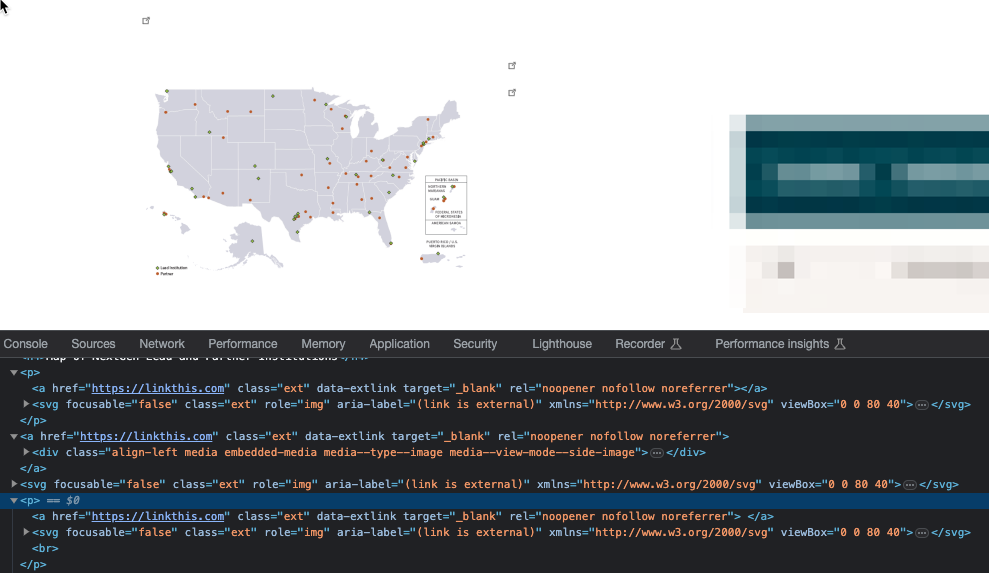
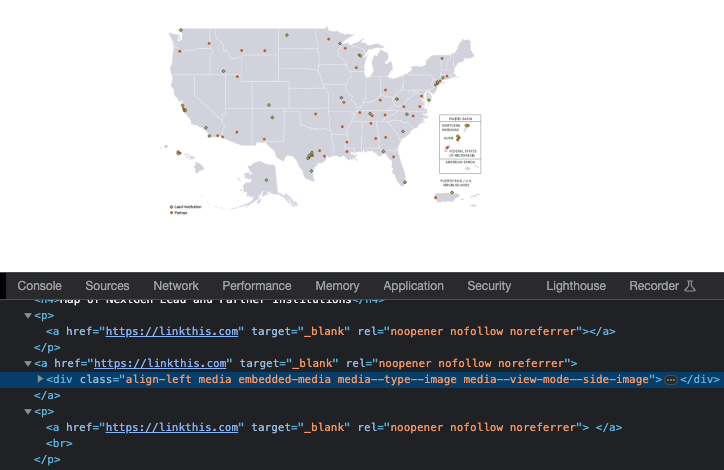
If you put a link around an embedded media, CKEditor adds empty links in the page (one before the image and one after). It also strip some of the text on the page, and some times some other elements such as other embedded images:
becomes
NOTE: I get the exact same behaviour using Google Chrome and Firefox.
If you have several images and some of them have links, get ready for a show! CKEditor shuffle images around (yes, it actually re-order the images on the page), delete many of them and delete lots of text. You basically get what you would expect from putting the page in a blender. It's a real disaster!
Proposed solution
CKEditor uses the browser "editable" feature. Whatever solution we go with will need to work client side. Disabling links on embedded media could solve the problem, but it's not a solution.
I think the real solution would be to add the link as a custom attribute in the "drupal-media" tag, and render it around the "img" tag in the twig template.
I don't know if there is a solution to prevent CKEditor from "blending" the page when switching back and forth between Source and Preview mode. If you manually put a link around a "drupal-media" tag, your browser will mess the HTML no matter what. Unless there is a way to instruct the browser to treat "drupal-media" as inline element. That way, it should leave the HTML code as we write it, even if it's not technically valid. That would give us a chance to fix it.
Comment #37
gaellafond commentedI bit more information.
I edited the text format "Full HTML" and changed "Text editor" from "CKEditor" to "None". Then, I edited the Partners block containing a lot of media (images), most of them with links on them. Since CKEditor is not there to alter the content, I can now copy the original content of the block.
I have simplify the UUID and URLs:
Here is what the exact same block looks like, when CKEditor is enabled:
As you can see, the HTML content is massively modified by CKEditor. A lot of information is lost and some images are swapped around.
Comment #38
tedfordgif commentedComment #40
edysmp#28 Fixes my issue. Now media images can be linkable. Thanks!
Comment #41
bkosborneI wonder if anyone has tested how this works in CKEditor 5? Maybe it's easier to accomplish there?
Comment #43
scotwith1tStill seeing problems with this in CKEditor 5 with D10.1.2. While adjusting the order of the filters does link the image (Yay!) the markup is still broken.

This is compounded and becomes particularly visible when using ExtLink module, where the broken markup results in multiple external link icons being added.

Comment #44
cewernlund commentedJust wanted to say the comment in #28 worked for me. I was thinking something in the Text Editor format might be the culprit and this proves it. Many thanks for reporting it!
Comment #47
jayhuskinsHere is a patch for 10.1.5 that simply removes the ability to link media.
Comment #48
scotwith1tI don't know about others but, to me, removing the ability to link media altogether is not a viable solution. Linking media is a critical function for many sites.
Comment #49
marcoka commented@scotwith1t yes, i agree, of course that is an important function. Linking media is used everywhere :)
Comment #50
loze commentedI think all the options available in ckeditor5 (edit, link, align, caption, etc.) should all be configurable on the media bundle, or view mode.
Is that possible?
or maybe a hook that runs on each media entity in the editor, where you could unset a specific option for that entity based on your needs.
Comment #51
scotwith1t@loze While that would definitely be a great feature, it doesn't really fit into the scope of what's being addressed in this issue. See https://www.drupal.org/project/media_embed_view_mode_restrictions contrib module which was created out of #3308069: Provide per-bundle configuration for embeddable view modes as a potential solution (tho it doesn't have a D10 release yet).
Comment #52
rgpublicWell, the main problem seems to be (IMHO) that way to many field templates (e.g. core/themes/stable9/templates/field/field.html.twig and many more) in Drupal contain a div tag when they should better use a span tag, I guess. A span tag would be more correct because a whole field, for example, is an inline element. There can be multiple fields in a row. As long as they are all using div tags, they can never appear inside a p tag :-(
Comment #53
millerrs commentedI get the same broken markup in #43 with 10.2.1. My filter order is the same as suggested in #28.
While I have limited knowledge of CKEditor's mechanics, the proposal in #18 to utilize an attribute for the link appears feasible and aligns with the methods used for alignment and other options.
Comment #54
chuck_theobald commentedOn Drupal 10, CKEditor 5, fully updated Media tooling:
FWIW, the issue I am seeing is a link with no content, followed by the image.
Seen in CKEditor Source mode:
test media image link
Delivered to the browser:
test media image link
Moving "Convert line breaks into HTML (i.e.
and
)" to last in the processing order fixed the linking issue. My filter processing order:
Convert URLs into links
Advanced Insert View
Restrict images to this site
Align images
Caption images
Embed media
Display embedded entities
Linkit URL converter
Correct faulty and chopped off HTML
Convert line breaks into HTML (i.e.
and
)
Comment #55
mortona2k commentedI ran into a similar issue as above.
I have a media view mode that displays an image linked to the file.
When it's embedded, the link is stripped.
The issue was with the order of filters, after moving things around the link worked.
Comment #56
drubbI did something similar like in #28 or #54. While the image is correctly displayed and linked, there are still additional empty links before and after the image. Something like
It's weird!
Comment #57
caspervoogt commentedI was running into issues with linked media images not rendering as linked images. Disabling the 'Convert line breaks into HTML' filter fixed that for me. It was not enough for me to move it to the end of the list of filters. I also tested putting it first. Only disabling that filter solved it for me.
Comment #58
chuck_theobald commented#57: ++
Finally getting back to this and can confirm that caspervoogt's solution works for my sites as well.
Thank you!
Comment #59
bhogue commentedMaybe no new information here, but I'm also having this issue and being driven crazy by it, so I'll include what I've seen just in case.
My CKE5 content is a simple
<drupal-media>element with a link added and the "Convert line breaks into HTML" text filter is near the top of the list. This is what the source looks like:This is the rendered output:
Note the
<p>that precedes the<article>. It contains an<a>that contains only a<br>and which of course results in a duplicate link (which is bad practice). None of these elements were present in the CKE5 source.I figured out (as others have) that if I turned off the "Convert line breaks into HTML" text filter, the image link began working as expected and the rendered output looked like this:
So that solves it! But I don't want to turn off the filter completely because that might mess up existing content that relies on the line breaks being converted, so instead I moved the "Convert line breaks into HTML" text filter to the bottom of the filter list. That results in this rendered output:
If you're playing along, you can see that we have an image link that works, but now the duplicate link is back. This time it does not have a
<br>in it. Instead, a<br>mysteriously appears after the<img>. Again, neither the extra link nor the<br>were present in the CKE5 source.Another wrinkle: I noticed that if I add an image caption to the linked
<drupal-media>element, I get this rendered output:Of note here is that the image link is correctly formed and works, but we again have a duplicate link and a
<br>following the<img>.My default display for images does not include any link. This is happening on 10.2.x.
Again, as others have already noted, it seems like turning the filter off if is currently the best option for getting a correctly linked image and no problematic markup.
Comment #60
drubbDid a quick test to look at this filter in isolation, by calling the _filter_autop() function directly. This is broken indeed:
Result:
Closing the drupal-media tag using "/drupal-media" does not fix this:
Comment #61
catchMoving this to filter module. Should be possible to write a test case given the examples above to reproduce the duplicate link, then we can try to fix it in _filter_autop
Comment #62
catchRe-titling.
Comment #63
phenaproximaGlad we got this isolated, I think with that in mind it shouldn't be too hard to write a test case.
Comment #64
drubbThe question is, does this filter make any sense at all in conjunction with CKEditor fields? I think it's primarily meant for use with plain text fields, as CKEditor does this conversion already. I can't think of a use case for fields powered by CKE, so maybe we need a hint not to use it, or prevent usage at all for CKE fields. At least it should fail silently and not destroy the markup given by CKE.
Comment #65
rgpublic* IMHO, I think this is correct. The filter is only for text. It shouldn't be used for HTML. I don't see any valid use-case either. Whether it really needs to check and silently fail or whether a description would enough is anyone's guess. There are other filters which just use the issue description to specifiy their hint in order to work correctly ("only use after/before this and that"). They don't check and silently fail in these cases either.
* This issue morphed into sth. else though. The original issue as still seen in the issue description was "we can't guarantee that the rendered representation of that media item will be a single HTML element". That's still a valid concern and by far isn't solved by just disabling this filter. But perhaps a new issue could be filed for this. The far more complicated problem to solve is: If a media *entity(!)* is rendered it unsurprisingly consists of entity *fields(!)*. When rendering these fields, there are DIV tags introduced at the very least because the default field item template contains DIV tags. I know this affects issues with far reaching consequences and this is probably not easy to change, but my take on this is: This is actually wrong. A DIV cannot appear inside a SPAN tag. This causes invalid HTML. Whenever a field is rendered inline you will get these problems which is kind-of sad. It could perhaps be solved without turning the whole of Drupal on its head if we said that field elements should be rendered with a special SPAN tag template just for the media entity display mode or sth. along these lines.
Comment #66
catchThe output of a text format is by definition HTML. Even if you're entering markdown or something, the end result is HTML, and the auto line break filter can theoretically be applied at any point in that process. You could say it should only be applied at the beginning, before any other HTML formatting is applied from different filters, and that editors shouldn't copy and paste paragraph breaks when using a format with the automatic line break filter, but the text format system doesn't enforce this at all, and I've had plenty of sites where a mixture of handwritten and copy and pasted content gets put into the same text format.
The media filter can be used without ckeditor5, so the line break filter ought to be able to work with it - and comments above suggest this is broken without any involvement from ckeditor5 at all.
There might well be a case for adding some validation to prevent the auto-line break filter from being configured alongside ckeditor5 though but that feels like a new issue to me.
Comment #67
ryrye commentedWhen faced with this issue, caspervoogt's solution https://www.drupal.org/project/drupal/issues/3075527#comment-15604529 to disable to the "Convert line breaks into HTML" filter worked for me.
Comment #68
johnatas commentedHey!
I'm working on a project with Drupal version 10.3.6 and using CKE5. I'm experiencing the same issue when inserting a Drupal media with a link.
In my case, disabling the "autop" filter isn't an option, as this filter is essential for my site.
So, I decided to work on a custom patch to resolve the issues I was facing.
Since it seems to be working, I'm sharing it with you.
The attached patch has completely resolved all my problems. Note that it works perfectly when the filter order is set so that "autop" comes after "media embed".
So far, I've seen no side effects—no empty
tags or unwanted line breaks.
If you notice any side effects with this approach, please let me know.
Comment #69
damienmckennaIn my case we have content like this:
When that's rendered it turns into this:
This is migrated content, so I wonder if I need to modify the migrated content to avoid the problem?
Comment #70
alphex commentedMoving the "Convert line breaks into HTML (i.e.
and
)" action to be AFTER the "Embed media" seems to solve the problem.
This still needs a fix though... Its unfortunately very hard to explain to your client that "this is not something you should be wrapping an around"
Comment #71
ni.pineau@gmail.com commentedMoving "Convert line breaks into HTML" filter to bottom solves the issue for me (Drupal 10.2.5), but it does not solve the point of additionnal tags being added : I still get
<p>tags including<a>before the media (and sometimes after, depending on the markup)... Tried #68 but it fails to apply.I don't have much knowledge of FilterAutoP's subtleties but I get really weird result if I call it with the following html :
Comment #72
damienmckennaSimilar to #71, here's what I have in my node's body field:
When that's rendered it turns into this:
There are two different paragraphs thrown in there that shouldn't exist.
Comment #74
fisherman90I've re-rolled #68 for Drupal 11.3 if anyone needs it :)
Comment #75
krystianbrzoza commentedPatch for Drupal 11.4.1
Comment #76
nicxvan commentedCan someone update the title to reflect the new class?
Comment #77
chaitanyadessai commentedComment #78
chaitanyadessai commented