

Closed (fixed)
Project:
Font Awesome Icons
Version:
8.x-2.x-dev
Component:
Miscellaneous
Priority:
Normal
Category:
Feature request
Assigned:
Unassigned
Reporter:
Anonymous (not verified)
Created:
28 Jun 2019 at 17:37 UTC
Updated:
21 Jul 2025 at 23:10 UTC
Jump to comment: Most recent, Most recent file



Comments
Comment #1
Anonymous (not verified) commentedBwolf created an issue. See original summary.
Comment #2
daniel.moberly commentedShould currently support it by simply using the Kit src in the "External file location" field. I.e. you can use
https://kit.fontawesome.com/314b2441e7.jsas the external file location.Comment #3
jennypanighetti commentedI actually noticed a problem with the existing FA CDN just today, and luckily I was able to use the kit.fontawesome.com URL just now.
But I am looking to use something like this:
https://cdnjs.com/libraries/font-awesome/
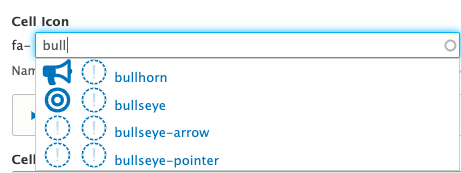
and it isn't loading properly. I'm using the min.js URL (i.e. https://cdnjs.cloudflare.com/ajax/libs/font-awesome/5.9.0/js/all.min.js) and in the Drupal admin section, I see something like the attached screenshot.
Is there a different URL we should be using?
Comment #4
daniel.moberly commentedIt is loading properly - bullhorn "regular" is only supported in the Pro version
https://fontawesome.com/icons/bullhorn?style=regular
So it renders as a ? mark here
Comment #5
jennypanighetti commentedOhhh, and that CDN is only the free version. Makes sense; thanks!
Comment #6
daniel.moberly commentedYes. Unfortunately I don't think there's a cut and dry method of determining which you're using (free or pro versions) or I would think we could pare the icon list down to only show valid icons
Comment #7
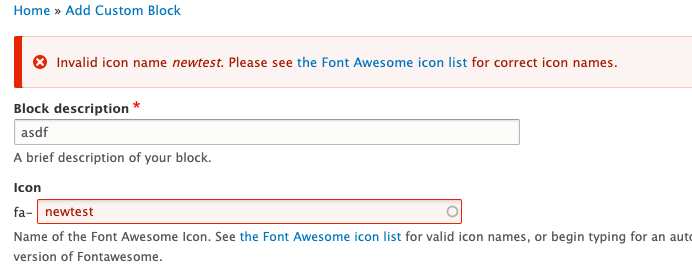
doostinharrell commentedI am a Fontawesome Pro subscriber and I'm also not seeing many of the icons in the auto complete widget. I have tried using both webfonts and svg and provided the necessary external kit url. Further more when I provide one of the valid icons I just get an error message of "Invalid icon name [MISSING-ICON-NAME-HERE]. Please see the Font Awesome icon list for correct icon names." on save.
Is "full" pro support on the road map? I'm also happy to help push this task forward as well as I have time.
Comment #8
bradallenfisher commentedis there any work being done on this?
We have the pro version, are using the external cdn
icons we have in our kit only work on the page, but we can't add them via the picker.
the icon code is
<i class="fak fa-our-custom-icon"></i>I assume that the fak part is messing it up. I found in the IconManagerService that there were "brands" being set...
obviously would love to alter this rather than hack it... but could you tell me if we are even close to being in the correct place for adding our custom icons to the picker?
Comment #9
daniel.moberly commentedI am attaching a patch which should allow for you to select custom icons with "Kit Uploads" as the icon type. This will not fill in the auto-complete as the list of your custom icons is not available to the module, but this should allow you to manually type them in. Could you test and let me know?
Comment #10
bradallenfisher commentedI am still seeing invalid icon for the field
the patch applied cleanly.
Comment #11
bradallenfisher commentedI think in modules/contrib/fontawesome/src/Controller/AutocompleteController.phpAutocompleteController.php
needs to be
but i put that in place and it still won't save with same message.
Comment #12
bradallenfisher commentedI'm not sure but is the validation not honoring the new kit-upload meta?
Comment #13
daniel.moberly commentedI see. Attaching another patch which provides a setting to allow validation bypass. I think this is the only way to deal with custom icon names since we can't pull them from the metadata files. Try this and let me know if it works for you after you turn on the bypass in Font Awesome settings.
Comment #14
daniel.moberly commentedGood catch on the 'fak' line and on the additional validation in the editor dialog. New patch attached.
Comment #15
bradallenfisher commentedHey man thanks a ton for all of the quick responses.
Unfortunately, composer won't apply the latest patch you rolled.
I think it's borking at this:
Comment #16
bradallenfisher commentedhttps://www.drupal.org/files/issues/2021-03-16/3064863-allow_kit_uploads... applies clean against dev. my bad, duh. ;)
However, still having a problem using the Kit Uploads style. It won't save the selection when i submit the widget.
Comment #17
daniel.moberly commentedCan you provide steps to repeat? I can't duplicate the issue
Comment #18
bradallenfisher commentedSure,
I have added a field to a custom block type.
I have clicked the bypass validation button
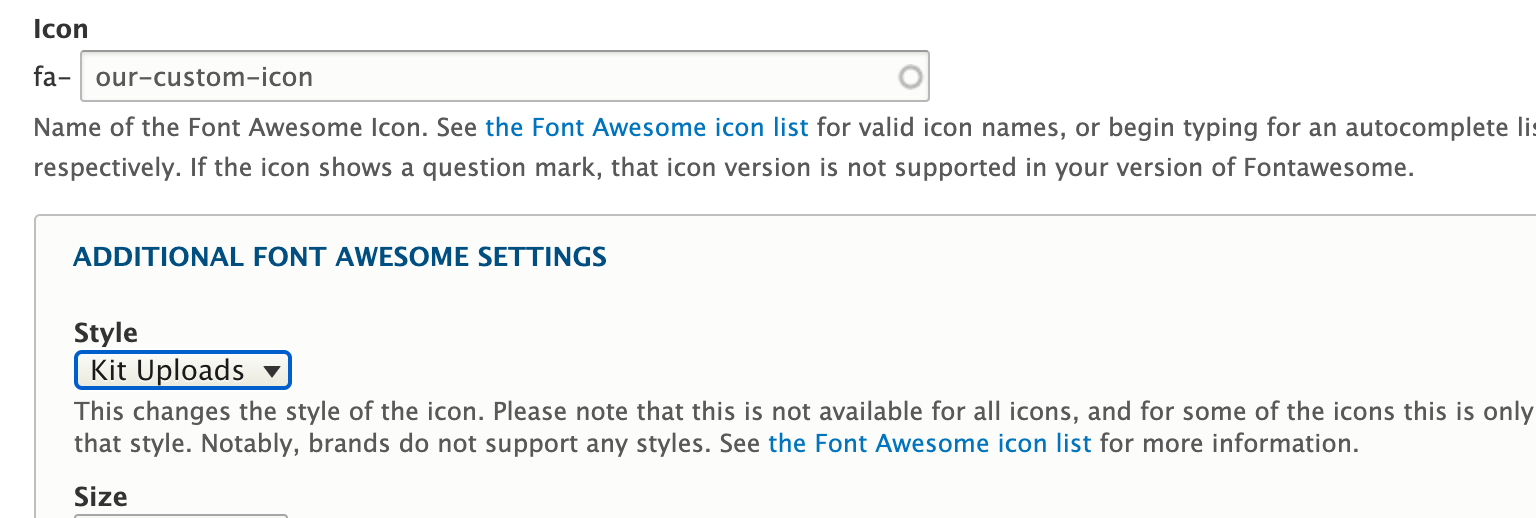
i paste in the text "our-custom-icon" in the autocomplete field
I open the ADDITIONAL FONT AWESOME SETTINGS field set
I choose Kit Uploads from the Style options
I hit save...
Then i see that the icon does not appear correctly.
Upon inspection of the icon code, i see that it tries to set "fas" as the data-prefix (svg) or class (webfont)
So i edit the block again and see that the Kit Uploads style is not preserved and it has been set back to Solid
Comment #19
bradallenfisher commentedComment #20
daniel.moberly commentedThanks - tracked it down. The icon setting was being massaged to "fas" when it wasn't found in the metadata, which obviously "fak" would not be.
Tested and I think this patch resolves the issue - let me know.
Comment #21
bradallenfisher commentedThat got it! this is now working with kits uploads. Thanks for all your work on this i think it will really be a nice addition for the module.
Comment #23
daniel.moberly commentedThanks for all the work on this!