

Closed (fixed)
Project:
Computed Field
Version:
7.x-1.x-dev
Component:
Code
Priority:
Normal
Category:
Bug report
Assigned:
Unassigned
Reporter:
Created:
8 Apr 2019 at 06:52 UTC
Updated:
17 Apr 2020 at 22:31 UTC
Jump to comment: Most recent, Most recent file


Comments
Comment #2
nagarajanl commentedHello,
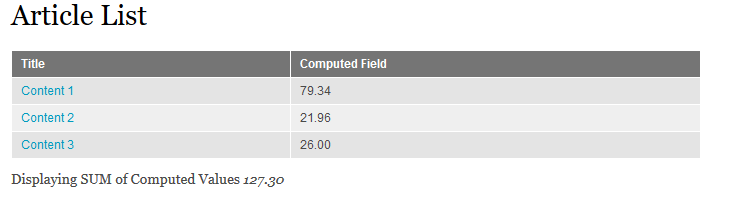
Are you expecting the output something similar to the attachment? If so, this can be easily achieved using Drupal custom "Views handler".
Comment #3
davidkp commentedThanks for you reply @nagarajanl,
Yes, as long as the value in each row of the Computed Field column is the sum of all for each of Content1, Content 2 and Content 3.
For example, I want the sum of each Industry like this,
which comes from these records,
Comment #4
nagarajanl commentedHi David,
Thanks for the response. I have a quick question, 'Industry' is nothing but 'Taxonomy term Name' or is it a 'Node Title'?
Comment #5
davidkp commentedHi Nagarajanl,
Industry is an entity reference field.
It's worth noting that other numeric fields SUM okay so I don't believe the group by field is the cause, the problem is only with computed fields.
Cheers
Comment #6
nagarajanl commentedHi David,
Thank you.. Let me look into this and fix this issue in other way.. Will get back to you soon
Comment #7
davidkp commentedThanks Nagarajanl,
FYI, I have a workaround using Views Aggregator Plus (VAP) and the global Maths Expression but I'm not happy with the performance. I have thousands of records so this PHP solution is to slow, far better to do the group by and sum with SQL. As a matter of interest, VAP won't sum on the computed field either but if I use the computed field token in the maths expression then VAP will sum that field.
PS: I've tried using the maths expression with the views aggregator but it's a fail.
Comment #8
nagarajanl commentedHi David,
You can achieve the desired results by simply adding the "Default Sort Option" from the "Table Settings", So that the SUM function for computed field works. Also i think the issue might not be related to computed field directly and still i suspects about "Group by" only
Please see if this helps you. I have also attached the image references.
Comment #9
davidkp commentedThanks for your persistence Nagarajanl,
Sadly, your suggestion to set the Industry as the table default sort column did not change the result.
I still believe the problem is in the display of the data and I've attached another 2 screen shots to demonstrate. As you can see, the options to configure the field are text based when using SUM, but numeric based when using COUNT. I've tried all the config formatter options but they also make no difference.
Is the config options in your Articles computed field the same?
Comment #10
nagarajanl commentedHi David,
Yes, the config options in the computed articles seems to be same as like above.
Can you do me a favour? Can you please enable the "Show the SQL query" from your views and paste the query here?
Or you can simply paste the screenshot of "Managed Fields" of your content type?
I just wanted to replicate the exact setup of yours, then only I can be able to reproduce/fix this problem
Comment #11
davidkp commentedThanks again,
To make it easier (I hope) I've created a Loom video to walk through the issue.
Cheers
Comment #12
nagarajanl commentedThanks for your video.
I have exactly replicated your video's scenario in simplytest.me and following is the URL.
https://d08d9.ply.st/admin/structure/views/view/computed_field_view
admin/admin is the drupal credentials.
But somewhat even the default grouping is not working here and the title still showing as duplicate. Can you please check this URL and see whether am missing anything here?
Additionally can you please also let me know your drupal version of
1. Drupal Core
2. Views
3. Computed Field
Comment #13
davidkp commentedHi,
Yes, for some reason the grouping won't work if the title is linked to the content, I guess it's because the link is unique. I've turned off the link so it now behaves as per my video.
I always run the latest versions so Drupal is 7.67, Views is 7.x-3.23, Computed Field is 7.x-1.1 and Chaos Tools is 7.x-1.15.
Have fun!
Comment #14
nagarajanl commentedHi,
Thank you.. Now i can clearly reproduce the issue. Let me investigate and get back with a feasible solution.
Cheers
Comment #15
nagarajanl commentedHi David,
The issue has been resolved now by introducing the "Custom field handler for computed field" and I have attached the screenshot.
I will share the files associated with this later.
Note : Can you please share your email address? it's hard for me to track it here.
Comment #16
davidkp commentedAwesome!
David@vforms.com.au
Thanks for your patience and persistence :)
Comment #17
nagarajanl commentedHi David,
I have uploaded the patch file "computed_field" which will create a custom views field handler named as "Computed Field Handler". This will read the consolidated values from the "computed field" and rendered it separately.
Comment #18
nagarajanl commentedComment #19
davidkp commentedHi Nagarajan,
Thank you for posting the patch. I'll test it and let you know how I go.
Once again, thank you for your help with this issue.
Comment #20
davidkp commentedHi Nagarajan,
So I tested the patch yesterday and all went well so I moved it to my clients test system and would you believe it didn't work :(
I figured I must of done something wrong with patching the code so I went back through the patch and tested again. After going round in circles a few times I finally discovered that the problem is the length of the system field name of the Computed Field.
For example, if I use a system field name of field_computed or field_test_one then the patch works perfectly. But if I use a system field name like field_timesheet_this_month then I get an empty result for every row. I tried this a million times to be sure.
I'm guessing there must be a default field length in Drupal so I'm hoping there's a way of updating the patch with a longer field length in the handler you've developed?
Cheers
Comment #21
nagarajanl commentedHi David,
Am not sure about the field length with respect to the custom field handler.
Let me inspect with longer field names and see how it's goes..
Additionally if you are trying with a longer field name say field_test_this_timesheet, I guess this field should be already available in view as the part of computed field..
Comment #22
davidkp commentedMany Thanks Nagarajan,
I've found a module Field Rename which has allowed me to shorten the long field name that is causing me trouble so I can now use your patch :)
Comment #23
nagarajanl commentedThanks David. Glad to hear that the patch is working.
Comment #25
ram4nd commentedComment #27
joelpittetThis looks like a nice addition but introduced some code standard issues for whitespace and dsm commented out is in there too.
Whitespace cleanup and leftover DSM
Comment #28
joelpittetAdded a follow-up with patch #3128775: Coding Standards from PHPCS and commented dsm() left in code