Problem/Motivation
Recent interviews and research exposed pain points around Drupal's admin experience of looking and feeling dated.
Proposed resolution
Implement new details style update styles to create a favourable first impression of Drupal for evaluators and a better user experience for site authors. No functional differences.
Specification
Quick overview
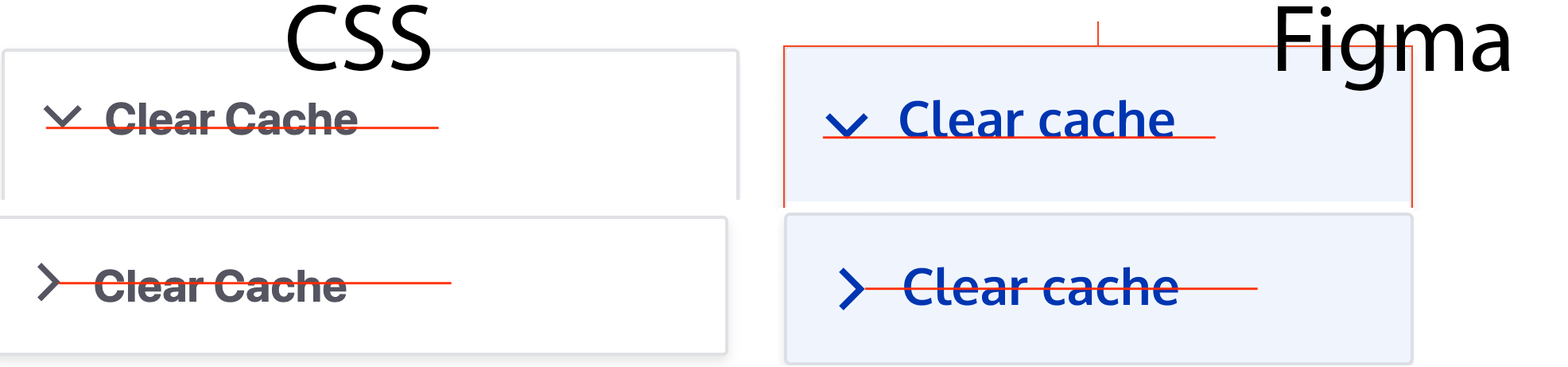
This image is just a quick overview for details specs. Please use the Figma link to full specification as the main resource for specks. Note that the design for details than the one for fieldsets.

Full specification
FIGMA: https://www.figma.com/file/OqWgzAluHtsOd5uwm1lubFeH/Drupal-Design-system...
This link is anchored to the board with the full specification. As an anonymous user you can see the design, but to actually be able to pick colours and sizes please login to Figma.
Remaining tasks
- Update patch styling to include time inputs
- Accessibility review
- RTL review (Right to left)
User interface changes
All details styles will be changed, no functional differences.
Test Pages




Comments
Comment #2
ckrinaComment #3
huzookaI think that the Basic site settings page (
/admin/config/system/site-information, the initial test page of #3023291: Fieldsets style update) is better for testing since it contains onlydetailsas root elements.Test module: https://github.com/zolhorvath/details
Comment #4
boulaffasae commentedHi, I have updated the Details style.
Comment #5
Kami Amiga commentedComment #6
Kami Amiga commentedSome more style updates. Some cases are still to be checked, but I guess it can already be reviewed.
Comment #7
huzookaRe #6:
Stylelint:
Comment #8
Kami Amiga commentedUpdated
Comment #9
kostyashupenkoComment #10
kostyashupenkoFixed last #6 #8 patches + cleanup.
Comment #11
nod_@kostyashupenko: from the outside the last 2 comments feels hostile. Usually if an issue is assigned to someone it's customary to ask and wait for an answer before reassigning to yourself. Someone assigning an issue to themselves means the person wants to take responsibility for moving the issue along. With the last two comments you ignored that and rewrote a big chunck of the patch. It doesn't matter if your code is better if you steamroll people along the way.
We all want to get this moving but not at all costs. Next time please make the effort and take the time and explain what should be changed if the issue is assigned to someone. It's not everyone that make the step to assign an issues to themselves, please be considerate of that and help accompany them.
Could you explain what the cleanup were please?
Comment #12
kostyashupenko@nod_ ah, patch in #8 was added and status updated, so i just thought @kami-amiga forgot to unassign this issue as it was here for example
https://www.drupal.org/project/claro/issues/3024049#comment-12934803 - assign
https://www.drupal.org/project/claro/issues/3024049#comment-13040831 - unassign (2 months later)
I just did that to speed up development. I'm sorry if i made a mistake, i just had some free time to quickly improve last patch. it's not hostile at all.
Cleanup was mostly to re-define logic for setting arrow-icon and all related states (hover, focus, open, etc), and also removed [dir="ltr"] prefix. Everything is in interdiff.
Comment #13
nod_Thank you for the details of what you changed.
Comment #14
huzooka#10 seems to be promising, I'll generate cross-browser screenshots.
Comment #15
lauriiiTalked with @ckrina and there's a mistake in the current designs. The arrow should only reflect whether the details element is open or not. The arrow icon should remain the same regardless of focus and hover status. Updated the specs in the issue summary as well.
Comment #16
ckrinaCorrecting screenshot with right arrows and color
Comment #17
huzookaUpdate on #10:
menu-explanded.png(inherited from Classy, see@classy/base/collapse-processed.css) and display our custom marker only on hover. I strongly suggest unsetting Classy'scollapse-processed.cssand add a replacement by extendingcore/drupal.collapse..claro-detailsborder is defined with px unit instead of rem.Comment #18
boulaffasae commentedComment #19
boulaffasae commentedThis patch:
- Alphabetize Details style variables.
- Provide variables for Details style properties.
- Use `rem` instead of `px`.
- Add new dependency to package.json postcss-calc, unfortunately IE11 don't render box-shadow when calc() is used https://caniuse.com/#feat=calc.
- The arrow icon is up to date.
For next steps, we will need to replace
collapse-processed.cssinstead of unsetting it. Thecore/drupal.collapsewill turn the summary into a clickable link (The default link color will override our summary color),One question what do you mean by the focus ring ?
Comment #20
huzookaRe #19:
The focus ring is the green outline around the summary (if it's focused), this:
The team just introduced a standard that changes things, sorry about that! https://drupal.org/node/3045783
Comment #21
boulaffasae commentedComment #22
finnsky commentedalso i found that details body should have own padding. we will not always have form item inside
Comment #23
finnsky commentedAlso it has sense to add modifier to details. with bigger paddings and left border for using in fieldsets and entity meta. https://www.drupal.org/project/claro/issues/3023291
Because as for me they are equal.
Comment #24
finnsky commentedseems evil copypaste
Comment #25
finnsky commentedComment #26
finnsky commented1. moved post-css calc to devDependencies.
2. Fixed margins and alignment.
3. Cleaned variables.
4. Added claro-details--accordion modifier for usage in meta tabs. Cleaned previous implementation.
5. Added claro-details__wrapper--spaceless modifier for usage in system-modules list and in views UI. Cleaned previous implementation.
From my point of view we need to follow BEM guildelines as much as possible. and all what related to component should be in component.
Comment #27
jds1This looks good to me. I did some functional/visual testing and reviewed the interdiff. Nothing jumping out at me that needs fixing from my perspective, but caveat that this is my first day devving on Claro =). I'm an optimist though, so marking as RTBC.
Comment #28
huzookaJust checked with extra large browser font size:
I think that #2 and #3 are the good solutions (A11Y), but they conflict with our current standard:
Comment #29
kostyashupenkogonna implement fixes for #28
Comment #30
kostyashupenkoComment #32
huzookaRe #30:
Majors:
See the attached screenshots & video.
Minors:
I think that instead of adding a new value we should update the `--color-focus` variable.
I think that it would be better to keep these in entity-meta.css
(no status change, NW is still valid)
Comment #33
huzooka…I said needs work…
Comment #34
kostyashupenkoComment #35
finnsky commented@huzooka
on entity meta level we can only add something related to geometry or positioning of Details component. But not to component itself. Here we have modifier of component. So better to keep all related to component in one place.
In ideal case we need to preprocess that details in entity meta. and add modifier class.
Comment #36
kostyashupenkofighting with details summary and its polyfill, will add patch tomorrow morning.
content: url(data:image/svg)andbackground-image: url(data:image/svg)are so buggy things)Comment #37
huzookaRe #35:
We can add the modifier in a form preprocess (we inherited the node form alter from Seven...):
In this case, we would have a modifier, adn its' modifier styles can get into our
details.css.Comment #38
kostyashupenkoJust added patch without preprocess for modifier (Re #37)
Few notes about FF, IE, Edge: It looks like focus is work "strange" in these browsers -> focus is available only on "Tab" key and "tap" touch, so if you will click on it - you can't see focus. Not sure how to fix this issue and should we actually?
Also in IE and Edge we have different structure of details/summary tags, since related to modernizr test and core/misc/collapse.js
So if Modernizr.details is true, we have (Chrome, FF for ex.):
if false, then (IE, Edge):
So in case of IE/Edge we have additional link inside summary to make it work (expected thing). Focus is not work for summary there, it works only with link itself, it means with the current styles impossible to see focus green border and blue colours on hover.
Question is should we have a "complete" restyle in case of IE/Edge failback? It's possible to do that with the help of "collapse-processed" class which appears only when link inside. So we may have smth like
So it looks like "duplicated" code, but it's provided by core i'd say...
Or we can actually add "text-decoration: underline" to a link on hover/focus for IE/Edge to highlight it somehow and it will be enough maybe ?
Comment #39
kostyashupenkoComment #40
huzookaSorry...
Comment #41
huzookaRe-rolled patch attached.
Comment #42
lauriiiLet's descope browsers that have native support but don't provide focus effect for pointer devices; it seems like a pre-existing problem that we could try to solve in a separate issue. In those browsers, this problem exists even with native styles. However, I do think we should try to provide the correct experience for browsers relying on the polyfill, even if it leads into slightly more complex code or duplicated rules.
Comment #43
lauriiiComment #44
huzookaForgot to assign this to myself...
Comment #45
bnjmnmContacted @huzooka to make sure I wasn't disrupting anything by browser testing while this is assigned to him. He's working on the focus ring and IE11 issues mentioned in earlier comments, so I just looked for things that aren't those.
?
Comment #46
huzookaAddressing #32 and #45.
Working on screenshots.
Safari won't animate the marker, I'll add a followup with my partially-working shim as soon as I'm done with the screenshots.
Comment #47
huzookaScreenshots attached.
Comment #48
lauriiiThe box-shadow transition doesn't work smoothly on Firefox. I found a blog post suggesting to use a pseudo element instead of animating box-shadow.
We should document that these are for LTR.
Nit: s/javascript/JavaScript
Nit: s/rtl/RTL.
Could we add a comment explaining what these are for?
I don't think we should provide comments on what we are overriding. It is hard to keep these kinds of comments up to date because of the location we are referring to or the setting could change in the future.
This should be documented according to our JavaScript coding standards. I think the existing comment could be moved there.
This behavior should be documented as well.
Comment #49
huzookaComment #50
huzookaAddressing everything from #48.
Re #48.5:
.claro-details__wrapper--spacelesswrapper, removed..system-modules .claro-details__wrapperlooks better without any mod. Since modules page is out of the scope of this issue, I removed that as well.#views-ui-add-form details details .claro-details__wrapperis a legacy (and obsolete) selector (View UI add form's id was changed years ago and it operates with<fieldset>, not<details>), removed.Re #48.7 and 8: I guess we should update our
packages.jsonandyarn.lockto follow Drupal core changes?..Anyway, this is ready for the next review.
Fresh screenshots attached.
Comment #51
bnjmnmIf this library is specific to focus, perhaps the js filename could be focus-specific as well.
Or, if the JS file could potentially be home to other details-related JS, could the library be renamed to something more general to make it clear this isn't exclusive to focus behavior?
I don't see the js-claro-details-summary class used anywhere
Should "coherent" be "consistent" instead? (there are two instances of this in the file)
Comment #52
huzookaComment #53
huzookaRe #52:
Comment #54
lauriiiWe discussed #52.5 earlier and we should honor the default browser behavior on that. See #38 and #42.
I can also reproduce #52.2. I don't see the focus ring for details when tabbing to details element on IE 11. I could see it when clicking with a mouse but only sometimes. Maybe it's helpful that it works correctly to me with #47, but not with #50.
Comment #55
bnjmnm@huzooka apologies for occupying your time with the not-reproducible IE stuff in #53, not exactly sure why my Virtualbox IE11 was doing that.
#52.2 was still happening for both Lauri and I. This was addressed by removing a box-shadow rule set on the polyfill selector
.collapse-processed > .claro-details__summary .details-titlethat didn't seem to be doing much other than overriding the default focus ring ruleI also noticed that in IE, details in modals did not get a focus ring when focused. A good place to see this happening is in views, doing something such as editing a header. This was addressed with a change that may be too all-encompassing for some tastes. I added an additional selector to the default claro focus ring rule.
This takes care of it, but it's possible there will be a preference for something with less broad scope.

Also fixed a few nits I spotted while working on the above
Comment #56
lauriiiI think adding this selector here is fine, but it seems like we accidentally left
position: relative;which causes some problems in the dialogs. We could probably remove this here.Comment #57
lauriiiFixed #56.
Comment #58
zrpnrReviewed the latest patch, I agree the
position: relative;should be removed.Confirmed in ie11 that the focused detail in a ui-dialog is now showing a focus state and works when tabbing onto it.
This rule
.claro-details[open] > .claro-details__summary:focusdoes not apply in ie11, probably the<summary>tag isn't recognized by that browser. The fallback to black looks good and its barely noticeable.Marking RTBC, this is really good!
Comment #59
huzookaRe #57, #58:
Details of dialogs in High contrast mode needs some minor enhancements. This is what I see now when I focus a details on Edge:
Edit:
The rule
claro-details[open] > .claro-details__summary:focuswon't apply on ie11 or edge because these don't support<details>. We have to use the.details-titleanchor element to support the states (seecore/misc/collapse.es6.js).Comment #60
lauriiiJust a reroll, we still have to address #59.
Comment #61
huzookaI'll fix this.
Comment #62
huzookaRe #54 ... #60:
I toke back
.collapse-processed .details-titleenhancements (and hope that the actual additions will fix #52.2 AND #59).Before (with the patch from #60):
With the current patch I see:
Please verify that this time it works as expected :)
Comment #64
lauriiiTested manually with Chrome, Safari, Firefox, IE 11 (normal + high contrast) and Edge (normal + high contrast) and this works consistently across all browsers except the missing animation on Safari which already has code comments explaining why. Thank you everyone who has helped on this. Committed and pushed!