

 The 2026 Drupal Business Survey is open. Your response will help shape the future of the Drupal business ecosystem.
Currently, the module code generates icon tags with class attribute automatically always prefixed with fa string.
- fontawesome_menu_icons.module Line:230
- fontawesome_menu_icons.module Line:233
- fontawesome_menu_icons.module Line:241
- fontawesome_menu_icons.module Line:248
- fontawesome_menu_icons.module Line:295
- fontawesome_menu_icons.module Line:298
- fontawesome_menu_icons.module Line:305
- fontawesome_menu_icons.module Line:312
While this prefix was necessary prior to FontAwesome 5.x, it is undesired. In current version of FontAwesome icons are defined with two CSS class names from which first one is icon style ("fas", "far", "fal" or "fab") and second one is icon code, thus resulting in class name like fas fa-address-book instead of old (4.7.x) class name fa fa-address-book.
This "fa" prefix in FontAwesome 5.x is a shortcut to select icon style "fas", thus resulting in conflict, when any other style than "fas" is expected.
To reproduce, take this example:
1. select "500px" brand icon in icon selector
2. observe that fab fa-500px is being displayed in input box
3. save menu item
4. observe that icon tag is rendered fa fab fa-500px while working result would be fab fa-500px
5. observe that icon is displayed as "undefined" - placeholder square box icon
I propose couple possible solutions to resolve this issue:
1. Remove fa prefix from module code altogether - they are not required anyway
2. Make it configurable, so that we can enable or disable it
3. Make it configurable, so that we can edit prefix - remove it or replace with something like "menu-item__icon" resulting in valid icon class name like menu-item__icon fab fa-500px
| Comment | File | Size | Author |
|---|---|---|---|
| #6 | fami_screen.png | 13.97 KB | lonalore |
| #3 | Incompatible icon prefixes for FontAwesome 5.x-3037330-3.patch | 3.2 KB | martijn de wit |

Comments
Comment #2
Deele commentedComment #3
martijn de witCreated a first patch that is removing
faprefix in classes.As the rest of the suggestions. It could be configurable as sugested by Deele or the maintainer can decide to start a 8.x-2 version for 5.x font-awesome.
This patch is a starting point and for people that can't wait and want to use fontawesome 5.x
Comment #4
aid_ua commentedApplied this patch via Composer, it works fine with FontAwesome 5.5.
Comment #6
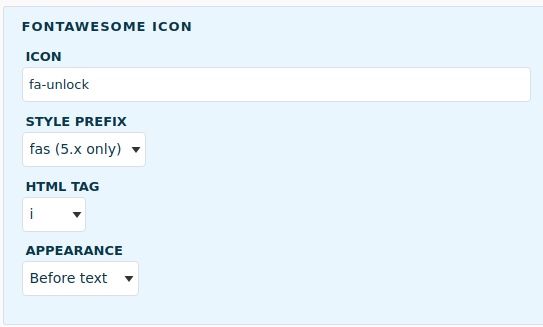
lonaloreNow you can select a style prefix (fa, fas, far, fal, fad, fab).
Comment #7
aid_ua commentedI have updated the module to the v.1.7 and the "Style prefix" option does not work for me.
After changing it to the "fal" on the menu item editing page and saving - a menu item icon not shows, "fa" class still there.
When I open a menu item editing page - in the "Style prefix" still selected "fa" option.
(FontAwesomeMenuIcons module - v.1.7, FontAwesome module - v.1.4)
Created a new issue: https://www.drupal.org/project/fontawesome_menu_icons/issues/3102931