
How to use
There is one major concept you need to understand using Commerce Funds, it's that you don't actually host any money on your website (also for security reason). Commerce Funds just provides virtual money transactions that need to be executed manually by site administrator then.
What to know before starting? (FAQs)
Why deposits are not added to my user balance?
If you are using the "manual" payment gateway, completing an order does not automatically trigger order payment. The manual payment method is intended for cash payments, so you need to manually inform Drupal Commerce that you have received the cash payment. To trigger the payment, as an administrator, go to Commerce > Orders, select your order, and then choose Receive Payment.

Why my user balance is equal to the site balance?
The site balance is essentially a user balance, specifically the balance of user 1 (the super administrator). This user account should not be used for testing, as it will accumulate transaction fees in addition to the transaction amounts. This can lead to confusion about how the module works.
How to add money to users' balances (or the site balance)?
Commerce Funds is designed to operate in isolation. You cannot create money out of nothing. The only way to add money to an account is by depositing funds using one of the payment methods available on your website.
An example: from deposit to withdrawal
For example, let's say user A deposit 100€ to his account using Paypal payment gateway. When depositing this amount to your website, his Paypal account will be debited from 100€ and your Paypal account will be credited with 100€. The money is safely hosted on Paypal accounts. But user A does have now a balance on your website of 100€.
User A now transfers 40€ to user B for a provided service (a brand new logo) and buy a book about how to become the highest ranked freelancer on your platform using his account balance for 20€.
Well, you can already send the book to user A, because he has already paid for it (the 20€ are already in your Paypal account as part of the 100€ he made when depositing).
| Account Balances | Paypal account Balance | ||||
| User A | User B | Global site | Global site | ||
| 40€ (100-40-20) | 40€ (+40 from the transfer) | 20€ (+20 from the book) | 100€ | ||
| Total: 100€ | Total: 100€ | ||||
Now, user B wants to withdraw money from his account for his hard work on the logo. He sends a withdrawal request of 40€. Administrators check his current balance and see that he has exactly 40€ in it, so perfect. Administrators validate the withdrawal request and by so, remove 40€ from user B account balance, so now his balance is set to 0€.
To finish the process, an administrator has to log into his Paypal account and transfer the 40€ to the Paypal account of user B.
| Account Balances | Paypal account Balance | ||||
| User A | User B | Global site | Global site | ||
| 40€ (no transaction) | 0€ (withdrawal request) | 20€ (+20 from the book) | 60€ | ||
| Total: 60€ | Total: 60€ | ||||
So at the end of the process, you do have earned 20€ for the sell of the book (global site balance) and it belongs to you to withdraw them from your PayPal account. To keep a track of this transaction, you should, as an administrator (drupal user 1), send yourself a withdrawal request, and validate it to remove 20€ from the global site balance.
| Account Balances | Paypal account Balance | ||||
| User A | User B | Global site | Global site | ||
| 40€ (no transaction) | 0€ (no transaction) | 0€ (withdrawal request) | 40€ | ||
| Total: 40€ | Total: 40€ | ||||
What you want to do is always to keep the total of the balances from your website equal to the amount in your PayPal account.
Using the currency converter
For every currency you will enable on your store, starting from 2 currencies, you can enable currency conversion by using Commerce Exchanger. You can choose to let a third party API keeping track of the currency exchange rates or set them manually yourself. Be aware though that you might have extra fees when actually converting these currencies using third party sites such as paypal or transferwise.
If you set the rates manually, It is up to you to gain a bit on the exchange rate by adding a small percentage on the conversion or not. It will also belong to you to keep these conversion rates accurate.
Funds balance as a payment method
If you want to give the possibility to your users to pay products from your website using their account balance, you can configure a new payment gateway in admin/commerce/config/payment-gateways/add. Select "Funds Balance", set the mode to live and then restrict the payment gateway to the options you want.
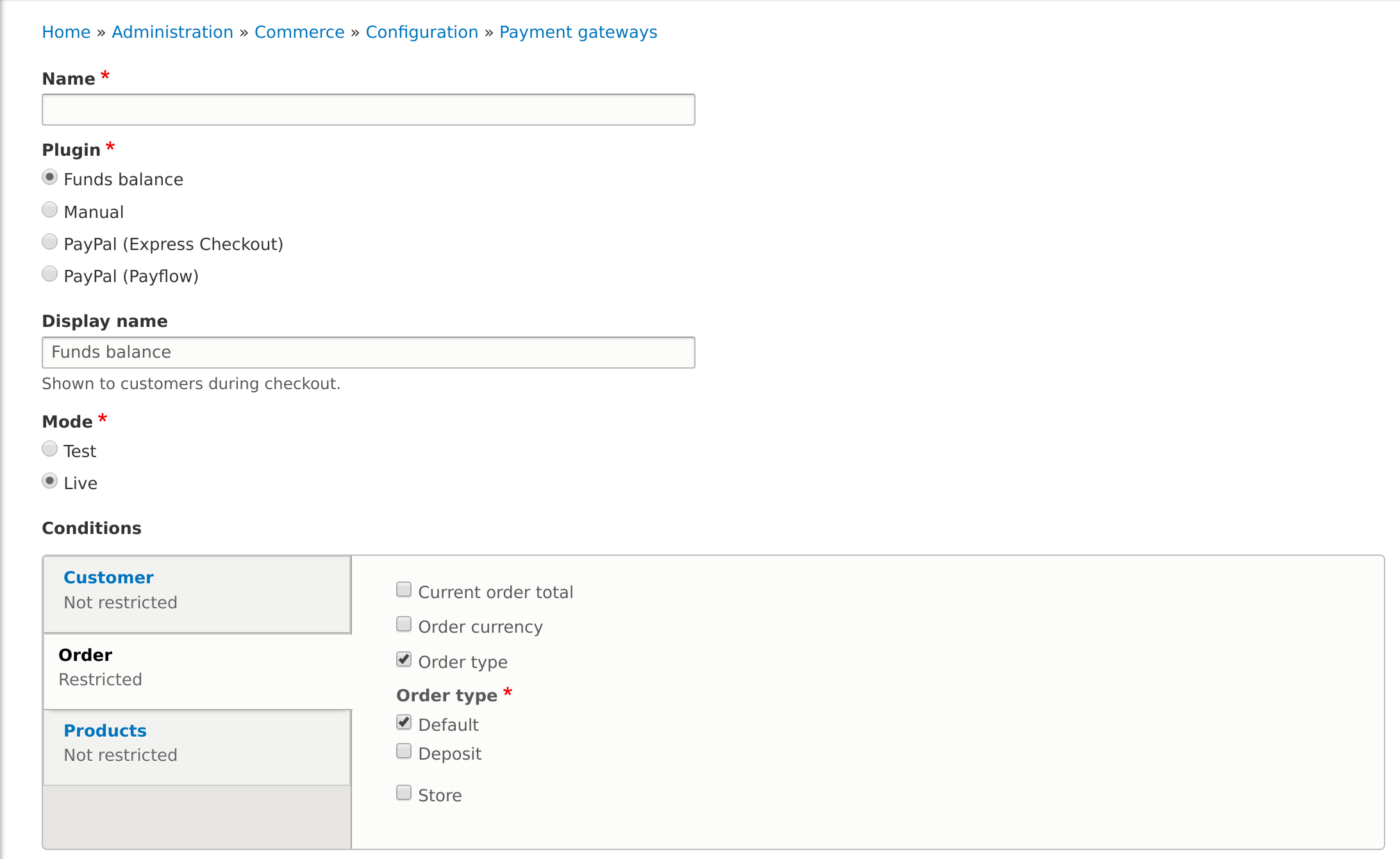
Important: you shouldn't allow users to pay a deposit using their balance account, as it doesn't make any sense.
Users will be able to buy any product from the website and the product owner balance will be credited of the amount.
Help improve this page
You can:
- Log in, click Edit, and edit this page
- Log in, click Discuss, update the Page status value, and suggest an improvement
- Log in and create a Documentation issue with your suggestion
