Hi,
Variables are returning NULL values.
To Reproduce the error:
1) Create a variable:
Type: Empty Entity variable
Target Entity Type: User
Target Bundle: User
2) Create an action:
Action: Fetch entity variable by id
Target Entity Type: User
Target Bundle: User
Entity id field: Integer: User ID [UID]
Empty variable: The created User variable
3) Create another action:
Type: Show a message
Message:
user_empty_entity_variable->uid}} -> {{user_empty_entity_variable->uid}}
user_empty_entity_variable->name}} -> {{user_empty_entity_variable->name}}
user_empty_entity_variable->mail}} -> {{user_empty_entity_variable->mail}}
user_empty_entity_variable->status}} -> {{user_empty_entity_variable->status}}
user_empty_entity_variable->created}} -> {{user_empty_entity_variable->created}}
user_empty_entity_variable->roles}} -> {{user_empty_entity_variable->roles}}
4) Fire the above rule under whatever event!
Results:




Comments
Comment #2
c.e.a commentedComment #3
bennos commentedSame problem.
Action fetch entity and no data in the variable.
tried it in my dev and on a vanilla install. No data
Comment #4
c.e.a commentedHi @bennos
If your website is online and you need a fix ASAP, i recommend to revert back to the 8.x-1.0-beta5 version until @yuriseki find some time for this issue...
Comment #5
c.e.a commentedAny updates regarding this issue !
Comment #6
bennos commentedYeah.
Version 8.x-1.0-beta5 works fine, but does not have examined beta6 version, why it happens
Comment #7
c.e.a commentedThe beta 5 version is working as expected, the issue is generated after updating to beta6 version
Comment #8
c.e.a commentedAny update on this issue please!
Comment #9
Drutech commentedSame problem for me also.
Varibales returns NULL values...
am I missing something ?
did you manage to solve this issue ? @C.E.A @bennos
Drupal: 8.6.7 / Business Rules: Dev-version
Comment #10
bennos commented@drutech
yeah switch back to beta5
see above #6
Comment #11
yseki commentedSorry about that. This issue had been created on beta-6 after the token process started to work together with variables. Fix already in dev and it will be available on beta-7
Comment #13
yseki commentedComment #14
c.e.a commentedThank you @yuriseki for your help and patch, the issue has been successfully solved.
Comment #15
c.e.a commentedComment #17
c.e.a commentedComment #18
c.e.a commentedRe-opening this issue because it is happening again when using BR module on site with core release of 8.7.x.
Entity variables are returning NULL Values and therefore almost the entire module at the moment is useless because of this issue.
Comment #19
weizrd commentedI can confirm that all the rules using variables on my site do not work anymore since upgrading to 8.7.0/8.7.1. Since both these CORE update fixed public security vulnerabilities and 8.7.0 had database changes (so i can't downgrade anymore), this is now a very very important and urgent issue to fix in BR. Thank you.
Comment #20
c.e.a commented@weizrd I have already contacted the maintainer of the module and waiting for any response from him !
Comment #21
Drutech commentedI have the same problem !!!
Please my entire site is based on entity variables and is not working at all.
This module is not compatible with core version 8.7.0...
can someone please make a patch or at least show me what code to be updated to make the entity variables work again until the maintainer @yuriseki find an official fix for this critical issue ?
Thank you,
Comment #22
avpadernoComment #23
lexsoft00 commentedHi all,
I'll provide a patch in a few hours.
Comment #24
lexsoft00 commentedApply patch:
patch -p1 < variables-returning-null-3016888-24.patchFlush cache:
drush crTry the test rule again.
Let me know if it still does not work for you and details to reproduce. This patch is for the latest dev version.
Comment #25
lexsoft00 commentedComment #26
lexsoft00 commented@weizrd You should always try the update on a development server and test important functionality before updating in a live environment.
Comment #27
c.e.a commented@lexsoft Strongly agree with your #26 comment.
I reviewed your patch #24 on the latest dev release and it is working as expected, however, while applying the patch it returned
Hunk #1 FAILED at 205Not sure is the failed hunk is important or it can be safely ignored.
Thank you for your patch as it saved the module and thousands of other users.
Comment #28
lexsoft00 commentedYou should update it manually if it failed.
file business_rule.module line 208 change:
if ($entity instanceof Entity) {to this:
if ($entity instanceof \Drupal\Core\Entity\EntityInterface) {Comment #29
weizrd commentedThe patch from #24 worked well, I got no errors. Also tested my other rules successfully. Many thanks @lexsoft. I also had it applied alongside another patch, the one for commerce and they work ok together.
@C.E.A, it looks like you had some other patches applied. I usually do all through composer, not with patch command. And this time i read the proposed solution and actually checked the files to be sure they were modified correctly (since as I said, i was expeting issues since as well I need another patch alogside)
On my dev server I did got into some hick-ups with composer (when you try to update, it does uninstall the module, but does not detect anything to install it back. So if you are not in maintenance mode and someone visits your website, drupal detects the missing module and it disables it. You can then only enable it after you manually remove the modules settings from DB. so you basicly loose all your rules). However, i had this issue before with other updates from other modules, so I could get around it safely (and I don't think is BR related).
Again, many thanks
Comment #30
c.e.a commentedI usually do it with patch command and not composer but the weird is I got the failed hunk described above on my dev site 1 but when I applied the same patch on dev site 2, I encountered no issues at all... so I think the problem is coming from my side.
I will add temporary note about this patch here on the module main page for other users until it will be officially approved and added to the module by the maintainer @yuriseki
Comment #31
c.e.a commentedComment #32
c.e.a commentedComment #33
eswiderski commentedStill getting NULL values with latest dev.
Comment #34
c.e.a commentedThe patch still needs to be applied as it is not committed yet !
Did you make sure the patch is applied cleanly ?
Did you flash all caches ?
If still have Null values, you will have to apply the patch manually... just open the patch file in any editor, then open any file listed inside the patch followed with the sign
+++and change the code inside each file from:if ($entity instanceof Entity) {to:
if ($entity instanceof \Drupal\Core\Entity\EntityInterface) {Hope it helps !
Comment #35
eswiderski commentedI applied the patch successfully, so I did not manually edit the file. And I did flush all caches--in addition to manually clearing the db cache tables. Still getting NULL.
Comment #36
c.e.a commentedPlease provide your Drupal version and make sure you are using the latest dev release of BR module.
As well, please describe the use case you are trying to accomplish which returns the Null so I can test it from my side.
Comment #37
kierduros commentedThe patch fixed the issue with the variables working, but since applying it (and moving from BETA7 to DEV branch of the module), the module won't populate the target bundles list properly after selecting the target entity type when creating new rules.
I've uninstalled and reinstalled the module (with the patch) so it's probably not an errant DB update issue from an odd switch.
Is this just me or are other people having this as a consequence, too?
Two relevant errors that show up in the list every time a target entity type is selected:
Shows up on first attempt...
On second attempt at selecting an entity type this is triggered:
Both have a location notation of: /admin/config/workflow/business_rules/add?_wrapper_format=drupal_ajax&ajax_form=1
Comment #38
num37 commentedThe patch from #24 worked for me, and I am not seeing the problem that @kierduros saw.
Out of curiosity, I tried it against -beta7 and -dev, and both seemed to work fine: the NULL issue is gone and I can still choose bundles just fine, for what it's worth.
Comment #39
remyyyyyIt is not just you @kierduros because i have the same problem.
Drupal version 8.7.2
Business rules version 8.x-1.0-beta7
Patch #24 applied
Warning : implode(): Invalid arguments passed dans Drupal\business_rules\Form\BusinessRuleForm->form() (ligne 143 de modules/contrib/business_rules/src/Form/BusinessRuleForm.php).
Symfony\Component\HttpKernel\Exception\HttpException : The specified #ajax callback is empty or not callable. dans Drupal\Core\Form\FormAjaxResponseBuilder->buildResponse() (ligne 67 de /core/lib/Drupal/Core/Form/FormAjaxResponseBuilder.php).
Comment #40
remyyyyy@kierduros see this https://www.drupal.org/project/business_rules/issues/2998984#comment-131...
Comment #41
belba commentedI apply the patch succesfull, but still can not create variables. Choose value from an entity field. Try to fetch a value from a content field. The content types does not show up after selecting content from the target entity list. Actualy it fails with all listed entities.
Use the latest dev module in Drupal 8.7.2 and this in a localhost server.
In previous Drupal versions, the module work fine.
Comment #42
remyyyyy@Belba have you seen this ? : https://www.drupal.org/project/business_rules/issues/2998984#comment-131...
Comment #43
belba commented@remyyyyy thanks for your answer.
I made this adjustments in the code, but unfortunately it still does not work.
Comment #44
lexsoft00 commentedHi @Belba,
Could give more details about your issue, like if your website has more than one language, what errors you get in dblog, what is the process to replicate your issue.
Try using https://simplytest.me .
Also if you have a html tag next to the variable it will not work. like
<p>{{ myvariable }}Comment #45
belba commented@ lexsoft
Thanks for the follow up.
The issue start after update to core 8.7.2
Then I uninstall business_rules and installed the dev version and apply the patch, reinstallation with composer.
Then I adjust the two files in src/form as mentioned in the link above.
I use the module to fetch a value from a content entity to reuse as a value for another field.
When adding a variable from type : value from an entity field.
On the add variable form, when choosing the target entity, the target bundle select list remain empty.
This Drupal installation have only 1 language English.
The same site with an earlier Drupal version , work perfectly fine.
Comment #46
lexsoft00 commentedI've added the module on simplytest.me:
https://drwfu.ply.st/user
User: admin
pass: admin
https://drwfu.ply.st/admin/config/workflow/business_rules/variable/colle...
The variable works. I can see the target bundle.
Maybe it's something you've done or custom entity or it could be PHP version. Don't know but it's not related to the module it seems.
Comment #47
Andy-vv commentedHi all,
I am a relative newbie to Drupal and have a similar issue that may be related to this one, so I am describing it in case it's useful to any of you great folks who write the code. I have Drupal 8.7.5 and Business Rules Beta 7. I also am using Drupal Commerce.
I am trying to send an automatic email using Business Rules. I want to populate the email with several entity field values. I can set up the variables OK in Business Rules, with no errors coming up in the process, but when the variable names are put in the email they do not get picked up, with the exception of one that is an email address. The output of my email looks in plain text like this:
andy@knowledge.co.uk Your order id is: {{order_id_variable}} Your start date is {{subscription_start_date}} {{order_subscription_start_date}} Hello {{current_user->mail}} this is your order user id {{order_user_name}} {{end_date}} {{subscription_start_date->field_start_date}}
I suspect the variables have null values, with the exception of the email address.
I moved to the Dev version and fitted patch 24 OK. After that my testing site would not send emails at all. Reverted to the Beta 7 version and it will send emails. Applied the patch 24 to the Beta 7 version. No errors, but no sending of emails. Revert to original unpatched Beta 7 and back to sending emails but no variables.
Hope this is useful to someone.
Comment #48
lexsoft00 commentedHow do you populate the variables? Why not use tokens instead?
You might have a misconfiguration somewhere.
Do not write a story: Try adding simple steps to replicate the issue.
Comment #49
Andy-vv commentedHello @lexsoft,
thanks for quick feedback and guidance.
In answer to your questions:]
A) my setup: Drupal 8.7.5.... Browser: Firefox.... PHP: 7.2.17... Database: Maria DB on sql....
Installation controlled by Composer.
I have only used Drupal Modules - I have not created any of my own custom code.
B: Relevant modules:
i: Business rules 8x Beta 7 with patch no.20 (commerce cart patch) installed
ii. Drupal Commerce 8x-2.13
iii: Swiftmailer 8x-1.0 - beta2
C: Why didn't I use tokens?
Because ajax will not open the tokens page properly while in the "Create Email Action" screen. See Screenshot No. 1
D. Steps to recreate
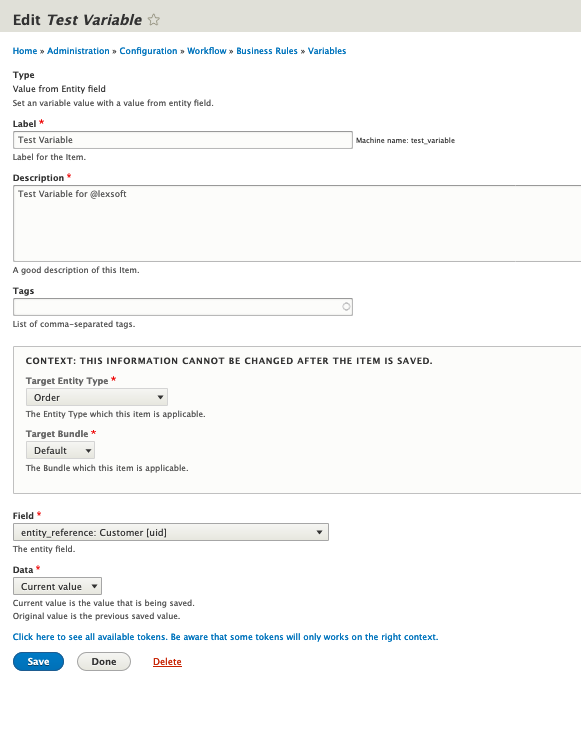
a) create new variable - test variable for lexsoft: type: Value from entity field. Target Budle Orders/Default. See screenshot No. 2
b) create new action: send email - place the {{test_variable}} into the email body.
c. Create new rule: type, "before Save" . Add the "Send Email" action to the rule.
d) trigger the rule by Saving an Order. Output email is Screen Shot no. 4. It just has the variable name.
E: Additional Steps to try to get around variable problem
a) Installed Businesss Rules Deve version with both Commerce Cart Patch and Varialbles-returning-nill patch. Only observble change is that triggering the rule no longer resulted in any email being sent. Reverting to 8x beta 7 resotred the email send behaviour.
b) After your comment above I found a different way to get acsess to the tokens, the cut and pasted them into my email. Tokens get used properly, which solves my immediate need for an email but doesn't fix the variables issue.
F: Additional note: From several pages withiin business rules I can access the tokens page. It was only on the "new actions" page that ajax had the problem.
Hope this helps.
Andy
Comment #50
lexsoft00 commentedI believe your problem is HTML markup. I've had a similar issue before.
You need to install the latest DEV version and add the patch. That's the version I use.
This is all the patches I have installed for business_rules
Try adding plain text as a format to the email body and check if that solves the issue.
You must be careful if the variable has any characters like
>{{ myvariable }}will not be processed the variables must be between open spaces> {{ myvariable }}. When you use full html the ckeditor might add some HTML markup.Comment #52
yseki commentedThanks @lexsoft and C.E.A.
Patch applied on DEV and prepared to be torted to BETA-8
Comment #53
Andy-vv commentedHi @lexsoft, many htanks for the detailed reply. I tried making my installation the same as yours but I still couldn't get the emails to send. I think it's lack of experience on my part. I have reverted to the beta and am using tokens to get 95% of what I need. thanks for the help, much appreciated.
Comment #54
Alex97Lewis commentedHi all,
I'm new to the drupal site, but have been using drupal for some time.
I've been using this module for since Drupal 8 was out, and now only come to this issue.
My site uses an empty entity variable which used to work prior to version 8.7.x, but now it no longer works, I've updated to the latest version of the development version which was released yesterday (12/08/19) and used the patch which lexsoft provided, but still to no avail. Just returns NULL using it as a "Show a message" for testing purposes.
Thanks for any help possible in getting this working