

 The 2026 Drupal Business Survey is open. Your response will help shape the future of the Drupal business ecosystem.
Hello,
As a connected user, I can't share any personal folder with other users, wathever rights they have, through the page "Share Folder tree".
When they have all the rights, including "Administer files and folders", it is indicated : "This user has content administration authority, so they always have access."
When they have all the rights but "Administer files etc.", it is indicated: "This user does not have view permission enabled for this module. They cannot be granted access.".
Did I miss something or did something wrong?
Thank you for your help!
| Comment | File | Size | Author |
|---|---|---|---|
| #16 | foldershare-wamp-uploaded-image.PNG | 55.47 KB | ameziane |
| #16 | foldershare-wamp-research-no-result.PNG | 50.21 KB | ameziane |
| #16 | foldershare-wamp-folder-with-picture.PNG | 49.02 KB | ameziane |
| #16 | foldershare-wamp-renamed-folder.PNG | 37.35 KB | ameziane |
| #15 | foldershare-new-install-sharing.PNG | 33.95 KB | ameziane |





Comments
Comment #2
ameziane commentedComment #3
toamit commentedTry flushing all caches.
Which version of foldershare and Drupal core are you using? You should be on latest release which is foldershare.0.5.4
What are the roles of test user and test user2?
Comment #4
ameziane commentedSorry for the late reply, I've just seen yours.
• I've flushed all caches several times.
• I'm using Foldershare 0.5.4.
• The role of "test user" is "Authenticated user". For "test user2", I've created a new role, which has the same rights than "Authenticated user".
Thank you a lot!
Comment #5
ameziane commentedSorry for the late reply, I've just seen yours.
• I've flushed all caches several times (using "drush cr").
• I'm using the last version of Foldershare.
• The role of "test user 1" is "Authenticated user". For "test user 2", I've created a new role, which has the exact same rights than the fiest one.
Thank you a lot!
Comment #6
ameziane commentedSorry for the late reply, I've just seen yours.
• I've flushed all caches several times (using "drush cr").
• I'm using the last version of Foldershare.
• The role of "test user 1" is "Authenticated user". For "test user 2", I've created a new role, which has the exact same rights than the fiest one.
Thank you a lot!
Comment #7
ameziane commentedSorry for the late reply, I've just seen yours.
• I've flushed all caches several times (using "drush cr").
• I'm using the last version of Foldershare.
• The role of "test user 1" is "Authenticated user". For "test user 2", I've created a new role, which has the exact same rights than the fiest one.
Thank you a lot!
Comment #8
ameziane commentedSorry for the late reply, I've just seen yours.
• I've flushed all caches several times (using "drush cr").
• I'm using the last version of Foldershare.
• The role of "test user 1" is "Authenticated user". For "test user 2", I've created a new role, which has the exact same rights than the fiest one.
Thank you a lot!
Comment #9
ameziane commentedComment #10
ameziane commentedSorry for the late reply, I've just seen yours.
• I've flushed all caches several times (using "drush cr").
• I'm using the last version of Foldershare.
• The role of "test user 1" is "Authenticated user". For "test user 2", I've created a new role, which has the exact same rights than the fiest one.
Thank you a lot!
Comment #11
ameziane commentedComment #12
toamit commentedTry setting foldershare module permissions as follows and see if it works.

You should try sharing as authenticated user, not admin
Comment #13
ameziane commentedThank you for your answer.
I've set the permissions as you said and connected myself a "testuser", the same problem's occured.
Comment #14
toamit commentedThe module requires PHP7+, this now noted on the module page, in next release we'll add a check so it does not install for sites with lower versions of php.
a) Can you try a fresh install with english and see if you still have problems
b) We have not tested with module with transliteration, so that may be causing some issues. This could also be the issue with your other bug report for search issue 3003529.
In any case please document the steps to replicate (include all setup details) if you still encounter problems.
Comment #15
ameziane commentedHello,
Using Acquia Dev Desktop 2, I did a fresh install with Drupal 8.6.2 and PHP 7.1.11.
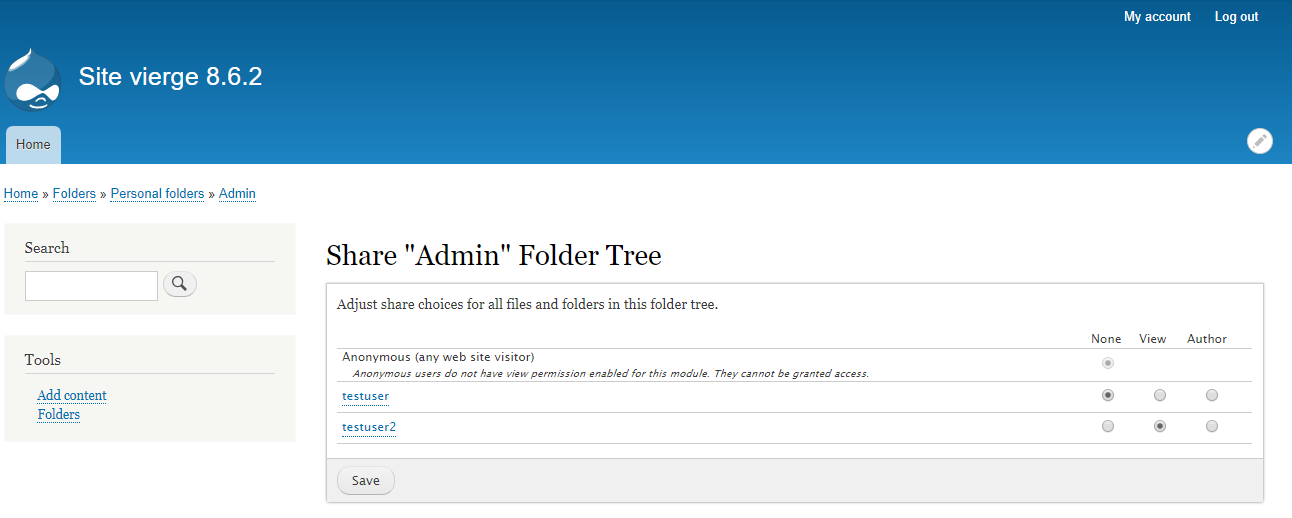
I can share now folders with anyone who has the "view" or "author" rights.
However, the search is still not working, with this error in the logs:
Drupal\Core\Database\DatabaseExceptionWrapper: SQLSTATE[42000]: Syntax error or access violation: 1055 'drupal_8_6_2.fs.name' isn't in GROUP BY: SELECT i.langcode AS langcode, fs.name AS name, fs.uid AS uid, fs.changed AS changed, fs.kind AS kind, fs.mime AS mime, fs.size AS size, SUM(i.score * t.count) AS calculated_score FROM {search_index} i INNER JOIN {foldershare} fs ON fs.id = i.sid INNER JOIN {search_total} t ON i.word = t.word WHERE (i.word = :db_condition_placeholder_0) AND (i.type = :db_condition_placeholder_1) GROUP BY i.langcode, i.type, i.sid HAVING (COUNT(*) >= :matches) ORDER BY calculated_score DESC LIMIT 1 OFFSET 0; Array ( [:db_condition_placeholder_0] => test [:db_condition_placeholder_1] => foldershare_search [:matches] => 1 ) in Drupal\foldershare\Plugin\Search\FolderShareSearch->search() (line 1400 of C:\Sites\drupal-8.6.2\modules\foldershare\src\Plugin\Search\FolderShareSearch.php).
Comment #16
ameziane commentedI also installed Drupal 8.6.3 (last version) with Wamp 3.1.4 + PHP 7.2.10, and new problems have appeared:
- When for example a folder is renamed, and the page reloads, we arrived on a 404 page, the confirmation message is still displaying though
- The research is now available (no root problems anymore) but returns no result. For example, I've added a file "download.jpg" in a folder and when looking for this term in the research, nothing is returned.
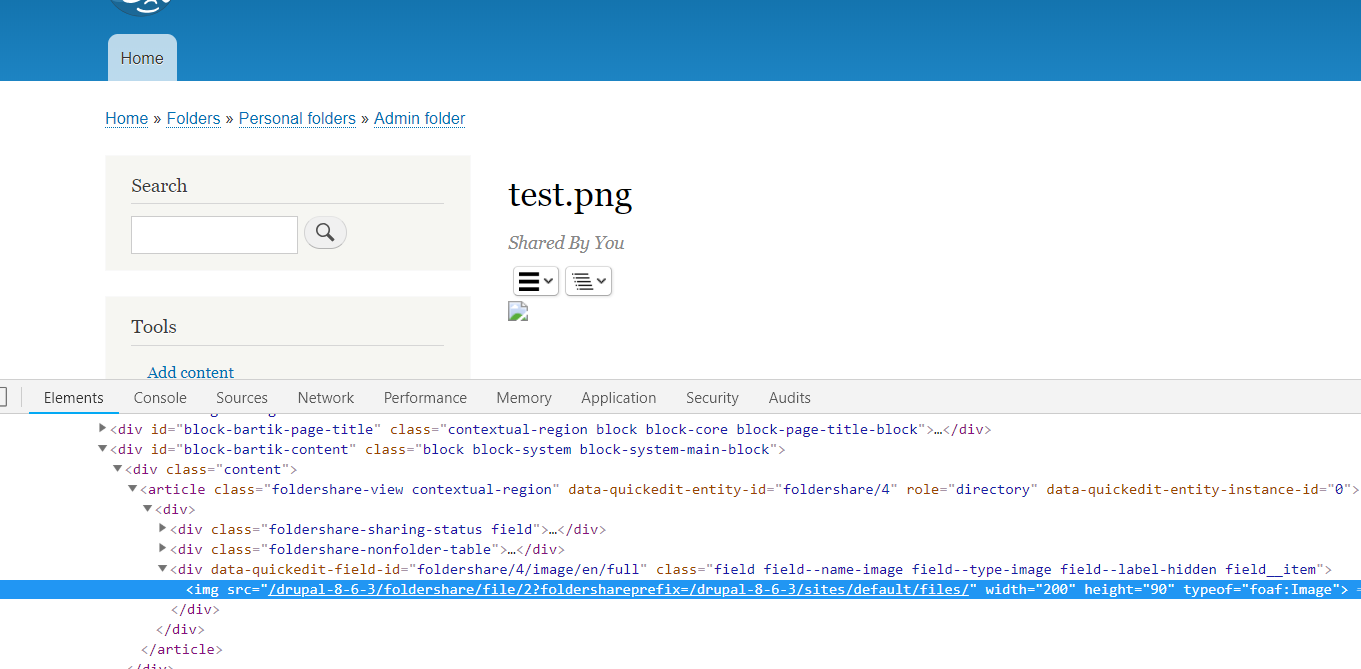
- When a new image is uploaded, its url is wrong (example: /drupal-8-6-3/foldershare/file/2?foldershareprefix=/drupal-8-6-3/sites/default/files)
Also, I'm aware this is an experimental module. I will try to find solutions.
Thank you for reading!
Comment #17
toamit commentedPlease close this issue as its is solved. It would be nice if you could report back what changed.
Are you still translating to another language?
My suspicion would be that a apache restart was required as somethings got mangled between updates.
Move the search issue to corresponding thread, or close previous and create new one.
Few things to try
Create separate issues for each new problem encountered, this way we and others can track things better.
Comment #18
ameziane commentedOnce again, thank you for your answer, and my apologies, I wrote these messages yesterday in a hurry. I will create new issues and update the search one.
The new tests were all done with an English install of Drupal, with no translation, and the sharing is then working again. As planned, I'm able to give the "view" or "author" right on a folder to a user, wether he has the necessary rights.
It is working with Drupal >8.6.2 and PHP >7.1, MySQL > 5.6.38, using Wamp or Acquia Dev Desktop 2.
It wasn't working on my original site, with the same environment, so I still have to make tests to determine if the problem comes from the multilangual feature, or other modules creating conflitcs or needing to be updated.
Comment #19
ameziane commented