

Closed (fixed)
Project:
Bootstrap
Version:
8.x-3.x-dev
Component:
Code
Priority:
Normal
Category:
Bug report
Assigned:
Unassigned
Reporter:
Created:
8 Jun 2018 at 16:58 UTC
Updated:
2 Dec 2018 at 09:09 UTC
Jump to comment: Most recent, Most recent file



Comments
Comment #2
aaronbaumanComment #3
aaronbaumanIn this patch: fix handling of the "backdrop" setting in modal.jquery.ui.bridge.js, which was incorrectly mapped to the "modal" option.
Comment #4
markhalliwellWhy is it "incorrect"?
Comment #5
aaronbaumanThe "backdrop" option from theme config is a select list of 3 possible values - true, false, or "static".
The "modal" option is a boolean value, indicating whether to use modal or dialog.
Currently, the "backdrop" option is ignored entirely when creating the options to pass through to bootstrap modal API. Instead, the "modal" option is passed through.
Instead of being ignored, the "backdrop" option from theme config should be mapped to the "backdrop" pass-through options.
Comment #6
markhalliwellI'm still not following. How does "theme config" make its way into this scenario? This file is the
modal.jquery.ui.bridge.jscode. Meaning that it's only intent is to map jQuery UI options (e.g.options.modal) to the supported Bootstrap options (e.g.mappedOptions.backdrop). There is nooptions.backdrop, or at least there shouldn't be.If whatever code that implements said jQuery UI dialog options doesn't explicitly provide the
modaloption, then it falls back to what the theme config specifies.Comment #7
markhalliwellIf anything, I think the real "issue" here is that there needs to be a disclaimer stating something to the effect of: "Note: these settings may be manually overridden depending on which options were explicitly specified by the code from core/contrib and then mapped using the jQuery UI Bridge."
Comment #8
aaronbaumanThe theme config setting is "modal_backdrop", which is assigned to Modal.DEFAULTS.backdrop in bootstrap/js/modal.js:
Modal.DEFAULTS is subsequently used to define options for the plugin definition, also in bootstrap/js/modal.js:
and finally, these options make their way to modal.jquery.ui.bridge.js via the option() setter:
Hence, the "options" in this patch are some of the pass-through values from theme settings.
If options.modal is used where options.backdrop should be used instead, then it's impossible to set a "static" backdrop.
Here's a call debugging frame at the appropriate line that will hopefully illustrate this more clearly:

If you go ahead and test theme settings for modal, you will see that the "backdrop" setting does not work.
With this patch, the "backdrop" setting does work.
Comment #9
markhalliwellI think you're missing the point...
If
options.modalis provided at all, it is an explicit override. jQuery UI doesn't have the concept of a "static" backdrop. Thus, whatever was set in via the theme settings is irrelevant.Comment #10
aaronbaumanMy point, as stated in the original title, is that the modal_backdrop option "static" -- provided by this module -- does not work as described, using vanilla bootstrap theme and default settings.
I'm not sure how to convince you of this other than to please ask you, again, to try for yourself if you don't believe me.
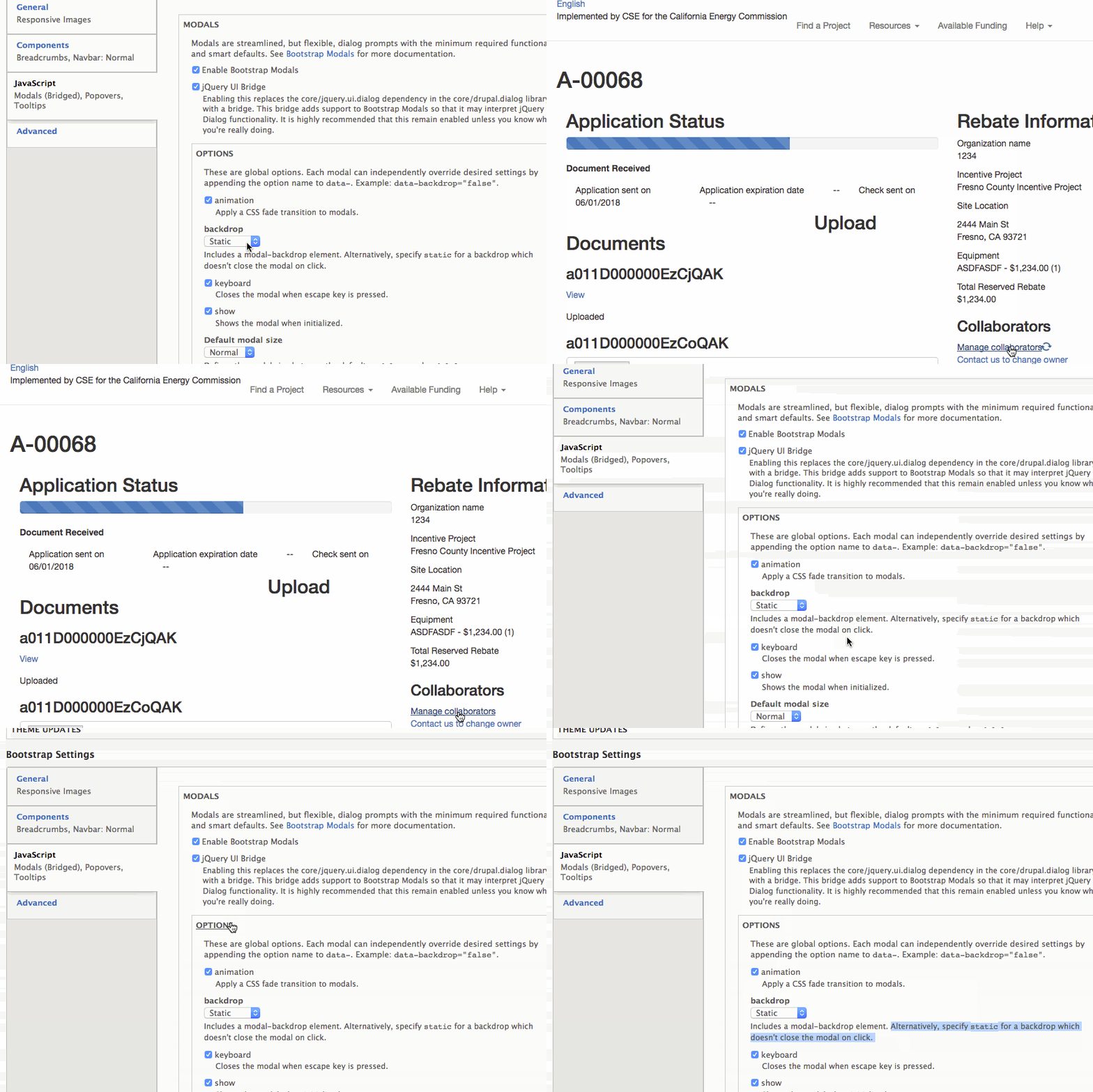
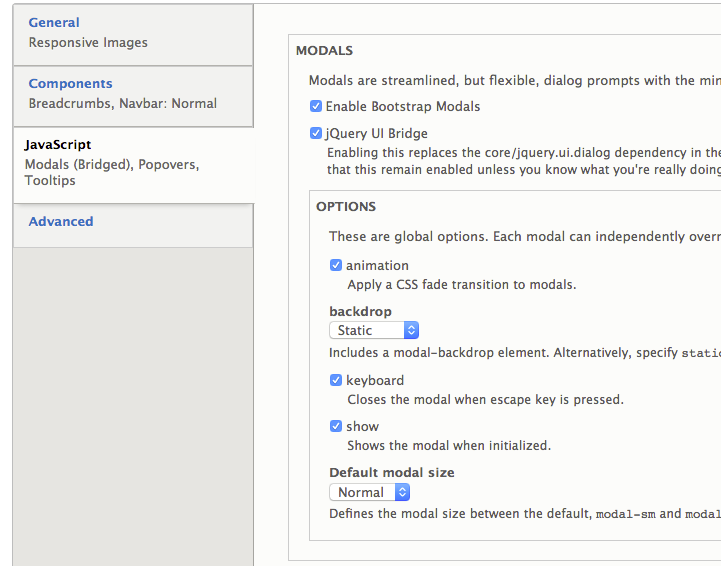
Here's what my current settings look like:

Here's a gif of unpatched bootrap *not* working:

You can see, when the mouse is clicked on the backdrop region, the modal disappears.
And here's a gif of the patched bootstrap version working:

Without the patch, "static" works the same as "true".
With the patch, "static" works as expected.
Comment #11
aaronbaumanMaybe the solution is that the "modal" option needs to take into account the "closeOnEscape" option?

Or, why does "closeOnEscape" have special treatment for the "modal" option, but not vice versa?
Comment #12
markhalliwellBecause, "static" really only comes into play when the
closeOnEscapejQuery UI dialog option is explicitly specified.As you can see, it explicitly sets
options.modaltostaticwhich is later mapped again:This is because jQuery UI's "modals" can, by default, be closed by clicking on the backdrop. The default functionality is not the same as Bootstrap's. The reason this doesn't just assume "static" is that the modal itself may not be constructed (from code/dialog options) to include a closing mechanism of some sort. Thus, the only way to actually "close" the modal is to click the backdrop.
If you want to ensure that that the modal is truly "static", add the following attribute
data-dialog-options="{"closeOnEscape":false}"so it triggers the above code the way it was designed.I'm not saying this is 100% "perfect" or "ideal", but there are simply limitations to bridges. This is one of them.
Furthermore, it is a bridge that is specifically designed to ensure that jQuery UI's dialog options are accounted for, not Bootstraps.
Comment #13
aaronbaumanI don't understand how that's supposed to work, because I'm already using that option and it's always subsequently overwritten by the "modal" option case handling. Do I have to use a different data-dialog-type option?
I've already using "dialog", which doesn't respect the "closeOnEscape" setting either.
Comment #14
markhalliwellNo, it's not "overwritten". They're the same. Please re-read my previous comment and the if statement logic.
Comment #15
aaronbaumanOK, I see at least part of the problem: closeOnEscape is being set to the string "false", and always evaluates to true.
Comment #16
aaronbaumanHere's a gif of step-through:
Comment #17
aaronbaumanOK, I finally got it to work with the following attribute on the ajax link:
data-dialog-options="{"closeOnEscape":""}"Comment #18
markhalliwellThat... shouldn't be happening.
Core uses jQuery's data method to parse the options:
http://cgit.drupalcode.org/drupal/tree/core/misc/ajax.js#n129
And as you can see here, it's parsed as a boolean, not a string:
https://codepen.io/markcarver/pen/zaEmKo?editors=1011
Comment #19
markhalliwellComment #20
imclean commentedI'm experiencing the same issue using a Bootstrap sub theme.
#12 still allows closing by clicking on the backdrop:
data-dialog-options="{"closeOnEscape":false}"#17 prevents modal from being closed by clicking on the backdrop:
data-dialog-options="{"closeOnEscape":""}"This option also hides the close button "X" in the top right, which may be normal behaviour but I was hoping to keep it.
Comment #21
imclean commentedIn case it matters how the link is generated:
Comment #22
markhalliwellFirst... why would you create a link like that?! That is a horrible way to do that.
Inline templates are only meant for user (GUI) based templates (think views field rewrites). They're not intended to be a replacement for actual Twig templates. Also, you're already in PHP, where you can use the proper
#type:Second... the primary issue, in this issue, is that setting
closeOnEscapeto an actualfalseboolean doesn't work. I've determined that this is actually a legitimate core bug: #3014136: Opening dialog via AJAX casts dialogOptions values to strings.I'm leaving this issue open, however, because I still think some general verbiage needs to be added to better explain how options are mapped.
Comment #23
imclean commentedYeah it's not pretty. It's actually mixed up with some Vuejs, which could also be extracted.
Thanks for the update, I'll check out the core issue.
Comment #24
markhalliwellI've been going over the code (and previous examples given) and think there could be a little better support while waiting on #3014136: Opening dialog via AJAX casts dialogOptions values to strings.