

Closed (fixed)
Project:
Views Contextual Range Filter
Version:
8.x-1.x-dev
Component:
Code
Priority:
Major
Category:
Bug report
Assigned:
Reporter:
Created:
13 Feb 2018 at 17:55 UTC
Updated:
5 Jul 2020 at 07:39 UTC
Jump to comment: Most recent, Most recent file


Comments
Comment #2
espurnesComment #3
espurnesI tested the module in simplytest.me in a non multilingual site, and I have the same problem.
Steps to reproduce
Do I have to write the arguments in another format?
Thank you.
Comment #4
espurnesI found a way to make the date range filter work, but I can use it because it'll probably break other functionalities in views.
Commenting the line 1776 of /core/modules/views/src/Plugin/views/query/Sql.php
$field = "DATE_ADD('19700101', INTERVAL $field SECOND)";lets you use "2012--2013" OR "20120101--20130101" as arguments and it works.
This line corresponds to:
public function getDateField($field)and affects Mysql databases.Commenting this line the sql query WHERE clause is:
((DATE_FORMAT((node__field_date.field_date_value + INTERVAL 3600 SECOND), '%Y%m%d') BETWEEN '20120101' AND '20130101' ))instead of
((DATE_FORMAT((DATE_ADD('19700101', INTERVAL node__field_date.field_date_value SECOND) + INTERVAL 3600 SECOND), '%Y%m%d') BETWEEN '20120101' AND '20130101' ))The problem is that this part of the SQL query:
SELECT DATE_FORMAT((DATE_ADD('19700101', INTERVAL 'node__field_date.field_date_value' SECOND) + INTERVAL 3600 SECOND), '%Y%m%d');that we can write like
SELECT DATE_FORMAT((DATE_ADD('19700101', INTERVAL '2012-05-02' SECOND) + INTERVAL 3600 SECOND), '%Y%m%d');Always returns 19700101.
So always, the view wants to show the records where 19700101>=start_date AND 19700101<= end_date, and this is just TRUE if start_date is 19700101.
Is it possible to patch Views Contextual Range Filter to overwrite this query?
Is maybe a views issue?
Thanks.
Comment #5
espurnesI checked that field_date is stored in database like "2003-02-20" so "Y-m-d", and I tested the query at https://www.w3schools.com.
Also tested on PHPmyAdmin with the same result.
Comment #6
rodrigoaguileraI also did some manual tests and it does not seem to work.
The code does the assumption that the fields store timestamps but is not the case for date fields from core.
If you add a timestamp field is not detected as date field but numeric.
I'll raise the priority since this is listed in the description of the module and the stability is now RC but trying to make it work is kinda misleading.
Comment #7
espurnesI tested the module with a timestamp field. It is detected as numeric field and it works properly with filters like 1455552189--1518710589.
1455552189 corresponds to GMT: Monday, 15 de February de 2016 16:03:09
1518710589 corresponds to GMT: Thursday, 15 de February de 2018 16:03:09
In my case I need to use the module with date fields because I have content with date fields...
Comment #8
espurnesIn my use case I'm using a views block embedded into node using a HOOK_preprocess_node to show my_content_type_b nodes with dates between start and end dates of current my_content_type_a node.
I decided to create another field into my_content_type_b to store timestamps.
So
I'm populating this field with a hook_entity_presave and bulk node save operation from /admin/content or custom view.
And in my HOOK_preprocess_node I load the view with arguments like this (I added the hook into my_theme.theme):
And I print my_view in node--my-content-type-a--full.html.twig like so:
{{ my_view }}my_custom_view lists my_content_type_b nodes and has field_custom_timestamp as contextual range filter.
I hope it helps some one.
Comment #9
espurnesI'm having issues with this approach, because I have dates before 1970 time stamp range is from 1970 - 2038.
In my use case I will not list content before 1970 so I decided to set timestamp = 0 on dates prior to 1970.
The
Comment #10
masipila commentedI'm also banging my head with this date range field issue. I'm not a big fan of the creating another timestamp field and populating that from the actual date range field as mentioned in #8...
Has anyone had a chance to do any analysis where things boil down when using date range fields?
Cheers,
Markus
Comment #11
masipila commentedI was looking into this yesterday. The reason for the issue seems to be exactly as described in #4 by @espurnes.
@espurnes provided one workaround in #8 which is based on using timestamps instead of date fields.
The timestamp based approach was not feasible for me, so I ended up using another workaround which is based on hook_views_query_alter() instead of this module. I will replace my ugly hack with this module once this date range bug has been resolved. For the reference of others, here's my hook_views_query_alter() implementation.
Comment #12
pingevt commentedFollowing the comments in #4 I think we could easily update the DateRange class to call the getDateField() method on the Query Object. getDateField() takes a string_date param, which if set to true, everything works fine.
I'm also noticing the normal timestamp fields, the $plugin_id is "date_xx" but if you are using a datetime field it is "datetime_xx". So we can use that to figure out how to call getDateField().
Need to investigate a little further and hopefully I'll be working on a patch today.
Comment #13
pingevt commentedThis could be going a few different ways. I believe this is working for my use case so far. I'd like to test on other date contextual filters.
Comment #14
pingevt commentedFixed some coding standards
Comment #15
cachesclay commentedis there a reason why the getFormula wasn't changed to getField, as per #4 & #12? I can't get this filter to work without it at all. Here's a patch for that.
Comment #16
pingevt commented@cachesclay This was a little bit ago so I don't remember how that played into exactly. Can you provide some more information on your setup and use case? Specifically the views config file with the plugin id?
I currently have the patch in #14 on a production site. I'm curious what your use case is to see whats breaking. #q4 might have only really fixed my use case. Thanks
Comment #17
cachesclay commented@pingevt I was just trying to filter by a datetime field - giving it params: 2019-08-08--2019-09-15. Before using the patch in #15, no results, after I added it, I got the correct results. When I looked at the code, that $field var had a full query in it that was breaking the logic.
Comment #18
pingevt commented@cachesclay Were you using the patch in #14 as well? or only the one in #15?
Just trying to understand your whole process, thanks!
Comment #19
cachesclay commented@pingevt - my bad - I didn't use the patch from 14, because it was working with a date range as I needed (2019-08-08--2019-09-15). I tried the patch from 14, but it didn't seem to fix that specific use case for me, so I held on adding it in.
Comment #20
pingevt commented@cachesclay - I'll be honest, at first I didn't understand what you were doing and just about to write a long message saying I have no clue how you go it to work... BUT I think we are using different arguments... I was using the `Date in the form of CCYYMMDD.` and looks like you were using the actual field argument. It took me awhile, but my arguments are formatted like "20190101--20190501" and yours had dashes. So these are completely separate use cases. And both behaving differently. I'll run down this rabbit hole for a bit and see what I can find.
I'll try and write some tests for this as well. I'm trying to get better at that, but writing tests are taking up a lot of time.
Comment #21
jasondmichaelson commentedComing into this discussion a bit late, but as this is a module I'd love to use, precisely in the date range context, I'm chiming in. In my use case I've got dates going back to 1952, and that content needs to be displayed so timestamps aren't an option for me either.
Looking at the comments above, I'm seeing multiple date formats CCYYMMDD, CCYY-MM-DD, etc. The code could be written to try and parse the filter parameter and try and guess the format, or it could be made explicit, as part of the settings for the filter in the view, or along with the settings in /admin/config/content/contextual-range-filter. Guessing the format IMHO is always a bad idea, although it would be more flexible.
I'm not versed enough with the contextual filter configuration on the view to figure out which is the more feasible option quite yet, but I'm very interested in helping get this issue moved to the resolved state.
As an aside, my use case only requires that the filter work down to the year, based on the current content of the site I'm migrating to D8
Comment #22
rdeboerI've not been able to give this module the attention it deserves for some time.
In addition quite a few things seem to have changed in Drupal core/Views too.
I've just checked into 8.x-1.x a number of changes to the DateRange plugin, which wasn't working at all (anymore).
When specifying date ranges you can use most formats, e.g. 20200519--20200608 and
19May2020--today should work equally well.
More testing and tweaking may be required, but I believe the module is in better shape than it was weeks ago.
Thanks @Beakerboy for doing the initial porting work!
Comment #23
gbirch commentedI have not dug into why, but the most recent release (rc3) makes the patch not apply and breaks the functionality.
I get a query that looks, in relevant part, like this:
AND ((DATE_FORMAT(
(DATE_ADD('19700101', INTERVAL node__field_call_date.field_call_date_value SECOND) + INTERVAL -14400 SECOND),
'%Y%m%d') BETWEEN '20191201' AND '20200531'))
The problem being that this statement:
"DATE_FORMAT((DATE_ADD('19700101', INTERVAL node__field_call_date.field_call_date_value SECOND) + INTERVAL -14400 SECOND),
'%Y%m%d')"
produces "19691231" for all values in the table. So no matter how you fix your parameters, the condition is never going to work.
Comment #24
rdeboer@gbirch
Thanks for your report.
Bummer.
Need to find time to look into this.
Comment #25
gbirch commentedIn case it helps, it appears that the bad bit of SQL just quoted SHOULD be:
DATE_FORMAT(DATE_ADD(node__field_call_date.field_call_date_value, INTERVAL -14400 SECOND), "%Y%m%d")
Comment #26
jasondmichaelson commentedEek. This actually appears to come from core in views/src/Plugin/views/query/MysqlDateSql.php in MysqlDateSql::getDateField().
Comment #27
jasondmichaelson commentedThis is a total hack but this worked for me. I think the right solution is to figure out if that's a problem in core, but its going to be more difficult, I think, to get things changed in core for this, unless we can come up with some evidence that its buggy behavior there.
Changed this:
to this:
in src/Plugin/views/argument/DateRange.php
Comment #28
rdeboer@gbirch @jasondmichaelson
Thanks so much for your research and solutions.
I am however confused as I cannot reproduce the erroneous results that you are getting.
I created a simple View on page /mycontent (no Menu) with the Changed date as a Contextual Filter.
I transformed it to a Contextual Range Filter on the module's configuration page, admin/config/content/contextual-range-filter.
I then went back to the Contextual Filter form and ticked the Allow relative date ranges checkbox.
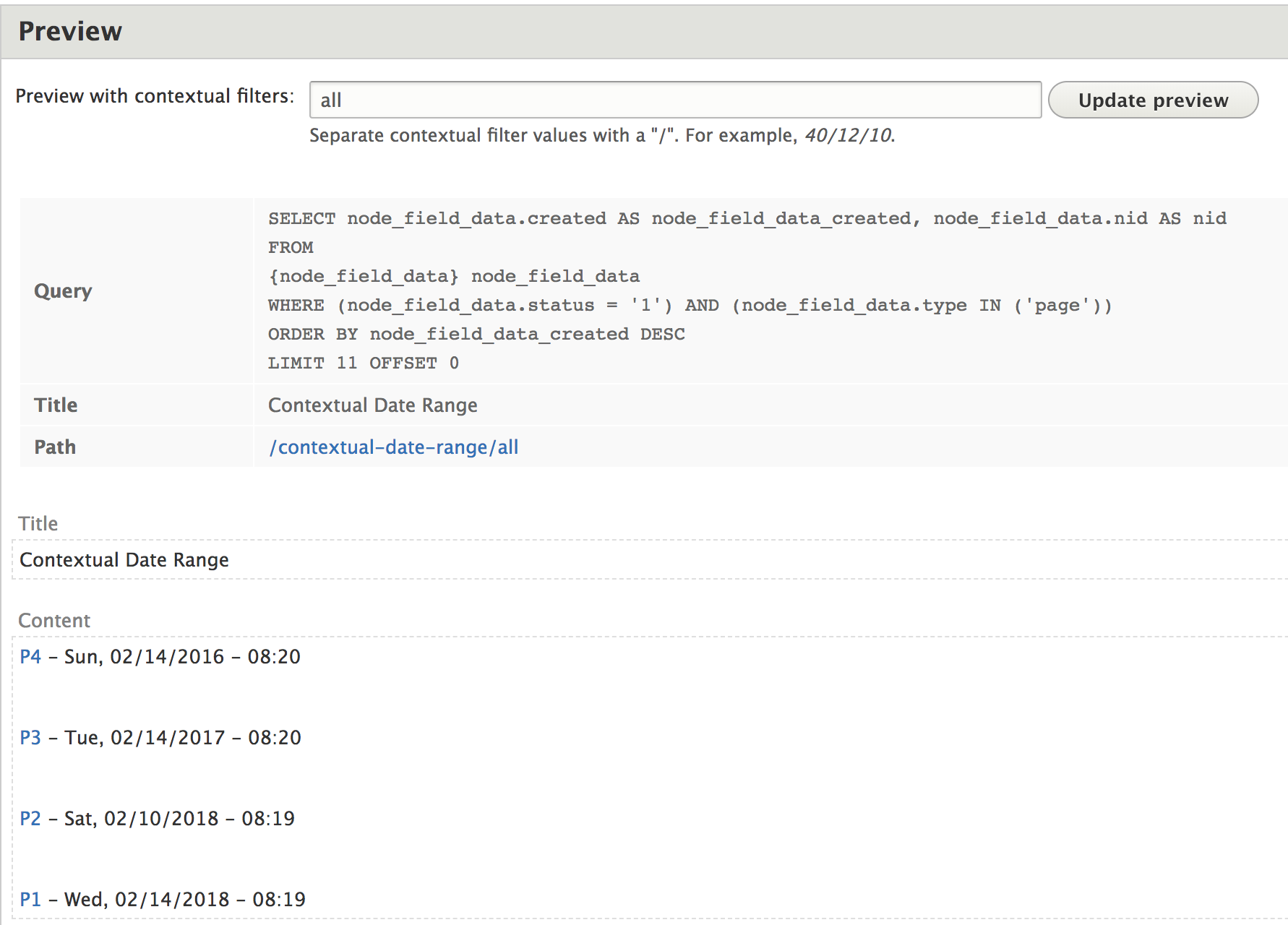
When I use the Views Preview pane and enter something like 2 weeks ago -- yesterday, I see this query being generated:
SELECT node_field_data.changed AS node_field_data_changed, node_field_data.nid AS nid
FROM {node_field_data} node_field_data
WHERE (DATE_FORMAT((DATE_ADD('19700101', INTERVAL node_field_data.changed SECOND) + INTERVAL 36000 SECOND), '%Y%m%d') BETWEEN '20200606' AND '20200619' )
Given the fact that today is 20 June 2020, it seems that Contextual Range Filter module has generated the correct (sub)clause, with "2 weeks ago" being translated to 20200606 and yesterday being 20200619
The 36,000 is explained by the fact that I'm in Melbourne, Australia, UTC +10 hrs.
Moreover, unlike @gbirch's experience in #23, on my system this query produces the correct results.
My system is MAMP stack on Macbook Pro, running:
Drupal 8.9.0 on Apache/2.2.34 with PHP 7.3.9 and MySQL 5.7.26
I agree with @jasondmichaelson that the "faulty" (if it is faulty) part of the above query is generated by core, not by the Contextual Range Filter module. And I also agree that a "hack" is better than no solution at all.
Comment #29
rdeboerIn addition to the above....
I applied the patch from #27 on my test system. The query thus generated changed from:
SELECT node_field_data.changed AS node_field_data_changed, node_field_data.nid AS nid
FROM {node_field_data} node_field_data
WHERE (DATE_FORMAT((DATE_ADD('19700101', INTERVAL node_field_data.changed SECOND) + INTERVAL 36000 SECOND), '%Y%m%d') BETWEEN '20200606' AND '20200619' )
to
SELECT node_field_data.changed AS node_field_data_changed, node_field_data.nid AS nid
FROM {node_field_data} node_field_data
WHERE (DATE_FORMAT((DATE_ADD(node_field_data.changed, INTERVAL node_field_data.changed SECOND) + INTERVAL 36000 SECOND), '%Y%m%d') BETWEEN '20200606' AND '20200619' )
This is not quite correct.
And on my system it is this second "fixed" query that produces NO results!
Exactly the reverse from what others have experience.
I guess this is because the Change date I've used is a timestamp (i.e. integer seconds since 1-Jan-1970), whereas others have had fields that are Drupal DateTime fields, which present themselves to MySQL as strings in this MySQL format: '2020-06-19' or '2020-06-19T23:59:59'.
NOTE: MySQL manual, https://dev.mysql.com/doc/refman/5.7/en/date-and-time-functions.html#fun...
Comment #30
rdeboerHave added a Date string fix and checked it in, while still also supporting the Authored On and Changed timestamps on Nodes.
Tagged as release 8.x-1.0-rc4.
Setting this to "Fixed"... until proven otherwise, which may not take long haha.
Comment #31
jasondmichaelson commentedActually, I think that did it.
Comment #32
rdeboer@jasondmichaelson
Thanks for confirming.
Will leave it for a few more days, then will release 8.x-1.0.
Note: regardless of whether the date field used is a timestamp or a Date(Time), the (default) absoulte date format for use in a contextual range is the same as D8 core Views, which is 2020-12-31 (ie WITH hyphens).
However when the "relative dates" box is ticked you can also use phrases like "31 Dec" (this year) to specify absolute dates.