

 Come together with the global Drupal community in Rotterdam, 28 Sept – 1 Oct 2026. Sessions, contribution, connection, and Early Bird savings until 8 June.
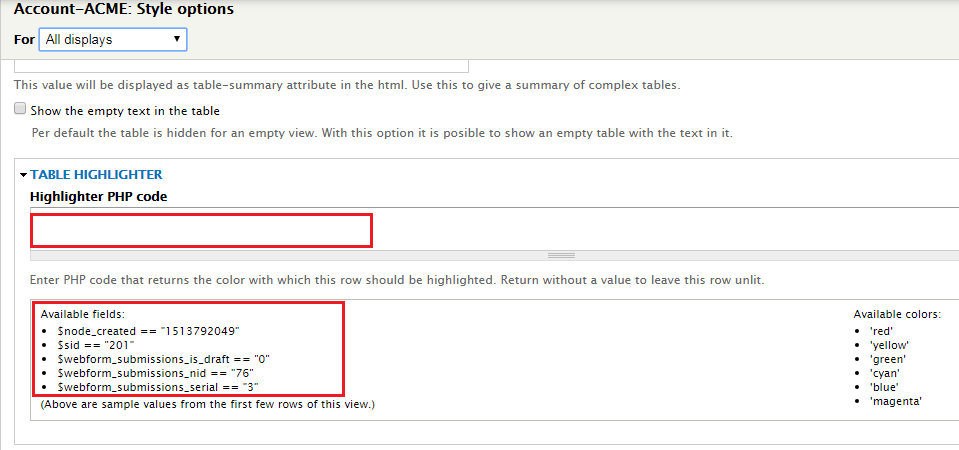
How can I identify and designate a custom webform submission field (i.e. Status) to be used with the "Table Highlighter" module to change the color of a view item/row when the status is "completed"? (see attached photo: 02-TableHighlighter-Options.png)
For instance, if I wanted to change all table rows to red that were based on nid = 76 I would use the following PHP code:
if ($webform_submissions_nid=="76") return 'red';
What code would I use to change all table rows to red if the "Status" = "completed"? Here are some additional details:
1. Node. The webform node equals 76
2. Submission Data. The status submission data is: webform submissions data: Value (Status) [see attached photo: 01-WebformField-Status.png
Thank you in advance for your help.
| Comment | File | Size | Author |
|---|---|---|---|
| 02-TableHighlighter-Options.png | 20.24 KB | jenna_katie_matthews | |
| 01-WebformField-Status.png | 8.88 KB | jenna_katie_matthews |


Comments
Comment #2
liam morlandI think $webform_submissions_is_draft will do what you need. If it's not a draft, it's complete.
Comment #3
jenna_katie_matthews commentedThank you, however I have to be able to identify the custom "Status" field in the webform submission which has value states of "assigned", "in-progress" or "completed". How do I identify the custom webform "status" field?
i.e. @webform_submissions[what next] ...
Once I identify the field, I can then check for the 3 different states.
Comment #4
liam morlandIt is uses Webform tokens, you need to use the form_key to identify the component. I'm not familiar with Table Highlighter. You might need to add some debugging statements, such as dpm(), to the code to see what variables it has access to.
Comment #5
liam morlandIf you need more help, please re-open and provide details.
Comment #7
avpaderno