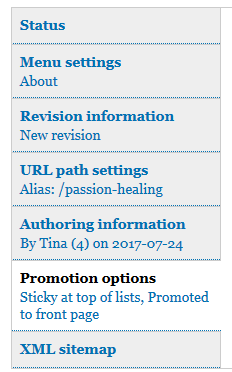
When editing a node, Drupal shows "Promotion options" as a tab, with a settings summary beneath - see attached image.
In bootstrap theme, with "Use the administration theme when editing or creating content" enabled, the settings summary is missing.
The problem comes from Plugin\PreprocessFormElement code commented "Place single checkboxes and radios in the label field." This is a modification that is required in Bootstrap for checkboxes and radios to function properly.
However, this modification means that node.es6.js fails to find the element where it expects.
In this case, simply using .closest('label') instead of .next('label') will work for all.
        if ($optionsContext.find('input').is(':checked')) {
          $optionsContext.find('input:checked').closest('label').each(function () {
            vals.push(Drupal.checkPlain($.trim($(this).text())));
          });
          return vals.join(', ');
        }


Comments
Comment #2
markhalliwellThis is a rather trivial bug IMO, but it should be fixed upstream... not hacked in contrib.
There is a lot of JS code still in core that expects a certain structure. In this case, simply using
.closest('label')instead of.next('label')will work for all.That being said, it should probably just get the parent
.form-itemelement and then grab all the text inside using.text()(might not work if the element has an individual description though...). Targeting any specific DOM elements or expecting a certain DOM hierarchy structure in JS is a big no-no.I've updated the issue summary.
Comment #4
bhanuprakashnani commentedComment #5
droplet commentedThis is the known issue if it's only a bug for the particular theme.
we have a list of things, and going to refactoring:
#2871619: Refactoring content_type.js
In another word: the CORE script doesn't handle different code patterns than the CORE (form API) one.
Comment #6
bhanuprakashnani commented@AdamPS
Attached a fresh patch. please review
Comment #7
markhalliwellTargeting DOM elements and expecting a specific DOM hierarchy is an anti-pattern . Contrib has the ability to alter markup. I think what you meant to say is that core [maintainers] don't like making changes against these inherited/existing anti-patterns; especially when other frameworks show just how broken they truly are.
---
@bhanuprakashnani, you don't edit the compiled .js file, you must edit the corresponding .es6.js file.
Comment #8
droplet commented@markcarver,
I meant this is an expected behavior and we going to (I suggest to) improve it for each instance at once rather than chop them into few issues with a different workaround. During the refactoring, I prefer a quick fix from the particular theme that breaks the UI but I'm not against to any good patch in this issue thread. So I have not marked it as duplicated.
`closest` is only worked on this issue instance. And this is still a `specific DOM hierarchy`. If we accept `Contrib has the ability to alter markup` (code patterns in my, @droplet's term) as the reason to make this fix, it's far from a good patch. The altered pattern outside the box of `closest` will break again.
We also need some Tests to move the patch forward.
Thanks.
Comment #9
chiranjeeb2410 commentedUploaded new patch with change suggested by in #7 in .es6.js file.
Hope it goes green!
Comment #11
adamps commentedI don't really understand all the discussion in #7-#8. However this patch does indeed fix the bug, thanks chiranjeeb2410.
I fixed the priority field value to match the official description of how it should be used:
This bug causes a misleading report of the current promotion options, and the user will not be aware of the error unless they actually click to expand the tab.
Comment #13
adamps commentedReroll
Comment #22
needs-review-queue-bot commentedThe Needs Review Queue Bot tested this issue. It either no longer applies to Drupal core, or fails the Drupal core commit checks. Therefore, this issue status is now "Needs work".
Apart from a re-roll or rebase, this issue may need more work to address feedback in the issue or MR comments. To progress an issue, incorporate this feedback as part of the process of updating the issue. This helps other contributors to know what is outstanding.
Consult the Drupal Contributor Guide to find step-by-step guides for working with issues.
Comment #24
acbramley commentedIs this still an issue that the bootstrap theme needs to work around? Looks like we're still using .next() https://git.drupalcode.org/project/drupal/-/blob/11.x/core/modules/node/...
Comment #25
acbramley commentedI installed the Bootstrap theme and set it as the admin theme and tested the summary fieldsets on node/add and wasn't able to reproduce this issue (they looked fine), although it's hard to say from the limited information in the IS and provided screenshots.
I'm closing this now as cannot reproduce but please feel free to reopen it with more thorough steps if it's still an issue.
Crediting people here that attempted to fix this.