

 The 2026 Drupal Business Survey is open. Your response will help shape the future of the Drupal business ecosystem.
I replicated the steps of the README.txt file. The first time I tried to import content I got that white screen with the text: "The website encountered an unexpected error. Please try again later." I clicked the back arrow in my browser and tried to import content again. This time only the fields title and body were imported.
I erased all content, uninstalled the module, cleared all caches (included the cache tables in the DB) and installed the module again.
Same result!
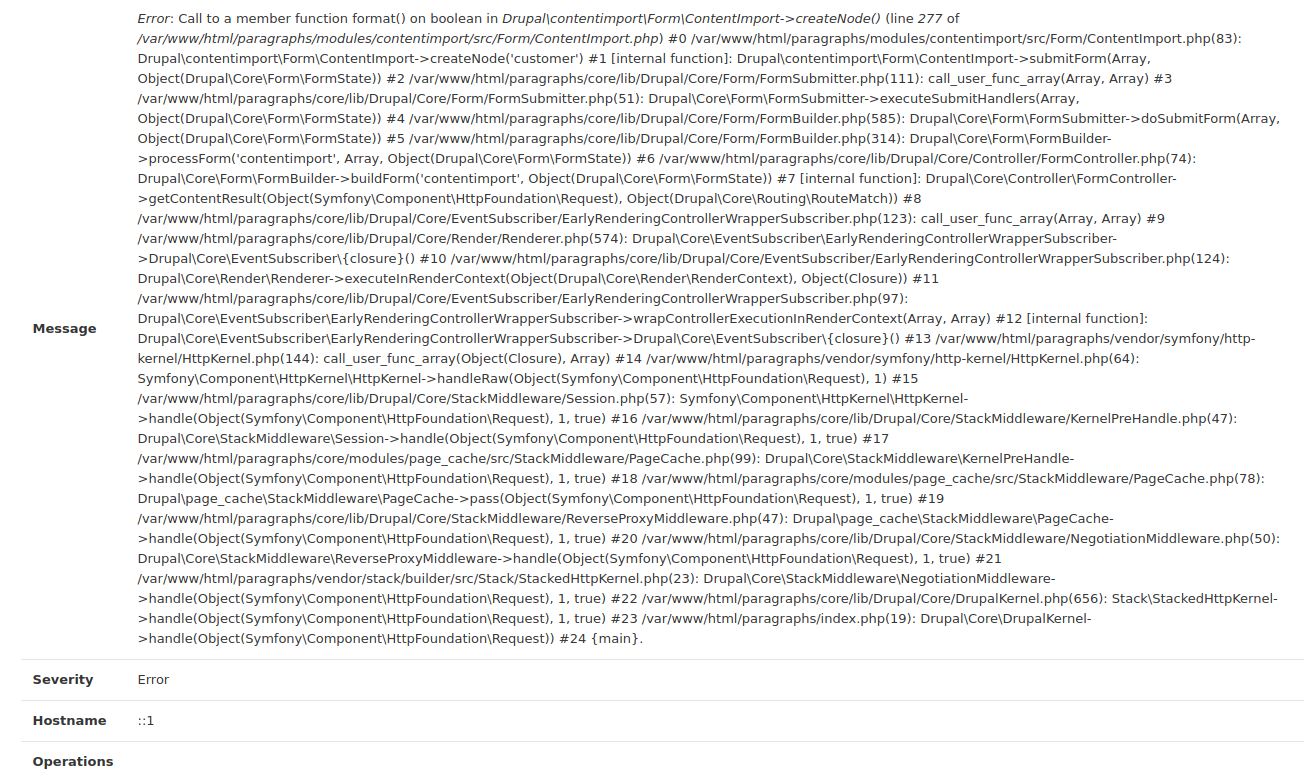
The log has following messages (see attachments).
| Comment | File | Size | Author |
|---|---|---|---|
| #4 | fixed_fatal_error-2911907-4.patch | 719 bytes | Ujwala_D |
| log2.png | 354.07 KB | jorgemontoyab | |
| log1.png | 336.4 KB | jorgemontoyab |


Comments
Comment #2
Ujwala_D commentedComment #3
carl.ben commentedThis error was fixed for me by editing the mySQL config file (my.cnf):
max_allowed_packet = 256MComment #4
Ujwala_D commented@jorgemontoyab,
The error came due to php function 'createFromFormat' which requires the format of passing date, which is unpredictable. So I have create date through timestamp. Please find an attachment for the solution.
Thanks
Comment #5
jorgemontoyab commented@Ujwala_D
Thanks! That solves the problem. However, you have to target line 275 in the patch file for the version 8.x-3.2 of the module and not line 264.
Comment #6
jorgemontoyab commentedComment #7
jorgemontoyab commentedComment #8
Anonymous (not verified) commented@Ujwala_D
I imported a CSV file containing a date. First time, it worked. I was happy. I tried it again with a clean install and stumbled over the message:
I followed your instructions but it didn't help. I can import files but only the titles show up. No other data is displayed. Going into the database, I see the dates stored. I have a CSV file with a date only—no time. I tried different PHP codes at:
It didn't help. The data doesn't show up though it is in the database. I tried different codes with such results in the database:
2012-08-27 (a date like it should be)
1970-01-01 (something went wrong)
2012-08-27T00:00:00 (date and time)
To be clear: I definitely don't want a time, just a date. The problem is that all data doesn't show up except the title.
P.S. The first time, I had several migration modules installed: Migrate Plus, Migrate Source CSV…
Comment #9
Anonymous (not verified) commentedComment #10
hongpong commentedI had a similar issue and adding max_allowed_packet = 256M into the [mysqld] section specifically worked. see #2941051: Problem with uninstalling module: database goes away
Comment #11
dhayanandan_k commented@20 Drei, I have replaced the code for Datetime import in dev version. Now it will work for both datetime and date fields.
@HongPong, the uninstall is working fine with dev version. Please verify
Comment #12
dhayanandan_k commentedComment #13
hongpong commented@dhayanandan_k my problem went away when I changed my mysql settings, therefore I could say the problem was not specific to the module. Best regards!