

Closed (fixed)
Project:
Commerce Point of Sale (POS)
Version:
8.x-2.x-dev
Component:
Code
Priority:
Normal
Category:
Task
Assigned:
Reporter:
Created:
11 Jul 2017 at 22:47 UTC
Updated:
12 Jan 2018 at 01:24 UTC
Jump to comment: Most recent, Most recent file


Comments
Comment #2
TimRutherford commentedSo here's what I got so far.
1) The YAML plugin for Label Formats. Defined formats are in commerce_pos_label.label_formats.yml.
2) The basic form structure for the Print Labels form, currently at admin/commerce/pos/labels or admin/commerce/pos/labels/{product_variation_id}. If given an product variation ID it will load the product and fill in the fields with its information, otherwise you'll get the search product form (not currently functional).
None of the print/add/remove functionality is done.
Nothing with commerce_pos_label_barcode is done.
Comment #3
TimRutherford commentedComment #4
cornifex commentedPatch from #2 with working entity_autocomplete field in print form. Currently only autocompletes variation title. Working on a selection handler that will grab a variation by either title or sku.
Comment #5
cornifex commentedSubmit/Validate handlers fleshed out a bit. Still working on the "Remove" handler not firing.
Comment #6
joshmillerWorking on this over the weekend. Goal is to have as much code / feedback / fixes as possible.
Comment #7
joshmillerAttached is the combined patches from #4 and #5. Very confused for awhile since the latest patch didn't have new module files :D. Still WIP, nothing new in this patch.
Comment #8
joshmillerComment #9
smccabe commentedComment #10
gauravjeet commentedGenerating barcodes based off product title is done. Currently, it only works with the route commerce_pos_label.print_label.
Added an interdiff of the work done.
For the label printing part, are we thinking of using a print library like mPDF, or is it just a barcode shown on a blank page that can be printed out using local system print?
Comment #11
gauravjeet commentedA screenshot of generated barcode.
Comment #12
smccabe commentedI think we can just format the label like a twig template, thats what we are doing for receipts as well, see #2901030: Receipt Printing
Comment #13
gauravjeet commentedPatch for suggested changes! The patch combines everything from #8.
Again, it only works with route commerce_pos_label.print_label.
Interdiff uploaded in #10
Comment #14
travis-bradbury commentedComment #15
travis-bradbury commentedI get an error when I try to print:
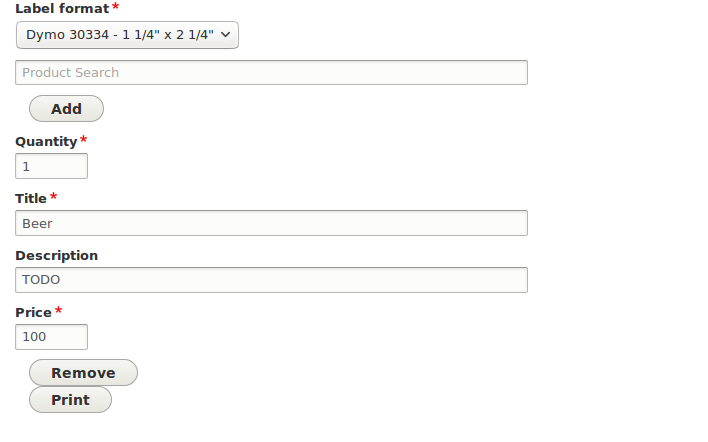
Here's the form before getting the error:
There's several TODOs in the module, including that one for the description in the image.
I think that supporting other label formats requires a module to support it. Is that the ideal way to set these up? My initial thought was that this is very similar to how the image style supports image styles, which is as config entities. Should a user be able to create their own label type in a form, or only by supporting it in a module?
Comment #16
travis-bradbury commentedThis fixes the phpcs issues, adds a menu link, and makes some changes to the form.
There's a few issues:
The second issue will mostly be following along with the receipt submodule but I got sidetracked by the ajax problem so I'm just posting what I did so far.
Comment #17
travis-bradbury commentedWhoops, uploaded the interdiff as the patch. Trying again.
Comment #18
travis-bradbury commentedNew patch with a bit more progress.
To do
I'm not sure how it's working out for label formats so far. The plugins have a CSS option but not their own templates, so that might be a bit limiting.
Comment #19
travis-bradbury commentedAnother work in progress patch. This one does actual printing!
I had to switch the barcode generator to the PNG version instead of HTML. The HTML one wouldn't show up when printing. The D7 version was using PNG anyway.
The print command works fine but the label needs styling. This patch includes the scss file from the d7 module and it looks like it should be OK for our default label format but it should compiled to css specific to that label format, probably not general for the whole module. The label format config also needs to point to that css file.
Barcodes have to be generated from the product's UPC field. We may want handling for UPC-less printing like the D7 module has. Right now the UPC is hard-coded and added in a theme pre-processor. The processing of products selected / configured by the form to rendered labels is very clunky.
There's also still an issue where some form edits are lost:
The jQuery print library is added in the label module but should be provided by commerce_pos instead: #2924548: Use commerce_pos jQuery print library in receipt submodule.
Comment #20
travis-bradbury commentedThis patch:
Still to do:
Still awkward is that different templates are not supported for other label formats and label formats define dimensions but those aren't used for anything.
Comment #21
travis-bradbury commentedComment #22
travis-bradbury commentedScrewed up the interdiff, trying again.
Comment #23
heddnRather than png, can we name the method something less technology specific and then we can swap out the service implementation for lots of different types of formats? png, svg, html, etc?
I think I would prefer to see this as a just base64 and let the
<img>tag stuff come in via a template. That way folks can more easily swap it out for their special use cases.This probably shouldn't get added to the repo.
Can this be more generic. Say, "generate" instead?
Nit: these should be separate array items. Not one long line.
Same here. Separate array items.
Comment #24
smccabe commentedtbradbury todo:
Tests.
--Add a test similar to the main POS one that tests the form flow, not able to actually test the print, because afaik we can't test that with phpunit. Could possibly add an additional test for the service, but I dunno how to verify a png, maybe just that it exists? thats pretty limited.
Write instructions in the README for using the module and adding new label types.
--Added simple readme, travis you can probably clean this up in a future issue of you want, or when we add custom twig support
Testing print output with the label printer.
--I do not have a label printer
The CSS should probably be specific to the label format rather than being named commerce_pos_label.css.
--Fixed, also created generic styling to use for the form, as the add button needed some styling
tbradbury: "Still awkward is that different templates are not supported for other label formats and label formats define dimensions but those aren't used for anything."
I'd spin off a child issue for that, since this patch is already huge.
Heddn feedback:
#1 switched to generate
#2 agree, moved into template
#3 I'm gonna go with keeping these in, afaik drupal ci has no way to generate them automatically and they are helpful should the need to debug arise, for us or other users.
#4 same as #1, switched to generate
#5 fixed
#6 fixed
I also moved some menus around as you could only get to labels directly, not through the menu system easily.
admin/commerce/pos moved to admin/commerce/pos/main
admin/commerce/pos is now a listing page that shows the main pos and the labels option
Also also, added scss files to the main gulp file.
I think thats probably it.
Comment #26
smccabe commentedOk,
Imma commit this mother and anything else can happen in follow-up issues, since this is already a big mamma jamma.
Big thanks to everyone that worked on this, it's really a whole big module in one patch PLUS some core module changes. Extra shoutout to Travis who did lots of the fiddly little bits near the end that actually make everything nice but are a pain in the ass.
Wasn't sure who to give extra special and prestigious "Author" credit to, decided on Travis, but many people did a lot of work here so don't feel slighted.
Comment #27
smccabe commentedAdded issue for the custom twig files that should still be done at some point. Just noting here so it's not lost if anyone follows this thread.
#2933448: Allow for unique twig templates per label type