Hi guys
If you are using the bootstrap theme, and if you wish to override the HTML TPL variables using the provided html.vars.php file, some things will not work as expected. For instance, modifying the body classes will result in a mess.
Here is what you can do to reproduce this bug...
- Copy the file named
html.vars.php from the bootstrap theme's templates/system folder into the templates folder of your custom theme. The content of that file can be seen at the address http://cgit.drupalcode.org/bootstrap/tree/templates/system/html.vars.php...
- In our case, we were trying to add a no-js class to the body tag that will be removed by JavaScript afterwards. This can be done in many ways. One possible way is to insert the following code at line 20 of
html.vars.php:
$variables['classes_array'][] = 'no-js';
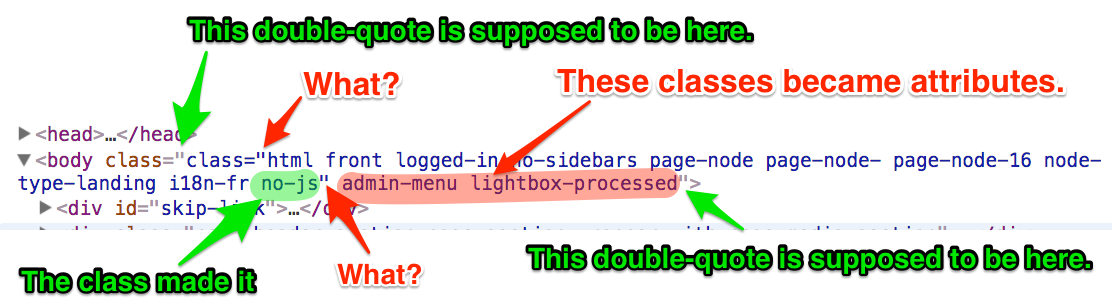
- Clear Drupal's cache, then view the source code of the pages. You will notice that the class attribute will be destroyed in an amazing way. See the attached screen capture.
- As an alternative, if you try adding a custom class using the patterns used at line 48, 52, and 56 in the switch(){} statement, you will get the same result. You can verify that by inserting the following code between lines 58 and 59
$variables['body_attributes_array']['class'][] = 'no-js';
Interestingly enough, if you forget about the html.vars.php file and directly implement the theme_preprocess_html() hook in your custom theme's templates.php file, then everything will work as expect and the new class will be properly added to the body tag.


Comments
Comment #2
asiby commentedComment #3
markhalliwellShort (temporary) answer:
Remove the copied
bootstrap_process_html()function from your sub-theme.You really shouldn't be duplicating the same logic as the base theme anyway.
Longer answer:
Phew. Took a bit to track this down :D
So.... this is technically a bug with both this project and core as this issue is one of the "fun" side-effects of using references.
The reason I never caught this when I implemented the related issue, is because one does not usually copy over
bootstrap_process_html()to a sub-theme.The base theme will still handle processing the variables after all the preprocess functions have ran.
---
It's very unfortunate that
drupal_attributes()uses&$datainstead of$attributes[$attribute] =.It's very common to miss/forget the way PHP actually works with references which is why core has this in this function.
At first glance, one tends to expect that when a function/method does not indicate that a parameter should be passed as a reference, then it shouldn't modify any part of the original variable passed.
Wrong. So wrong.
This means that the two times it sets values to
$data, it is actually setting the reference's value to a new value.PHP's foreach construct only copies the array itself when iterating over it. It does not handle copying any internal value references.
Thus, if a value in the array passed is already a reference and the value variable is a reference of that reference... it will modify the existing reference; not the "copy of the array value" (because there isn't such a thing if the value is a reference).
To put it in a little simpler terms within this context:
bootstrap_preprocess_html(), the$variables['body_attributes_array']['class']property is set as a reference to$variables['classes_array'].bootstrap_process_html()then invokesdrupal_attributes()on
$variables['body_attributes_array'].drupal_attributes()uses foreach with a reference, so the array passed is copied, but the existing reference to$variables['classes_array']is retained.
drupal_attributes()assigns the constructed string value of the array back to the reference, which is the reference to$variables['classes_array']$variables['body_attributes_array']['class']is now a string that equalsclass="..."class="class="...""---
Suffice it to say, there is indeed something that can be fixed in this base theme to make this not happen in the future, regardless if a sub-theme decides to double process these variables.
I'll attach a patch and commit the fix shortly.
---
Some vague references (pardon the pun) to this issue:
http://float-middle.blogspot.com/2010/02/php-references-to-array-element...
https://www.toptal.com/php/10-most-common-mistakes-php-programmers-make#...
http://stackoverflow.com/a/22939938/1226717
http://stackoverflow.com/q/894814/1226717
http://stackoverflow.com/a/1190298/1226717
It's unclear, but the following article seems to indicate that this behavior has been "fixed" (removed) from PHP 7. I'm not sure if that's true or not; regardless, using references in foreach loops is never a good thing IMO.
https://www.eduonix.com/blog/web-programming-tutorials/learn-changes-for...
Comment #4
markhalliwellComment #6
markhalliwellComment #8
asiby commentedThanks @markcarver for this very clear explanation.
That makes me wonder now ... how should someone override any of the vars.php files that are present in the bootstrap theme from within a startkit? I guess they are not supposed to be overridden in the child theme. It is so tempting to just copy some files in our own themes and rename the functions before customizing them ... just like we do with template files.
Comment #9
markhalliwellWell, first, you don't actually "override" anything from the base theme (that would actually require doing a registry alter to replace the functions that the base theme added).
Rather, preprocess and process functions are accumulative in nature.
You can still implement the same structure/files (
.vars.php) in your sub-theme. These files are just a way to "house" these two types of functions. It doesn't mean you have to have both present in that type of file.That being said, it is very rare when you actually need any sort of process function present in a sub-theme. If you do, it's likely to combat bad core/contrib logic (e.g. someone put stuff in a process function that should have actually been in a preprocess function. This is one of the reasons the theme process layer was removed in 8.x BTW.
Indeed and that is certainly OK, I do this all the time. You just have to remember to remove any unnecessary functions that were copied too. There's little to no need to duplicate the efforts of the base theme at that level. Supply what is actually needed, just don't do a totally blind c&p ;) Any time I typically copy something from the base theme, I usually remove the process function (if one was supplied), rename the preprocess function and then empty it out.
Comment #10
asiby commentedOk. Thanks for the tips.
Comment #12
goraisavant98@gmail.com commentedData science Courses in Perth
https://iimskills.com/data-science-courses-in-perth/