

Closed (duplicate)
Project:
Panels
Version:
8.x-4.x-dev
Component:
In-Place Editor (IPE)
Priority:
Normal
Category:
Bug report
Assigned:
Unassigned
Reporter:
Created:
27 Mar 2017 at 12:16 UTC
Updated:
5 Oct 2017 at 13:52 UTC
Jump to comment: Most recent, Most recent file




Comments
Comment #2
balsamaCan the steps to reproduce be simplified so that they eliminate the custom bundle? Sounds like it might be a legitimate bug, but I don't want to troubleshoot with more complexity than needed.
Comment #3
phenaproximaYeah, I don't quite understand what's meant by this:
How does one edit a bundle with Panelizer? We need steps to reproduce this. In the meantime, I'm postponing this on further information.
Comment #4
sanci91 commentedSorry for the delay in the feedback. After doing some tests, it seems that the problem is linked to inline entity form display and it happens in both custom blocks and custom media bundle when editing them in panelizer.
Here the steps to replicate the error, just checked on simplytest.me.
I attach some screenshots too.
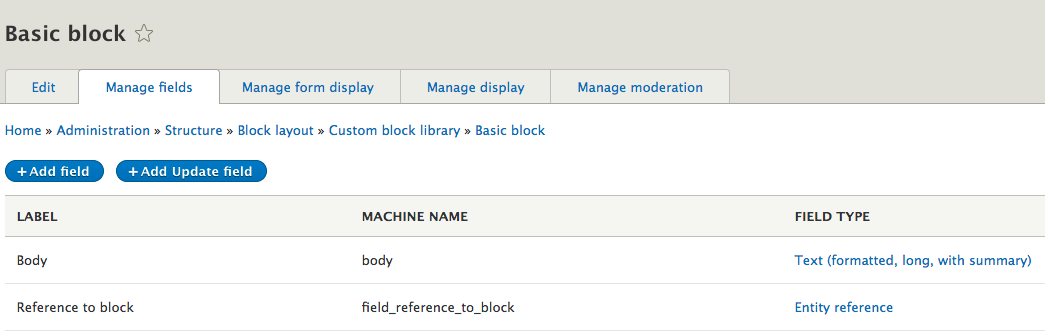
1) Create a custom block “test block” with an image field and a text field.
2) Add a reference in the existing “basic block” to this new custom block.
3) Set the number of values to “unlimited”
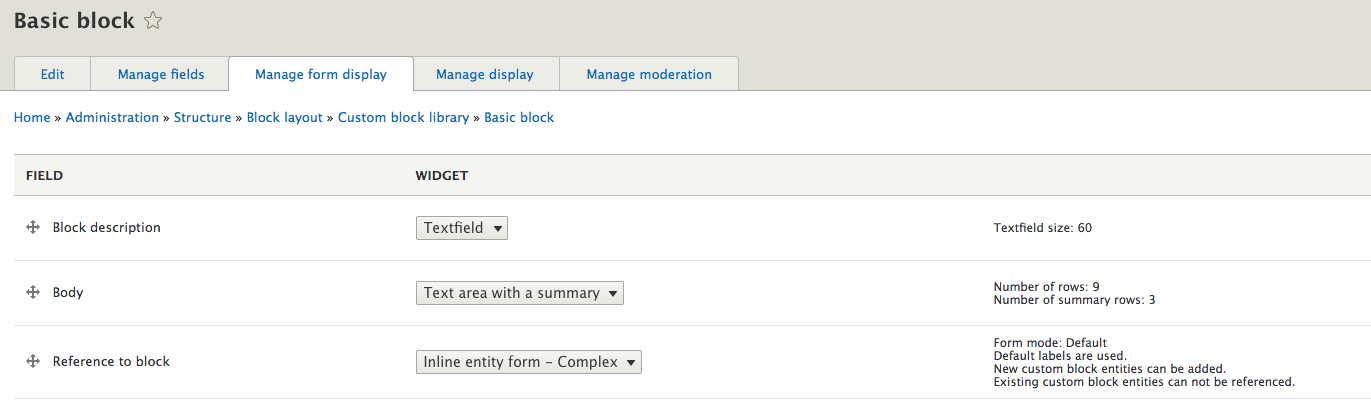
4) In the “manage form display” tab set the widget for this reference to “inline entity form - Complex”
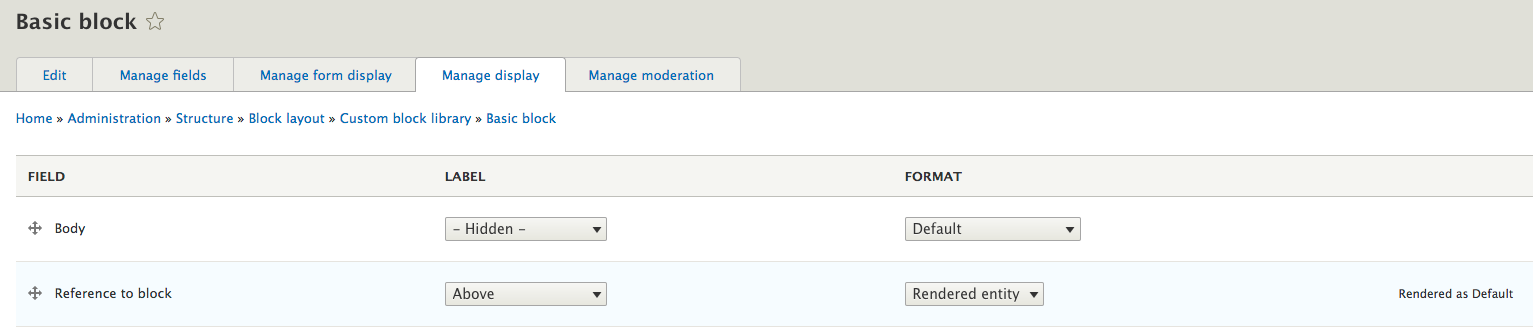
5) In the “manage display” tab set the format of this reference to “rendered entity” so you can see its fields and see if they are created right.
6) Create a new “landing page”
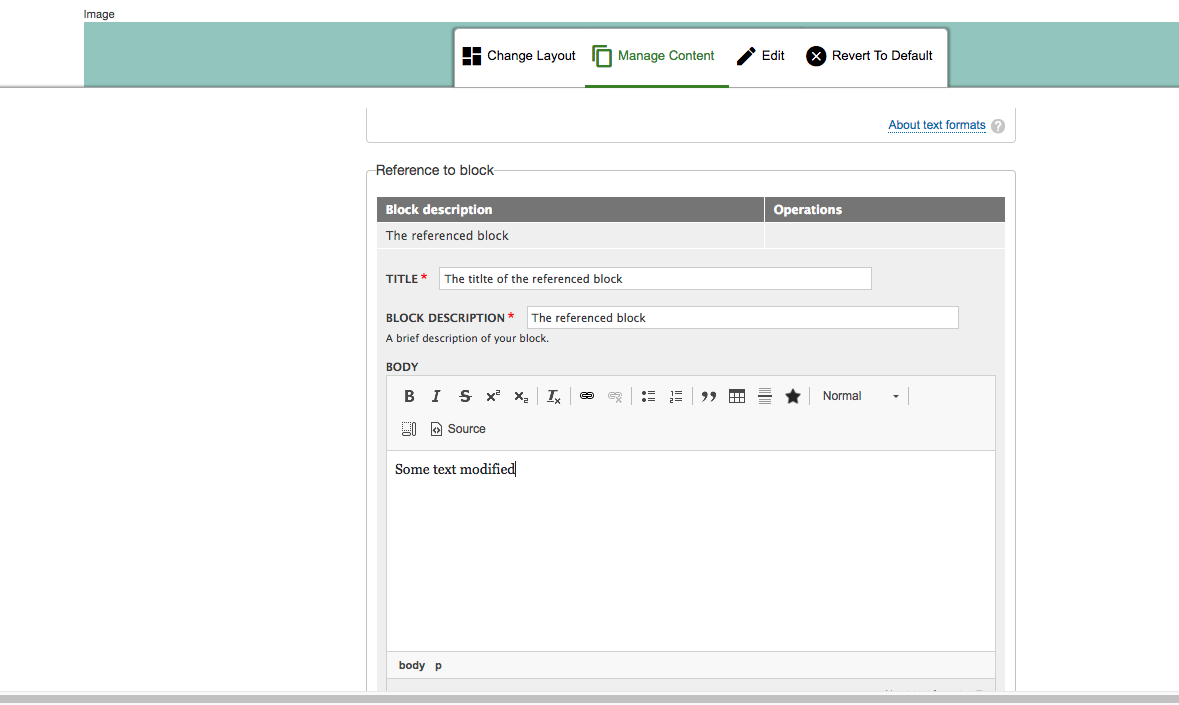
7) With panelizer add to it a “Basic Block” adding some test text. Create also the reference block by clicking on “Add new custom block” and fill all the fields of the “test block”.
8) Save the basic block
9) Try to edit it and change a value of the referenced custom block in panelizer and save.
10) The change has not been applied
If you change the basic block not with panelizer, but in /block/(block_id), you can successfully edit the referenced block. That’s why I suppose it’s an error with ief in panelizer.
Comment #5
sanci91 commentedComment #6
phenaproximaThose are excellent steps to reproduce. I will try them out and see what happens. Thanks, @sanci!
Comment #7
phenaproximaOkay, I am reproducing the problem. I cannot for the life of me imagine what it is that Lightning would be doing to cause this. Like you, I suspect this is an incompatibility between Panels IPE (not Panelizer) and Inline Entity Form.
I'm moving this issue to Panels' queue for further diagnosis, since its maintainers are in a better position to pinpoint what might be going wrong here, or at least point us in the right direction.
Comment #8
sanci91 commentedHi, do someone have some news regarding this bug? Imho is quite an important issue, because it doesn't allow to use Ief properly and badly limit user experience.
Comment #9
timodwhit commentedLooking into this bug it appears that panels IPE uses
'#type'=> 'button'for the submit button in PanelsIPEBlockContentForm.php for the submit of the block and the Ajax-ing of that submit.This causes an issue because in
Drupal\Core\Render\Element\Buttonthe attribute:'#executes_submit_callback' => FALSE. This leads to the submit callbacks never being picked up because $form_state->isSubmitted() never validates to true, thus the handlers aren't set and IEF can't pick up. When using'#type' => 'submit'the attribute'#executes_submit_callback' => TRUEas seen inDrupal\Core\Render\Element\SubmitThis seems like a larger Panels IPE issue because modules can't easily hook into the submit callbacks and add their own handlers (unless I'm missing something)
Will look for related issues
Comment #10
timodwhit commentedBased on this issue: https://www.drupal.org/node/2854542
I think we can mark this a dupe.
Comment #11
sanci91 commentedEven with the patches in the other related issues i'm not able to solve this problem. Have you tested it @timodwhit ?