I apologise in advance for this request as it must be something I am missing with there being no other query on this issue.
I have set up a CSV feed importer attached to a particular node type. When going to the importer at domain/import, the feed is there but it forms part of the "add content" form for that particular content type and therefore, I cant import because the content has required fields which stops the submission.
I have also tried manually adding one node hoping the rest would import but to no avail.
Is there a way of importing the CSV outside of this form? Feed is attached to the right content type, import on submission is unchecked, fetcher is file upload, CSV Parser, Node processor, bundle is selected as the same content type as the feed attachment in the basic settings page, all fields mapped accordingly.
Any help appreciated.


Comments
Comment #2
audiobloom commentedComment #3
megachrizI think your issue is that you attached the importer to the same node type as the one you selected on the processor. Unless you have a very advanced use case, these two should never be the same. I know it can be confusing that there are two places in the interface where you can select a node type, but these two settings have different meanings.
Attaching an importer to a content type means that you need to create a node to specify a source to import. This is useful if you have multiple sources to import, all in the same data structure. For example: several RSS feeds.
The node type you select on the processor is the data that you want Feeds to create for each item from the source.
The included Feeds News module demonstrates the use case of attaching an import to a content type. In there, the content type "Feed" is the one the importer is attached to and "Feed item" is the content type where Feeds creates nodes for during an import.
Solutions:
Comment #4
audiobloom commentedWell "duh"!
Great information - fixed and works like a dream!
Thank you MegaChriz
Comment #6
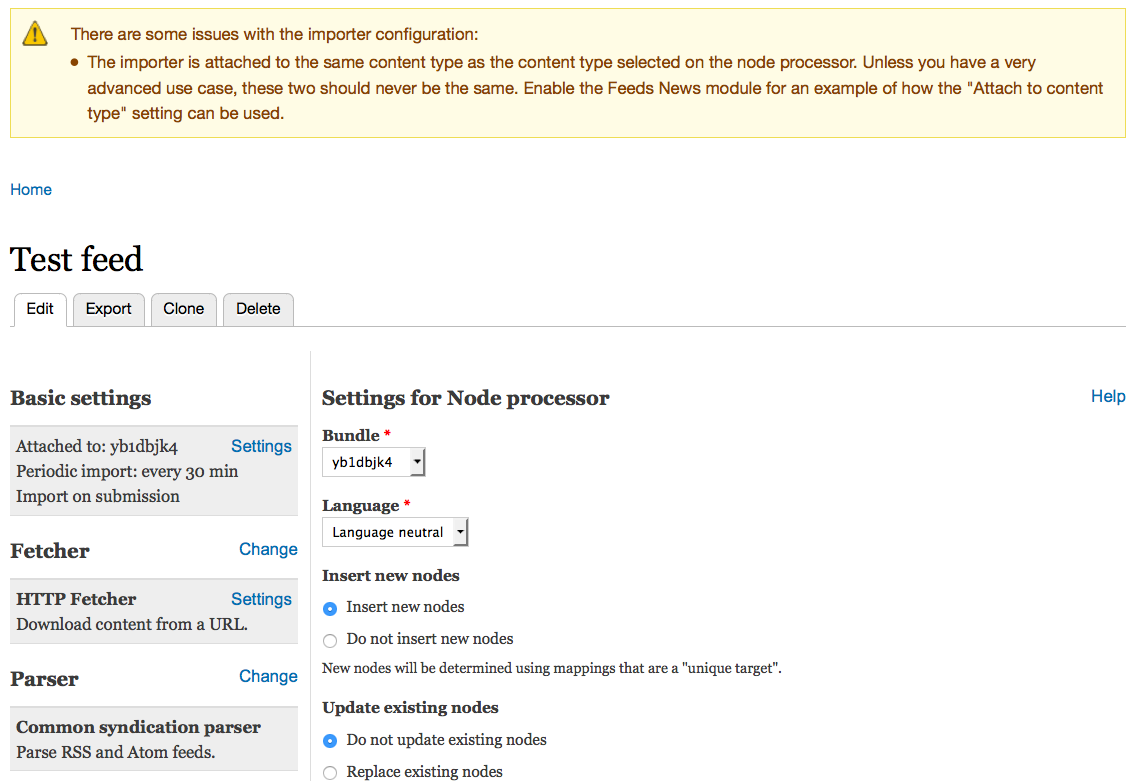
megachrizAs this seems like a common mistake, I think showing the user a warning message makes sense here. The patch shows a warning when the importer is attached to the same content type as select on the processor.
See also the image:

Comment #7
megachrizComment #8
megachrizReroll.
Comment #10
megachrizCommitted #8 with one small change: when having the "attach to content type" setting the same as on the processor on an importer called "feed", the message "see for example" would refer to itself.
Comment #11
megachrizFound one small issue: when creating a new importer, the warning was also displayed because then both the "Attach to content type" and Node processor bundle setting are empty. The attached patch checks if the "Attach to content type" setting has a value before issuing the warning.
Comment #13
megachrizCommitted #11.
Comment #15
crutch commented"Attaching an importer to a content type means that you need to create a node to specify a source to import."
Yes we have always done this for all feeds that we use and it operates properly. Now we see this warning message.
Why should they never be the same?
In attempt to answer the question...
When we create an feed importer, a specific content type is used for that, and no content contributors can add to that content, using that content type. So is it the case that when content contributors can still add content using that content type, then we can still import content to add to the contributed content using the standalone form?
In the case that a content type is specifically created just to import external content and no one else can create content using that content type, then it is okay to attach an importer to a content type as we have always done?
I think this makes sense but just trying to get it cleared up in my head because it can be confusing. In all instances we always keep imported content separate from human generated content.
Comment #16
megachrizAttaching the importer to a content type == editor/site builder needs to create a node of that type to import content
Node type on the processor settings == Feeds creates nodes of this type
Let me explain this with using a metaphor. The two node types have a different role: one node type that acts as the "factory" with which nodes (or other entities) can be created/updated. The other one acts as "products" of that factory. If you set both settings to the same content type, you'll setting up a factory that creates factories. So you potentially get a weird circular behavior.
Doing this doesn't have to be wrong per se, that's why it is only a warning. I put the warning up as I sensed that a lot of new users got confused by the two settings. It seems that a lot of first users are confusing "attaching to content type" with "that's the type of node I want to create" and then later on select it on the node processor settings again. And then get confused that when they edit the imported nodes, that there is a required field for either an URL or a file upload, which if they fill that field, will create another series of nodes.
In #963770: Feeds: Basic settings, Attach to content type I attempted to explain the "attach to content type" setting more in depth, using a help page. The reason why "attach to content type" and "node processor content type" should in most cases not be the same could perhaps be explained there as well. Then we could link from the warning message to the help page. Do you want to help with writing the help page?
Comment #17
crutch commentedThanks MC :)
We had to create one yesterday, and for the first time used standalone form, and worked as described. There are couple things I experienced yesterday that might cause confusion but I'm still trying to think it through because I think the instructions are correct. It's just that it is difficult to see the whole picture especially if a first time user.
- we can add a fall back url in the initial configuration at http fetcher, but it is hidden under collapsed Advanced settings. Does this setting only effect standalone form or is it also a fallback for node form?
- on the import page, the supplied URL field is required, but there is no indication that it will be saved, but it is saved upon import
- using standalone form only imports 50 by default, it took me half the day to figure out that was the issue and then added the appropriate #conf in settings to get all, but it may be better to add that as a configuration in the module? Not sure though as the change was easy enough but took some investigation to discover and resolve. The node form imports all by default.