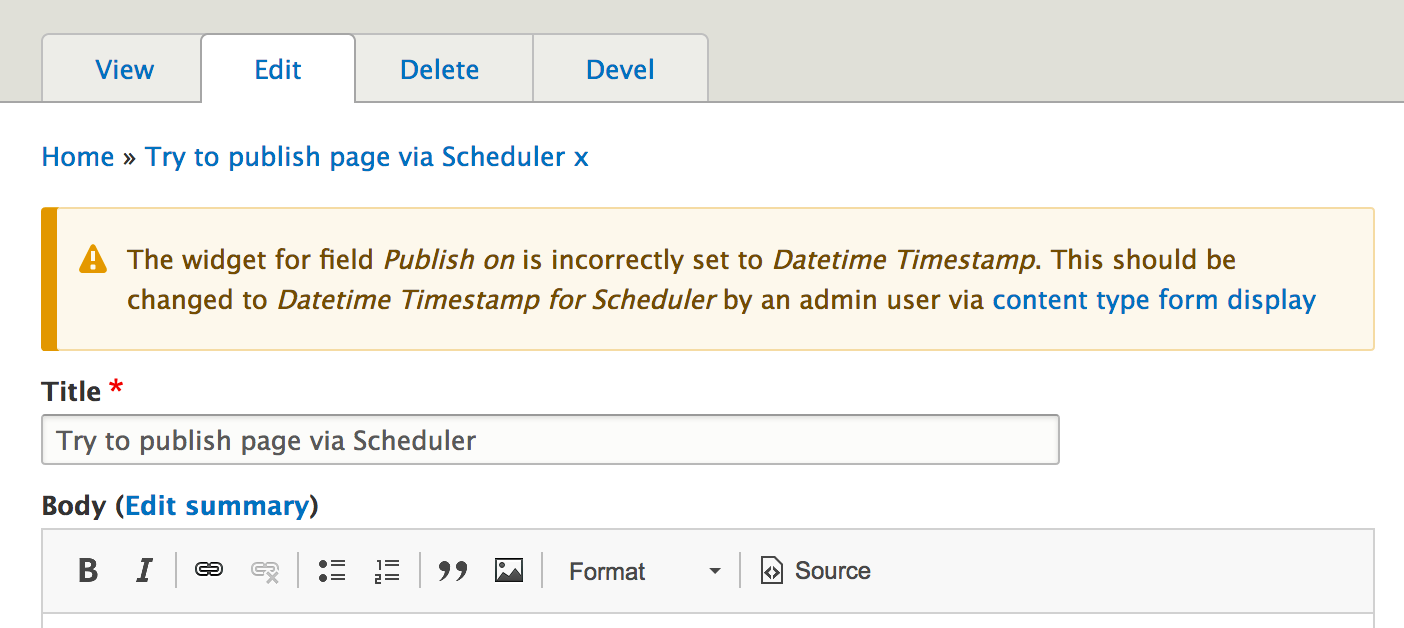
After re-installing the module, the widgets for the datetime fields are not set to the correct Scheduler-provided widgets 'Datetime Timestamp for Scheduler'. The fields revert to the core widget which provides a default of "now" if no date is entered. This causes the wrong behavior when saving a node edit form. To allow quick and simple diagnosis of this fault a warning can be given explaining how to fix the problem.
Original
The expected behavior of "Save and keep published" is to take no action on changing the status of the node.
When using "Save and keep published" with scheduler enabled, what actually happens is the node becomes unpublished and scheduled for publishing now.
This is not as innocuous as is sounds, because it will only become published again after the site cron or scheduler lightweight cron runs, making the published node disappear for some time. Really bad if your promoted front-page is updated. This problem can occur because the publish_on value will default to now on a published node, even if a value is not specified (or explicitly cleared from the form).


Comments
Comment #2
jdillick commentedParticularly when the content type has deselected the "Require scheduled publishing" option, I think the preferred behavior also might be for a "Save and Publish" action to immediately publish the node without scheduling a publish.
Comment #3
jonathan1055 commentedHello jdillick,
Thanks for posting and sorry to hear you have a problem. However, I need more info to fully understand your problem. When you say "with scheduler enabled, what actually happens is the node becomes unpublished and scheduled for publishing now" Scheduler will only do anything if a date has been entered in the 'Publish On' date entry field.
If the date is the in future then I don't think there is a problem, as by definition the node should not be published at the moment and only published when the time passes.
Or, if you are entering a date in the past you must also have selected one of the 'past date' advanced options in the content type. This will control what Scheduler does during the node save, either publish immediately or via the next cron. If you do not want to allow past dates to be entered then select the first radio option.
Hope that helps.
Jonathan
Comment #4
jdillick commentedHi Jonathan,
Thanks for the reply. In your response was a clue to the cause of the problem: Looks like for the content type where this problem was occurring, the publish_on field widget was set accidentally to "Date Timestamp" instead of "Date Timestamp with no default".
Turns out that if there is a default publish_on timestamp, no matter what, even if you unset the default date in the node edit form, it will apply a default value of NOW, always preventing manual publishing.
Switching the publish_on field widget back to "Date Timestamp with no default" seems to fix the problem. I might still consider this a minor bug if I were you. Perhaps preventing a default value for these two fields would be wise (if possible), or determine if the value is being set in the form.
Hope that makes sense.
Regards,
John
Comment #5
jdillick commentedComment #6
jdillick commentedComment #7
jonathan1055 commentedAh, that makes sense and explains the problem. The widget label has been improved, see #2807081: Better label for TimestampDatetimeNoDefault widget so I have altered the text you added in the summary. However, you won't see that change until 1.0-alpha3 is released.
If the wrong widget is set, I'll have a think to see if that can be detected and a warning given.
Thanks for your feedback.
Comment #8
jonathan1055 commentedChanging the title to reflect the new aim of this issue.
Comment #9
jonathan1055 commentedI worked out how to detect which widget is assigned to the form fields. Here's a patch which gives a warning message and a link to the content type 'Manage Form Display' tab for an admin to fix the problem.

Interesting, for the link I wanted to use the preferred function
Url::fromRoute('route.to.the.page')instead of hard-coding the url part. But I discovered that the route for url'/admin/structure/types/manage/{node_type}/form-display'has not been included in the core node.routing.yml file. I think this must be an oversight and there is no reason why it should not be added to that file. I have started a discussion before raising an issue in the core queue.So for now, this patch adds the missing route (using our own scheduler.routing.yml file)
Comment #11
jonathan1055 commentedMy fault. Blank line in patch. Try again
Comment #12
jonathan1055 commentedPatch re-rolled following the changes in #2861902: Fix coding standards violations in 8.x codebase
Comment #14
jonathan1055 commentedI have raised core issue #2865983: Add missing route for /admin/structure/types/manage/{node_type}/form-display to add the missing route, but in the meantime (as that may take ages to be committed, or may be rejected) I have added the route into scheduler.routing.yml, with a @todo to remove it if/when it gets into core.
Comment #15
jonathan1055 commentedThe route is provided in core, by field_ui module, but as it is dynamic it is not contained in any routing.yml files hence I did not know it existed.
Comment #17
jonathan1055 commentedThis has turned out to be useful in another way, as we probably should have had field_ui module as a requirement anyway. In the standard profile it is loaded by default so mostly we would not have noticed.