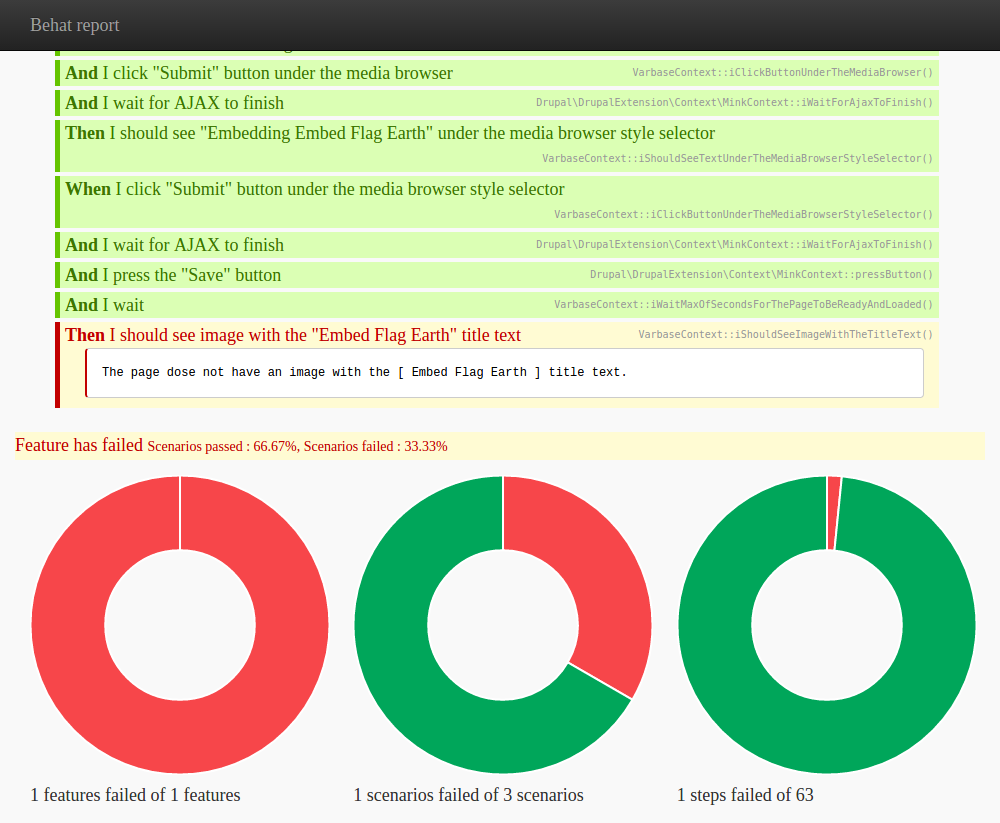
Failed scenarios:

<img alt="Embed%20Flag%20Earth%20in%20space" title="Embed%20Flag%20Earth%20all%20earth%20in%20space" height="667" width="1000" class="media-element file-default img-responsive" src="http://localhost/test/varbase3/sites/default/files/flag-earth_1.jpg">

It should be

<img alt="Embed Flag Earth in space" title="Embed Flag Earth all earth in space" height="667" width="1000" class="media-element file-default img-responsive" src="http://localhost/test/varbase3/sites/default/files/flag-earth_1.jpg">

Test Basic page to embed existing files

Feature: File & Media Management - Assets Management - Ability to embed existing files library in the rich text editor
As a content admin
I want to be able to embed existing files from the library of files in the CKEditor
So that it will show up under that rich text field without having to upload the image for each content

  Background:
    Given I am a logged in user with the "test_super_admin" user

  # Create the Basic page and upload the file to the library before the test case.
  # ----------------------------------------------------------------------------
  @javascript @local @development @staging @production
  Scenario: Create the "Test Basic page to embed existing files" content.
     When I go to "node/add/page"
      And I wait
      And I fill in "Test Basic page to embed existing files" for "Title"
      And I fill in the rich text editor field "Body" with "Test Basic page body to embed existing files"
      And I press the "Save" button
      And I wait
     Then I should see "Basic page Test Basic page to embed existing files has been created."

  @local @development @staging @production
  Scenario: Upload the "Embed Flag Earth" file.
     When I go to "admin/content/file"
      And I wait
     Then I should see "Add file"
     When I click "Add file"
      And I wait
     Then I should see "Upload a new file"
     When I attach the file "flag-earth.jpg" to "Upload a new file"
      And I press the "Upload" button
      And I wait
     Then I should see "flag-earth.jpg"
     When I press the "Next" button
      And I wait
     Then I should see "Alt Text"
     When I fill in "Embed Flag Earth" for "Name *"
      And I fill in "Embed Flag Earth in space" for "Alt Text"
      And I fill in "Embed Flag Earth all earth in space" for "Title Text"
      And I press the "Save" button
      And I wait
     Then I should see "Add file"
      And I should see the "Edit" in the "Embed Flag Earth" row
  #-----------------------------------------------------------------------------

  @javascript @local @development @staging @production
  Scenario: Check if we are able to embed existing files library in the rich text editor.
     When I go to "admin/content"
      And I wait
     Then I should see "Content"
     When I fill in "Test Basic page to embed existing files" for "Title"
      And I press the "Apply" button
      And I wait
     Then I should see "Test Basic page to embed existing files"
     When I click "Test Basic page to embed existing files"
      And I wait
     Then I should see "Test Basic page body to embed existing files"
     When I click "Edit"
      And I wait
     Then I should see "Edit Basic page Test Basic page to embed existing files"
     When I click on "media" command button in the rich text editor field "Body"
      And I wait for AJAX to finish
     Then I should see "Media browser"
      And the media browser is open
     When I click on the "Library" tab under the media browser
      And I wait for AJAX to finish
     Then I should see "Media browser"
     When I fill in "Embed Flag Earth" for "File name" under the media browser
      And I press the "Apply" button under the media browser
      And I wait
     Then I should see "Embed Flag Earth" under the media browser
     When I select the "Embed Flag Earth" file under the media browser
      And I click "Submit" button under the media browser
      And I wait for AJAX to finish
     Then I should see "Embedding Embed Flag Earth" under the media browser style selector
     When I click "Submit" button under the media browser style selector
      And I wait for AJAX to finish
      And I press the "Save" button
      And I wait
     Then I should see image with the "Embed Flag Earth" title text

Comments

RajabNatshah created an issue. See original summary.

rajab natshah’s picture

Title: Fail of ALT and Title of images when we Check if we are able to embed existing files library in the rich text editor. » Failed Check on ALT and Title of images when we check if we are able to embed existing files library in the rich text editor.
Issue summary: View changes
rajab natshah’s picture

Version: 7.x-2.x-dev » 7.x-2.0-beta9
rajab natshah’s picture

Investigating ....
json2 library. https://github.com/douglascrockford/JSON-js
and the pass of json image from the media browser to the WSYWIG.

It's right in Edit entity file.

But only in WSYWIG:

[[{"fid":"13","view_mode":"default","fields":{"format":"default","field_file_image_alt_text[und][0][value]":"Embed%20Flag%20Earth%20in%20space","field_file_image_title_text[und][0][value]":"Embed%20Flag%20Earth%20all%20earth%20in%20space","field_text[und][0][value]":""},"type":"media","attributes":{"alt":"Embed%20Flag%20Earth%20in%20space","title":"Embed%20Flag%20Earth%20all%20earth%20in%20space","height":"667","width":"1000","class":"media-element file-default"}}]]
rajab natshah’s picture

It is encodeURIComponent

Drupal.media.formatForm.getOption

modules/contrib/media/modules/media_wysiwyg/js/media_wysiwyg.format_form.js
This will print out:

[[{"fid":"13","view_mode":"default","fields":{"format":"default","field_file_image_alt_text[und][0][value]":"Embed Flag Earth in space","field_file_image_title_text[und][0][value]":"Embed Flag Earth all earth in space","field_text[und][0][value]":""},"type":"media","attributes":{"alt":"Embed Flag Earth in space","title":"Embed Flag Earth all earth in space","height":"667","width":"1000","class":"media-element file-default"}}]]

This is the behavior override
modules/contrib/media_ckeditor/js/media_ckeditor.format_form.js
This will print out the encodeURIComponent

rajab natshah’s picture

StatusFileSize
new803 bytes

This is the patch to fix this issue.
Should be move to the media_ckeditor module

rajab natshah’s picture

Status: Needs work » Needs review
joseph.olstad’s picture

Project: D7 Media » Media CKEditor
Version: 7.x-2.0-beta9 » 7.x-2.x-dev

joseph.olstad’s picture

Status: Needs review » Closed (duplicate)
Parent issue: » #2720997: Overridden fields not encoded in token
rajab natshah’s picture

Passed the full automated functional test.