

 Come together with the global Drupal community in Rotterdam, 28 Sept – 1 Oct 2026. Sessions, contribution, connection, and Early Bird savings until 8 June.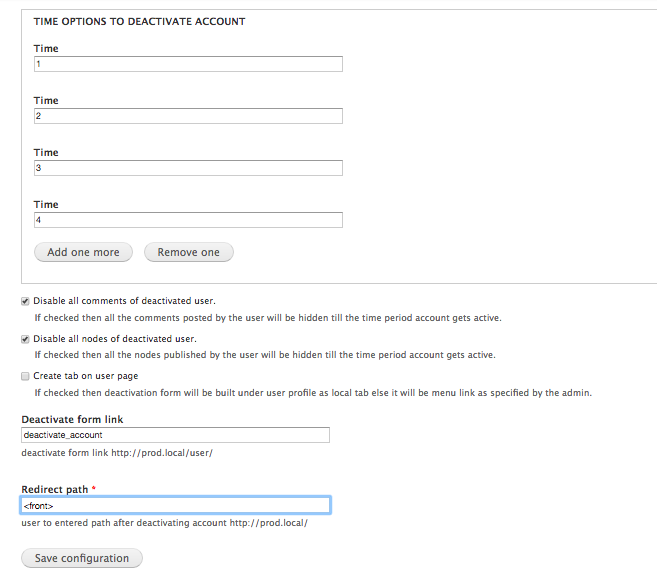
This project is not covered by Drupal’s security advisory policy.
This module allows a user to delete his/her account or deactivate it
temporarily. A user can choose the time period option for which the account
will stay deactivated. These options are configurable. The account will stay
inactive for the selected time period.
DEPENDENCIES
None.
INSTALLATION AND CONFIGURATION
1. Download the module and place it with other contributed modules
(e.g. sites/all/modules/contrib).
2. Enable it from Modules list page.
3. Modify permissions on the People >> Permissions page.
4. Go to admin/config/people/deactivate-account, and set the time period
options. These options will be presented to the user, after (s)he selects to
deactivate the account.
FEATURES
1. Configurable time period options for which user account can be deactivated.
2. Setting to either keep/disable the content (nodes, comments) after the
account has been deactivated.
3. The "Deactivate account form" can either be shown at a normal menu link or a
local tab under user profile. This option is configurable.
4. A menu path has to be provided if the "Deactivate account form" is set to be
displayed as per menu.
5. The user can be redirected to a configurable path after the account is
deactivated or deleted.
Supporting organizations:
Project information
 5 sites report using this module
- Created by anand.toshniwal93 on , updated
 This project is not covered by the security advisory policy.
Use at your own risk! It may have publicly disclosed vulnerabilities.
Releases
8.x-1.2
released 24 May 2024
Works with Drupal: ^8 || ^9 || ^10
Install:
Development version: 8.x-1.x-dev updated 24 May 2024 at 12:22 UTC


