Currently, only the size setting actually does anything. The remaining settings need to be read by the formatter, and passed onto the twig template and javascript. Then the template and javascript need to be coded to use them.
I created a new content type with a file field as Jmol object. But I cannot set any configuration settings for the formatter. Shouldn't there be a cog wheel next to the formatter? I'm not seeing that right now.
Also, my page with the .pdb file I attached as Jmol object is empty. The molecule is not showing. It's just an empty page.
Using alpha2 version.
I quickly tested this version on one of the online drupal test services. It looks like in this release, the settings work for a text (SMILES string) field, but not the file. I've made a few changes since alpha2, including combining a bit of the shared code from the two formatters into a parent class. This is why my local site works. You can either try the dev branch in git, or I will probably make a new alpha this weekend.
In the alpha3 version, the configuration settings now display for both the string, and the file formatters. Again, only the size setting actually affects the behavior of the output at this time.
I downloaded and installed alpha3. The gear is there and I can see the settings.
However, the JSmol object is not showing for a pdb file I attached. I wonder if the plugin is able to find the jmol library.
I installed the library in /sites/all/libraries/jmol
In v7, I used to get the jmol path using the libraries module, but I can't see how it's done now.
I followed the instructions in the README file (which was once in the root of the module's folder, did this change in v8?).
Upon clearing all caches I got this javascript error when trying to load the page with the jmol object:
[Java2Script] The required class file

/modules/jmol/lib/j2s/core/package.js
could not be loaded. Script error: expected expression, got '<'

data:

<!DOCTYPE HTML PUBLIC "-//IETF//DTD HTML 2.0//EN">
<html><head>
<title>404 Not Found</title>
</head><body>
<h1>Not Found</h1>
<p>The requested URL /modules/jmol/lib/j2s/core/package.js was not found on this server.</p>
</body></html>


0 function (c,d,e,f)
1 function (c,d,g,h,k)
2 function (c,f,g,j,h)
3 function (a,c,d,e,f,g)
4 function (b)
5 function (d)
The jmol module is in /Library/WebServer/Documents/drupal8/modules/jmol
And the unfound file is present though in /Library/WebServer/Documents/drupal8/modules/jmol/lib/j2s/core/package.js
The /Library/WebServer/Documents/drupal8/modules/jmol/lib/ folder contains:
The files open in the webbrowser when called directly. So permissions should be fine. I'm currently on a Mac, but I will try in ubuntu later to see if this makes a difference.


Comments
Comment #2
jvdurme commentedI created a new content type with a file field as Jmol object. But I cannot set any configuration settings for the formatter. Shouldn't there be a cog wheel next to the formatter? I'm not seeing that right now.
Also, my page with the .pdb file I attached as Jmol object is empty. The molecule is not showing. It's just an empty page.
Using alpha2 version.
Comment #3
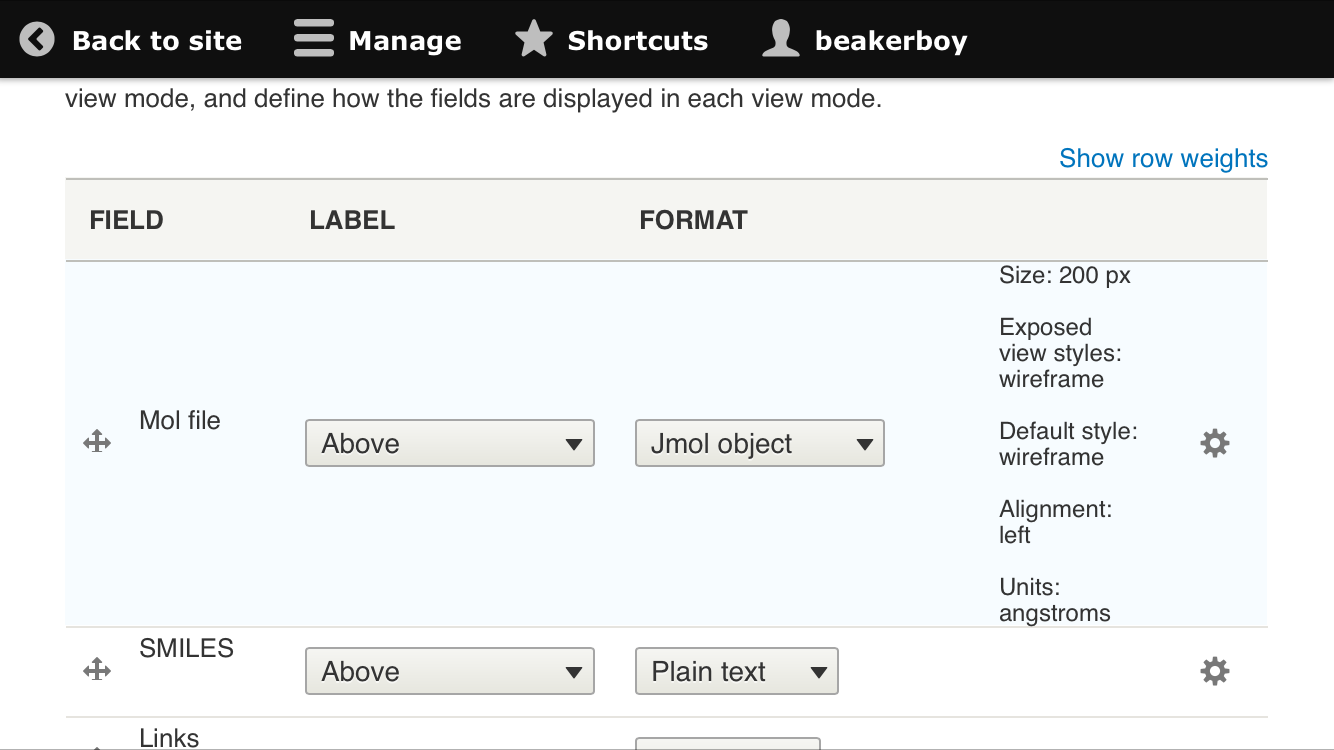
beakerboyI'll have to try installing from scratch, but I made a custom content type with a file field named Mol file.
When I visit:
http://test.mysite.net/admin/structure/types/manage/chemical/display
I see the following. The gear is there and it works.
The "lite" version of Jmol only renders Mol files. Make sure you are not using that. Do the example pages work?
Comment #4
beakerboyI quickly tested this version on one of the online drupal test services. It looks like in this release, the settings work for a text (SMILES string) field, but not the file. I've made a few changes since alpha2, including combining a bit of the shared code from the two formatters into a parent class. This is why my local site works. You can either try the dev branch in git, or I will probably make a new alpha this weekend.
Comment #5
beakerboyIn the alpha3 version, the configuration settings now display for both the string, and the file formatters. Again, only the size setting actually affects the behavior of the output at this time.
Comment #6
jvdurme commentedI downloaded and installed alpha3. The gear is there and I can see the settings.
However, the JSmol object is not showing for a pdb file I attached. I wonder if the plugin is able to find the jmol library.
I installed the library in /sites/all/libraries/jmol
In v7, I used to get the jmol path using the libraries module, but I can't see how it's done now.
Comment #7
beakerboyThe README file explains where to put the libraries. Look in the module's lib directory.
Comment #8
jvdurme commentedI followed the instructions in the README file (which was once in the root of the module's folder, did this change in v8?).
Upon clearing all caches I got this javascript error when trying to load the page with the jmol object:
The jmol module is in /Library/WebServer/Documents/drupal8/modules/jmol
And the unfound file is present though in /Library/WebServer/Documents/drupal8/modules/jmol/lib/j2s/core/package.js
The /Library/WebServer/Documents/drupal8/modules/jmol/lib/ folder contains:
And the /Library/WebServer/Documents/drupal8/modules/jmol/lib/j2s/ folder contains:
Not sure if it's a problem of permissions? Have you tried this on a local drupal installation on your machine?
Comment #9
beakerboyI have no experience with the 'wheel' group. Is this what the webserver runs as? On Debian everything is www-data.
Are you able to open the files in /modules/jmol/lib and /modules/jmol/lib/core from your web browser? If not, then it's certainly permissions.
I thought the README was in root too, but I must have accidentally put it in lib.
Comment #10
jvdurme commentedThe files open in the webbrowser when called directly. So permissions should be fine. I'm currently on a Mac, but I will try in ubuntu later to see if this makes a difference.